
constly
constly
我找到了必现的手法: 1. 执行 "bin/msvc/debug/lua.exe" "test/simple/main.lua" 2. 在imgui窗口内 按住 鼠标右键 拖动,必定会报上面的错
操作是这样: 1. 进入场景后,渲染一个imgui界面 2. 点击按钮并 执行 window.reboot 3. 在加载期间 晃动鼠标,游戏崩溃 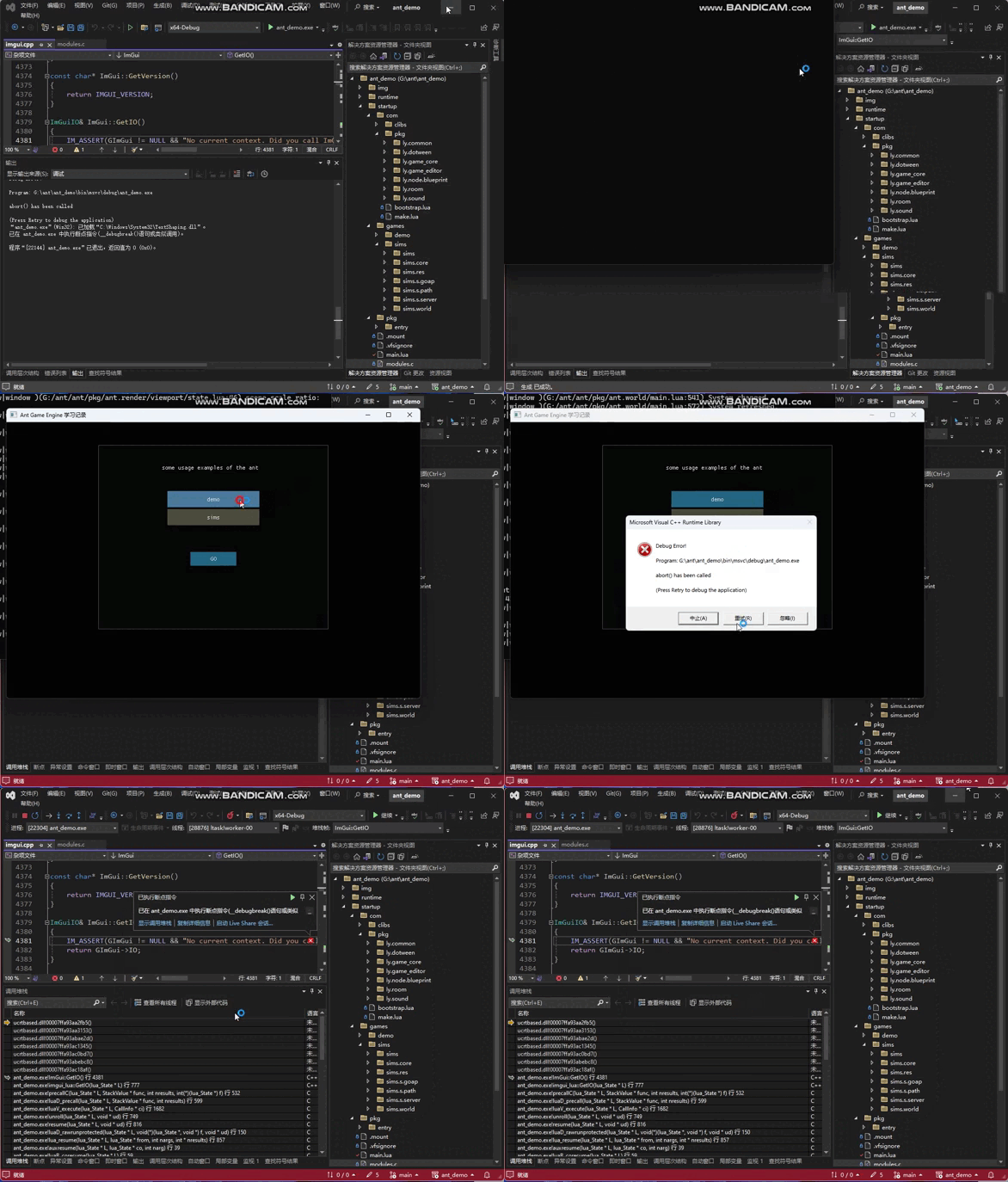
昨天晚上卸载重装了Lua Debug插件,不得行,不过今天早上来引擎的demo项目可以调试了(可能是重启了电脑)。 现在我这里自己的项目以及vaststars依然不能调试, vaststars调试报错为: ``` PS G:\ant\github\vaststars> & 'G:/ant/github/vaststars/bin/msvc/debug/ant.exe' '-e' 'dofile[[c:/Users/username/.vscode/extensions/actboy168.lua-debug-2.0.10-win32-x64/script/launch.lua]];DBG[[38296/lua-latest]]' 'startup/main.lua' Service 1 error: /engine/firmware/ltask_service.lua:1: attempt to index a nil value stack traceback: /engine/firmware/ltask_service.lua:1: in main chunk PS G:\ant\github\vaststars>...