
zp1112


zp1112
```js var rect1 = this.stage.graphs.rectangle({ x: 0, y: 0, width: txtW + 20, height: txtH + 20, radius: { tl: 6, tr: 6, bl: 6, br: 6 }, color: '#ef8376'...

Satellite mode and Contours mode with different width and height.
like the example,the boundary of graphic is out of LineSegments edges bounds.  and like this,the mesh center is not on the scene center 
like this in atom: 
when I click one node and drag it and hold it not release the mouse, why the other nodes are keep moving
When I location to the topic page,it positioned in the comment box anchor but not the top of page.
目前写博客是使用**hexo**部署,好处在于可以定制博客风格,没有设计感的人就别说定制了,定制了也很丑,只好用模板。要使用图片什么的还得上传到图床然后粘贴,写好了还得部署。还是挺麻烦的,比较适合写那种深入理解的文章。自从多说那个很丑的评论系统关闭了以后,大家纷纷替换了disqus评论系统,好像要翻墙?还得,注册才能评论?总之各种不方便。 另外一个记笔记的是**印象笔记**,他的优点先不说了,最大的缺点是,笔记太零散,回头找的时候已经找不到当初的那个知识点了。 还尝试了一个在线文档编辑,[石墨文档](https://shimo.im),讲真这玩意还不错,但是也存在一个毛病,就是知识多了,文件创建多了,就找不到知识点了、、、 作为程序员,大多数人写博客,一方面想要让自己的博客精美,一方面又想让自己的博客得到传播,好成为大佬一样的网红前端,噗。。。 但是我们在平时工作或者阅读的时候,经常会遇到一些有意思的问题,和有意思的知识点,这时候想要即兴写一篇总结和笔记,又不想过段时间找不到。那么github的issues可以派上用场了, 优点: 图片直接上传,使用github的静态服务 支持markdown github自带issues评论系统,还都是gay界各路大佬,可以共同审查博客中暴露的问题,帮助进步。 labels等同于是博客的tag标签,明显 projects等同于是博客的分类,整洁 issues列表就是博客归档,一目了然 那么我就从零开始使用github issues搭建属于自己的博客吧。 **第一步,新建一个仓库** 可以命名为blog或者自己喜欢的名字。  **第二步,新建project** 这里的project可以类比分类,将来你写好的issue可以拖到某个你已经创建的分类下面。比如新建了github专题的,以后有关github的文章都可以拖到这里。  **第三步,新建issue** 在右侧点击label的标志,可以选择已创建的一些label,或者当场创建label,需要注意label太散也不好,久了也会造成知识太零碎的情况。  选择一个project,提交后这个issue就会分类到这个project下面  然后点击提交issue试试 **结果** 最后你会在issues列表里面看到很舒服的一条issue 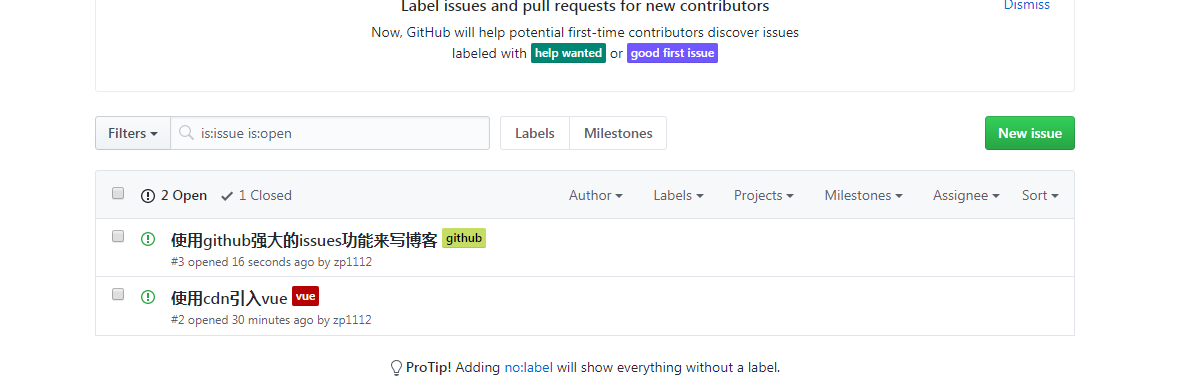 进入projects的github专题,你会看到你还没创建子类,任务卡,相当于大专题里的小专题吧。...
### 装饰器 ### 打印console.log 调试的时候经常需要打印一些log来查看,这时候直接展开function,在return之前加console似乎比较繁琐,可以写一个装饰器log来装饰这个func,使之在return之前打印结果。 ```js function log(target, name, descriptor) { var oldValue = descriptor.value; descriptor.value = function () { const res = oldValue.apply(null, arguments); console.log(`Calling "${name}" and return `,...
### Proxy Proxy意思为“代理”,即在访问对象之前建立一道“拦截”,任何访问该对象的操作之前都会通过这道“拦截”,即执行Proxy里面定义的方法。 基本用法 ```js let pro = new Proxy(target,handler); ``` 1. new Proxy()表示生成一个Proxy实例 2. target参数表示所要拦截的目标对象 3. handler参数也是一个对象,用来定制拦截行为。 这里不讲proxy的原理,只讲proxy在我们实际项目中可以利用到的地方。 ### 图片懒加载 图片的加载需要一定的时间,我们常常希望在图片加载成功之前显示一个占位图,那么可以使用proxy在html渲染图片的时候通过替换src来实现,因为html渲染图片img标签的时候实际是在执行一个get操作,因此可以使用proxy来实现 ```js function proxyImg(img, loadingImg, realImg) { const vImg...
## Raycaster拾取物体的方式 raycaster通过鼠标位置拾取鼠标所在的物体。 ```js onDocumentMouseOver: function (event) { const mouse = new THREE.Vector2(); mouse.x = (event.clientX / this.width) * 2 - 1; mouse.y = - (event.clientY / this.height) * 2...