



Alan
1. support: custom url 2. change to go mod 3. add dockerfile
ldc 删除后,ld 还显示为Claimed状态,是否类似pv的处理显示未一个特殊状态Released之类的? Output of `kubectl version`: ``` v1.23.1 ``` Output of `kubectl get lsn -o yaml`: ``` apiVersion: v1 items: - apiVersion: hwameistor.io/v1alpha1 kind: LocalStorageNode metadata: creationTimestamp: "2022-04-17T08:14:05Z" generation:...
Whether it can support the installation of plugins, such as karmadactl, etc. and the same user can continue to use their own environment next time
**Describe the bug** A clear and concise description of what the bug is. 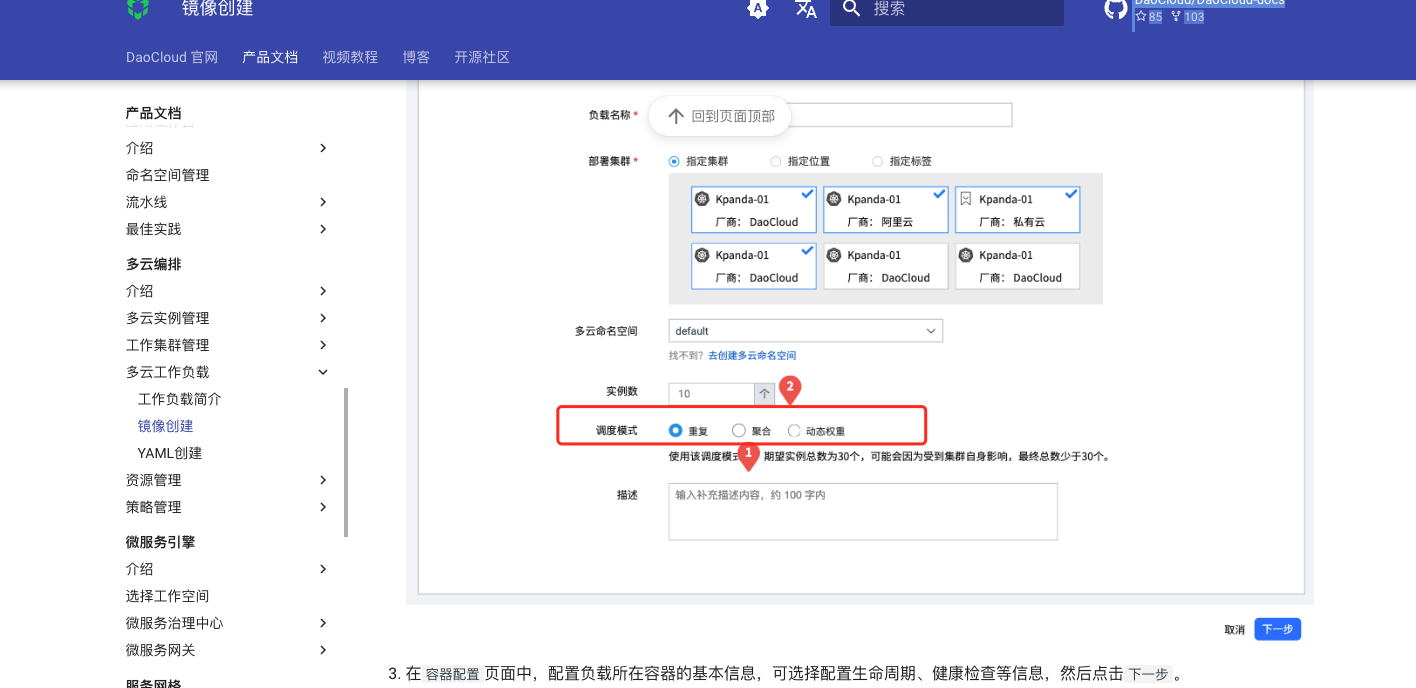 调度模式建议增加相关的文字说明和解释 目前不知道“聚合“和”动态权重“ 是什么效果 **To Reproduce** Steps to reproduce the behavior: 1. Go to '...' 2. Click...
Output of `lsblk`: Output of `blkid`: Output of `kubectl version`: Output of `kubectl get lsn -o yaml`: ``` apiVersion: v1 items: - apiVersion: hwameistor.io/v1alpha1 kind: LocalStorageNode metadata: creationTimestamp: "2024-02-05T09:55:50Z" generation:...
目前,画梅的盘是根据磁盘类型HDD,SSD等自动组成存储池 这样确实简化了很多操作 但有些场景需要手动设定盘加入那个pool或运行新建存储池 1. 客户的机器由ssd,hdd等组成,每个机器只有100g,希望不区分类型组成一个池子统一使用,配置为默认sc使用 2. 针对高io的应用,客户希望单独组成一个hdd池来用,避免影响其他业务(如es,prometheus等) 3. 某些盘的类型识别错误,导致hdd盘被识别为了ssd加入了另外的pool;希望可以设定这个盘加入到hdd pool里面
Update Dockerfile for easy cache
https://docs.daocloud.io/kpanda/user-guide/gpu/nvidia/mig/index.html 这里讲解了切分,非常棒  但如下部署的时候就有点看不懂了,希望可以细化下,最后举个场景该怎么切分 1. 比如A800 能怎么切分(其他卡怎么查询切分限制?),其中一种切分的事例? 2. 默认配置文件支持哪几种分发?对应的label名是? https://docs.daocloud.io/kpanda/user-guide/gpu/nvidia/mig/create_mig/#gpu-mig-single 
GPU 文档错误

这里有几个文档错误,建议修改---不了解原理,仅仅通过上下文对比得出来的结论 1. 测试下来,整卡是支持A800的,感觉这个表格表格不对  2. 上面写着A800支持MIG模式,这里又没有A800的信息了  3. 这里的链接是错误的  ]
change base image to node:alpine for more small image size