
Lz
Lz
> 可否贴一下配置文件?首选项 - 配置文件 - 打开 [General] as_admin=true startup_fix=2 first_run=false read_tips=16 font_dialog_size=@Size(500 360) [Hotkey] snip="16777265, 113" snip_and_copy="134217793, 134217793" super_snip=2 [Interface] tray_color=@Variant(\0\0\0\x43\x1\0\0\xff\xff\xaa\xaa\0\0\0\0) color_mode=2 copy_without_sharp=true magnifier_pixel_scale=10 uppercase_hex=true max_pens=5 font="Microsoft YaHei UI,9,-1,5,50,0,0,0,0,0,Regular" auto_theme_color=true...
> ``` > disable_mouse_scroll=true > ``` > > 你禁用了截图的滚轮功能。 谢谢!我已经在首选项>截屏>按键下取消勾选“禁用鼠标滚轮功能”,目前已经可以在“Edge浏览器收藏夹栏”通过鼠标滚轮选择父/子级元素。 但是现在”90%的软件无法检测到界面中的元素“这一问题仍存在(详见图片) 目前已进行以下尝试: - 移动鼠标,手动选择元素(未能识别) - 通过鼠标滚轮来切换父/子级元素(未能识别) - 按下Tab键来切换父/子级元素(未能识别) 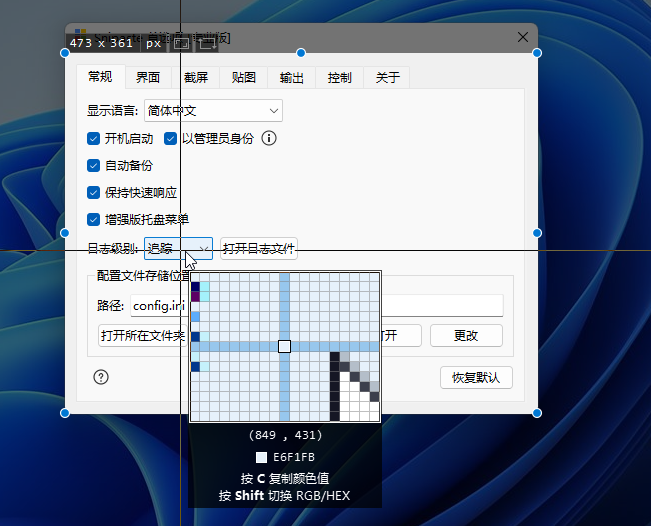
> 由于 Qt 的原因,Snipaste 自身的窗口控件都是不支持元素识别的。 😥图片只是阐释不识别元素的这一问题,并非只有Snipaste不识别元素,而是多数软件在win11下都不能识别(手动选择也不能),但过去使用win10的时候就可以正常识别,暂不能确定问题出在哪里。