
段丛磊
段丛磊
I use the apisix-docker\example\docker-compose.yml deploy apisix apisix-docker\example\dashboard_conf\conf.yaml 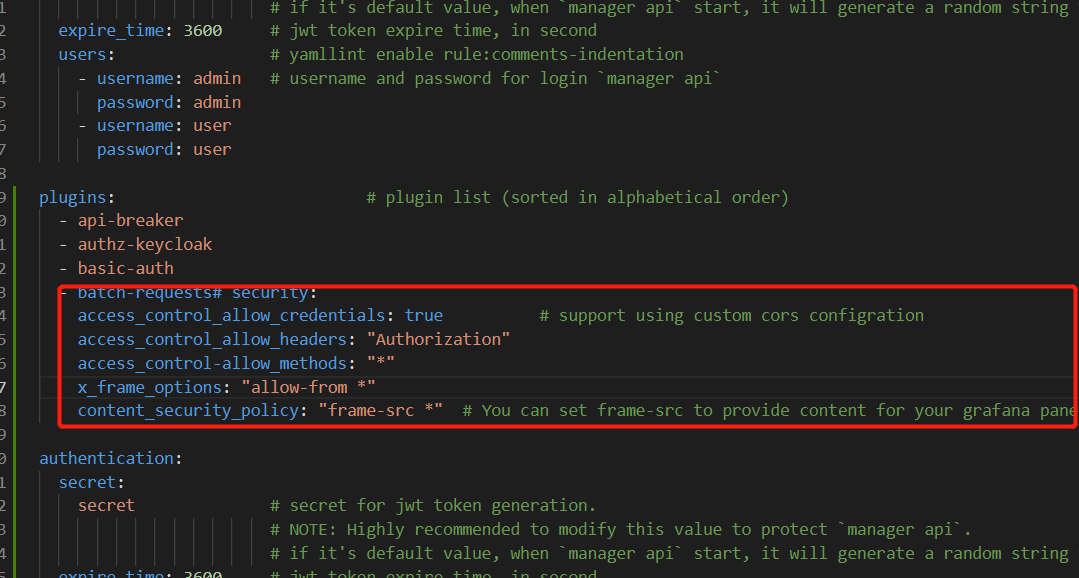 Access http://127.0.0.1:9000/dashboard Grafana Access errors 
Have you solved the prolem?
> > 你解决问题了吗? > > 它对我有用,在 conf.yaml 中添加一些行 > > security: access_control_allow_credentials > > : true # support using custom cors configration access_control_allow_headers > > : "Authorization" > > access_control-allow_methods:...
>  yep, 是用你上面的配置吗?
Is the front end not cleared already completed
Hi I also encountered this problem, how do you solve this problem
Help the baby. The baby's crying
> But it lost its original meaning And then there's no way to get the file information across
> Mm-hmm. Ooooooo the baby is already crying
 I successfully fulfilled the requirement