
Urmil Parikh

Urmil Parikh
+1 Very useful feature.
Autodesk 123D Design imports it as hollow model.  Source and step files: [cube.zip](https://github.com/solvespace/solvespace/files/925447/cube.zip)
I confirm that `10mmcube-modded3.step` shared by @Jonimoose does show up as solid in 123D Design as well.
@Lor-Saba, I have taken liberty to publish v0.2.3 on Chrome webstore. https://chrome.google.com/webstore/detail/code-injector/jgcallaoodbhagkaoobenaabockcejmc
+1 Please provide a fix
Also, it shows up as `Electron` in Open-with menu. Same issue happens with Open-with method as well.
I'm using Windows 10, installed latest MarkRight two days back. On double-clicking apis.md file:  Later, when MarkRight is ready: 
Also, it shows `Electron` in Open-with menu: 
Oh, I don't have a build system. :(
Can the text be added above or below arrow? Also, can there be an option to rotate text in direction of arrow? Something like this: 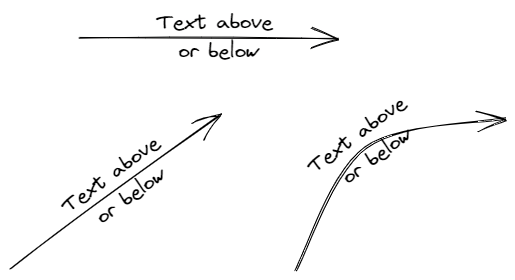 In case of curved...