
Simon Lundström



Simon Lundström
This solves #1 and #11 IMO. Thank you @williamspatrick and sorry for necromancing this PR = )
(seems that Github has lost my mail reply...) I understand the implication of fixing this issue and I appreciate that you took the time to analyze it. Is it possible...
https://github.com/openssh/openssh-portable/blob/2dc32802/contrib/gnome-ssh-askpass3.c#L159-L172 this is the logic we should implement
Which `Alacritty.app` is Spotlight finding when you search for it? When I search I find it in these paths: * Applications * release * assets All of them except the...
And you can't launch it? Tried `rm -rf /Applications/Alacritty.app && make clean install` ? On Thu, 2018-06-21 at 17:44:54 -0700, Kevin James wrote: >@simmel I just confirmed: it is finding...
Have you tried to find it in Finder, hold shift, right-click on Alacritty.app and click Open? This circumvents the thing that requires applications to be signed.
I'm out of ideas then. Maybe someone else will chime in. On Thu, 2018-06-28 at 11:09:01 -0700, Kevin James wrote: >Looks like its [control-click rather than shift-click](https://support.apple.com/kb/ph25088?locale=en_US) but thanks for...
> I'm also having this issue, I don't know how I can help debugging this Can you please: 1. launch Spotlight, search for `alacritty` or what you search for 1....
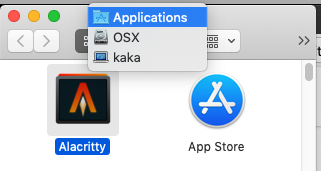 cmd+click on the title just to get the path where Alacritty is but you already see that in Alfred. Well, I don't know anything...
Try to remove Alacritty.app and make install and copy Alacritty from the dmg again. On Mon, 6 May 2019, at 16:02, Gerry Agbobada wrote: > * `open /Applications/Alacritty.app` works (and...