
tobianoapps



tobianoapps
They probably mean something like below. Labels at the bottom, values at the top. 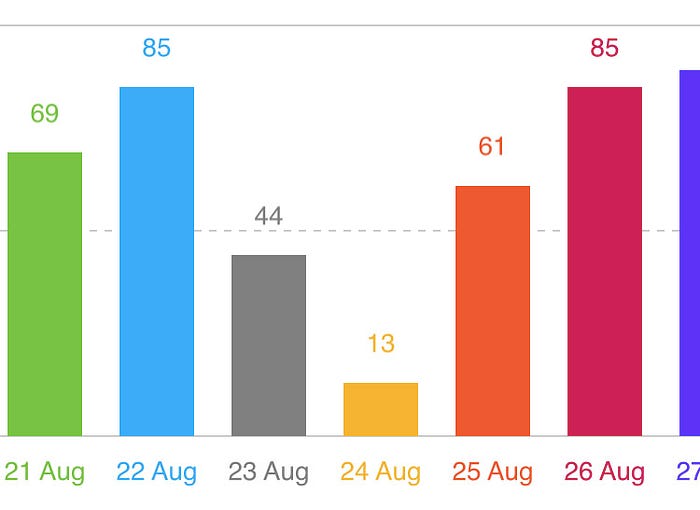
It might fit the iOS aesthetics a bit better than Android IMO, but gradient fill on vertical and horizontal bars would definitely be a welcomed addition.
For folks using a recent Gradle version, add the jitpack repo in your `settings.gradle` file and the Spin Kit library should resolve and download. ```gradle dependencyResolutionManagement { repositoriesMode.set(RepositoriesMode.FAIL_ON_PROJECT_REPOS) repositories {...
Before onCreate(): ```kotlin private lateinit var progressBar: ProgressBar ``` In onCreate(): ```kotlin progressBar = spin_kit ``` When you want to show or hide, just call: ```kotlin progressBar.visibility = View.GONE ```...
@freeridre I haven't written java code in a while but it would look something like this I imagine? Before onCreate(): ```java private ProgressBar mProgressBar; ``` In onCreate(): ```java mProgressBar =...
Same here.
Did you add `maven { url 'https://www.jitpack.io' }` to your project build.gradle file under `allprojects { }`? See: https://github.com/AAChartModel/AAChartCore-Kotlin#step-1-add-the-jitpack-repository-to-your-build-file
I would like to know how to customize the values shown on the X axis too. Can a series be applied to X axis values? Thanks!
Found this which seems to answer my question: https://github.com/AAChartModel/AAChartKit-Swift/issues/83#issuecomment-422625259 Use `.categories(arrayOf("label1", "label2", "label"))` when you initialize your `AAChartModel()`. You can then use `.xAxisTickInterval(2)` if you want to skip every other...
Well, the issue went away on its own. Weird. This is concerning as it appeared seemingly out of nowhere - no modifying code related to this lib - and also...