
salman
salman
试了下楼上提供的插件,貌似对key里边带横岗的不会自动处理。gsonformat就会自动重命名,非常不错,期待大神早日提供支持kotlin的
@wuseal 恩,设置里选了gson就会重命名了,谢谢,终于不用手动写了。哈哈
sorry,the project is not mine,i just fork it
@7hundeR 上边代码也差不多了,你继承LinearLayoutManager 就完事了。也没啥demo吧,recyclerView该咋用咋用,就是layoutManager用这个就行了。 `import android.content.Context import android.support.v7.widget.LinearLayoutManager import android.support.v7.widget.RecyclerView import android.view.View class LayoutManagerScaleFirst:LinearLayoutManager{ constructor(context: Context?) : super(context) constructor(context: Context?, orientation: Int, reverseLayout: Boolean) : super(context, orientation, reverseLayout) private var oldChild0:View?=null;...
不知道你说的啥样子,上下margin用decoration就行,左右的margin应该没啥影响吧,我这里是滑动的效果图,没看出有啥问题。 或者你具体说下,给谁添加margin?另外我就是个菜鸟。 https://www.jianshu.com/p/42f9997e3ce0
@KobeBryant824 流式布局不是我们需要的,我们的ui需求是每行最多3个,完事居中。。流式的不能限制每行几个吧,他不是那种能显示几个就显示几个的吗
现在可以自动定位了,不用进去手动点击了。非常感谢 第5条那个好像问题还在,如下图,我定位设置的是6秒,完事进去我立马进行搜索,然后6秒以后定位出来就看到第二张图的结果了,那定位的ui蹦出来了,而搜索结果里第一条数据被删了。 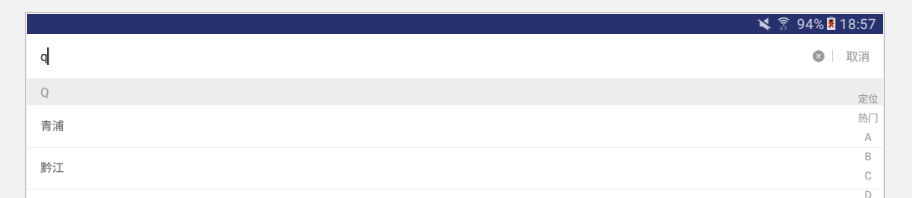 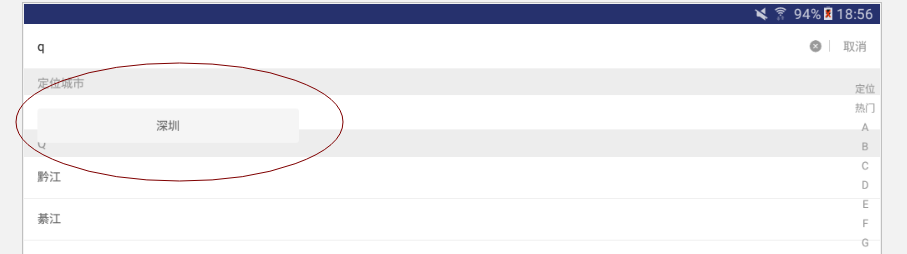 ` public void updateLocateState(LocatedCity location, int state){ mData.remove(0); mData.add(0, location); stateChanged = !(locateState == state); locateState = state; refreshLocationItem(); } public void refreshLocationItem(){ //如果定位城市的item可见则进行刷新 if (stateChanged...
手指按下的时候满足if条件,完事往播放器上滑动,mVelocityTracker没有初始化,action_move的时候就空指针了。 
小米android6.0的系统,开启悬浮窗他也不显示,这种垃圾手机啥时候停产啊,谁没事总要为它浪费一堆时间。