
Puteulanus


Puteulanus
同样的问题,VRouter 版本 0.4.2,操作系统 10.10.5。VirtualBox 已更新到最新版。 配置软件源的时候进虚拟机是这样的,看起来依然还在启动中,是因为等待系统启动的时间不够长吗?已经尝试过把 CPU 分配到 4 线程了,但似乎启动过程中总会在几个位置卡比较长的时间。
执行 `sudo xattr -r -d com.apple.quarantine /Applications/AiAPI.app` 之后可以打开 参考 https://zhuanlan.zhihu.com/p/135948430
遇到了同样的问题,进入 AiAPI.app/Contents/MacOS 用终端执行 ./AiAPI 能看到日志 ``` Express server listening at http://localhost:3456 Error: Forbidden at onopen (/Applications/AiAPI.app/Contents/Resources/app.asar/src/index.js:377:17) at fetchSSE (/Applications/AiAPI.app/Contents/Resources/app.asar/src/index.js:485:16) at process.processTicksAndRejections (node:internal/process/task_queues:95:5) at async /Applications/AiAPI.app/Contents/Resources/app.asar/src/index.js:263:22 ``` 发现程序不知道为什么不走软路由上 passwall 的分流规则,手动设置 passwall...
Hello, I support adding an environment variable to control the listening port of socat. When I use `--net=host` so that WARP can use the host's IPv6 network stack, I cannot...
> 这个,我大概看了下,馒头现在是单页面应用的结构,按nt目前的代码和我的理解,小改可能不太好支持了。。。 > > 即使增加了等待加载完成:[sgpublic@845b406](https://github.com/sgpublic/nas-tools/commit/845b406a0eaa46d8078ff93de384dfefc2dd1250) ,对于馒头这个站点,等待加载完成后立即拿 page_source 拿到的也是个预加载的页面,而非完全渲染完成后的界面,如果强行继续等待个几秒再拿 page_source 就没问题了。 > > 所以如果要支持的话,查找每个元素的时候都应该使用 WebDriverWait,但随之而来的问题就是并不是每个站点都有所有特定的元素,如果每个都 WebDriverWait 的话会造成查找时间大幅增长。 > > @hsuyelin 大佬有什么看法吗? 要不写个转译层单独用 Docker 跑,给它新 API 渲染个 NexusPHP 风格的精简页面,反过来去 match 馒头以前的规则,nt 这边地址填成...
同遇到,加上 --debug 之后能看到是这个请求失败了 [2024-06-06 00:02:22.491] - aid=380945537,cid=492999764,epId=,tvApi=True,IntlApi=False,appApi=False,qn=0 [2024-06-06 00:02:22.491] - bangumi=False,cheese=False [2024-06-06 00:02:22.491] - 获取网页内容: Url: https://api.snm0516.aisee.tv/x/tv/ugc/playurl?avid=380945537&cid=492999764&fnval=4048&fnver=0&fourk=1&device=android&platform=android&mobi_app=android_tv_yst&npcybs=0&force_host=2&build=102801&otype=json&qn=0, Headers: User-Agent: Mozilla/5.0 (Windows NT 10.0; Win64) Gecko/20100101 Firefox/93.585 Accept-Encoding: gzip, deflate Cookie:...
> 同样遇到此问题, 合并音频失败 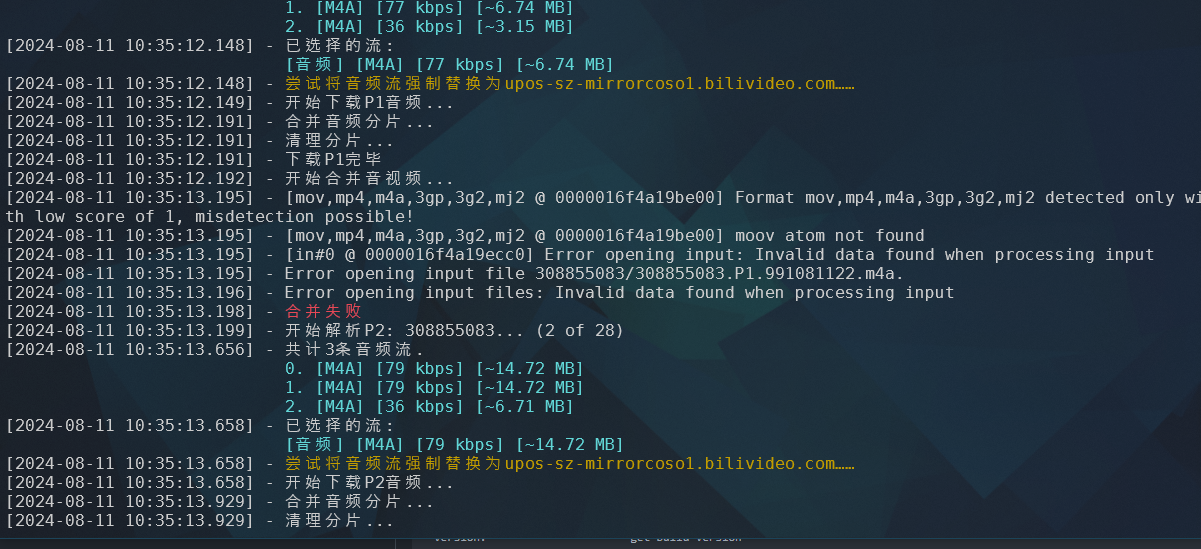 这个不是一个问题吧,看起来是用的 FFmpeg,也没开 --debug。我试了下 mp4box 下载合并你那个视频正常。 你自己开个 issue 把视频地址、环境、版本和带 debug 的完整日志那些都写清楚吧,方便作者复现一点。
I started AdGuardHome inside the docker and configured DHCP, the VM get the IP successfully. My guess is that the problem may be with dnsmasq.   
> Enter the Docker container and execute apt remove --purge dnsmasq; apt autoremove --purge. Then restart the container to restore the network. It works! 🍻
It seems that after removing dnsmasq, the network setup script stopped working (I guess), causing qemu to change its network mode: The bridged network adapter inside the Docker container disappeared....