
octaeder
octaeder

This is very similar to issue #2297: I click on a Log view list entry and the cursor jumps to corresponding line in the editor. Then I use ctrl+click to...
### How to reproduce 1. Use a new setup of txs (i.e. remove files in config folder). Open a document with several pages and open the pdf in the windowed...
When I start a first forward search (ctrl+F) with sync in the embedded or windowed pdf-viewer the search doesn't start searching (for a word in the document). The search indicator...
Please add a context menu for the root node in the TOC panel with entrie "Open Document" (this should also be the mouse click action for the node). More suggestions...
With txs 4.2.3 Qt 6 Win10 I use this to get error messages in the log/issues panel: 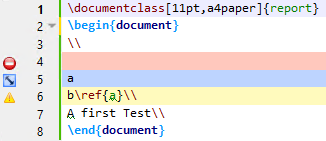 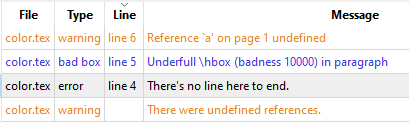 Following items describe current state and how state should be: -...
### Describe the feature and the current behavior/state Left to the linenumbers of the document is an area where a click creates a bookmark. But with documents with thousands of...
It should be like "Soft Line Wrap after max. Characters" but without line wrapping. This can be simulated for illustration with "Hard Line Wrap ..." (s. first line): 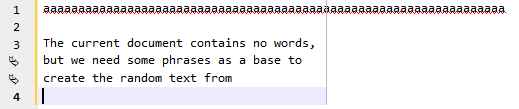 The...
We can split view, and each part of the view can show tabs and docs. We can move them one by one or all by use of the context menu...
### Environment - TeXstudio: 4.2.2 - Qt: 5.15.2 - OS: Windows 10 - TeX distribution: miktex ### Expected behavior Changing the order of user commands in the Build configuration should...
Apply Idefix/Hard Line Break... 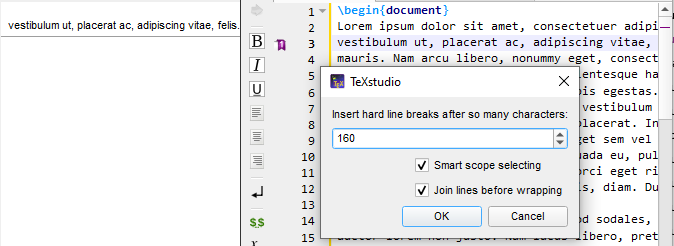 After that bookmark icon, bookmark indicator and entry in view Bookmarks are gone. But using undo (Ctrl+Z) two of them come back, but not the...