
mrrs878




mrrs878
I also encountered this problem. I used the chrome debugging tool to locate this arrow and found that it was a style calculation error 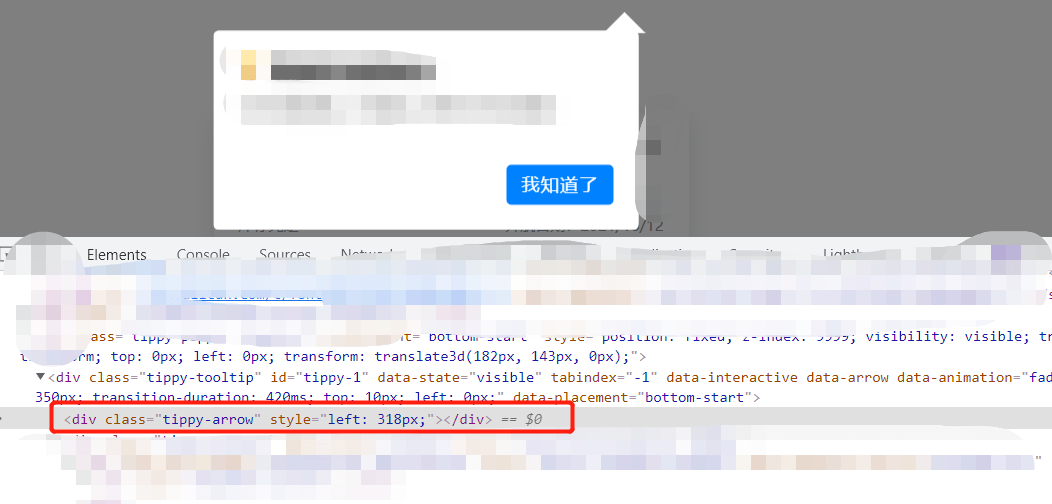 ``` html ```
Need to manually specify the left value of the arrow ``` css body.shepherd-active[data-shepherd-step="booking"] .tippy-arrow { left: 160px !important; } ```
在`==`时,会强制类型转换并比较转换后的结果 比较过程如下: - 如果两个变量都是对象,则当都引用同一对象时才返回`true` - `null == undefined` ? 返回`true` - 当两个变量类型不一致时会进行类型转换: - `string == number` ? `string`转换为`number`后再进行比较 - `boolean == any` ? `boolean`转换为`number`后再进行比较 - `object == string/number/symbol` ? 尝试调用`object`的`valueOf`或`toString`将其转换为原始类型后再进行比较...
可以借助`Map`实现 ``` js class LRUCache { constructor(limit) { this.limit = limit; this.cache = new Map(); } get(key) { if (!this.cache.has(key)) return undefined; const value = this.cache.get(key); this.cache.delete(key); this.cache.set(key, value); return...
I did this: call gif.abort() in the callback function of gif.on("finished") and then running is reset to false
Yes, I found that there would be problems when rendering a new gif after calling `gif.abort()`, so I replaced `gif.abort()` with ``` js // ... gif.running = false; gif.frames =...
``` css background: linear-gradient(90deg, rgba(200, 200, 200, .1) 3%, transparent 0), linear-gradient(rgba(200, 200, 200, .1) 3%, transparent 0); background-size: 20px 20px; ``` 
``` css flex: 1 2 300px; flex-grow: 1; flex-shrink: 2; flex-basis: 300px; ``` `.left` + `.right`的宽度已经超过`.container`的宽度了,所以会发生缩放,`flex-grow`不起作用,`flex-shrink`和`width`(`flex-basis`)决定具体的大小 具体的计算公式: ``` js itemSkrinkScaledWidth = flex-shrink * width shrinkRatio = itemSkrinkScaledWidth / totalShrinkScaledWidth realWidth...
找到合理的解释了 [高级进阶:深度揭秘 Promise 注册微任务和执行过程](https://cloud.tencent.com/developer/article/1554181) ``` js new Promise((resolve,reject)=>{ console.log("1") resolve(); }).then(()=>{ // 外部第1个then console.log("2") new Promise((resolve,reject)=>{ console.log("3") resolve(); }).then(()=>{ // 内部第1个then console.log("4") }).then(() => { // 内部第2个then console.log("5") }) }).then((res)=>{...