
madey83
madey83
i had the same issue and i though that is related to MKVToolnix but i found solution. To have constant Frame rate mode when your encode is done you need...
my last encode and mux up had video, audio, subtitles (SUP) and chapter (xml), nothing else. this is what i observed.
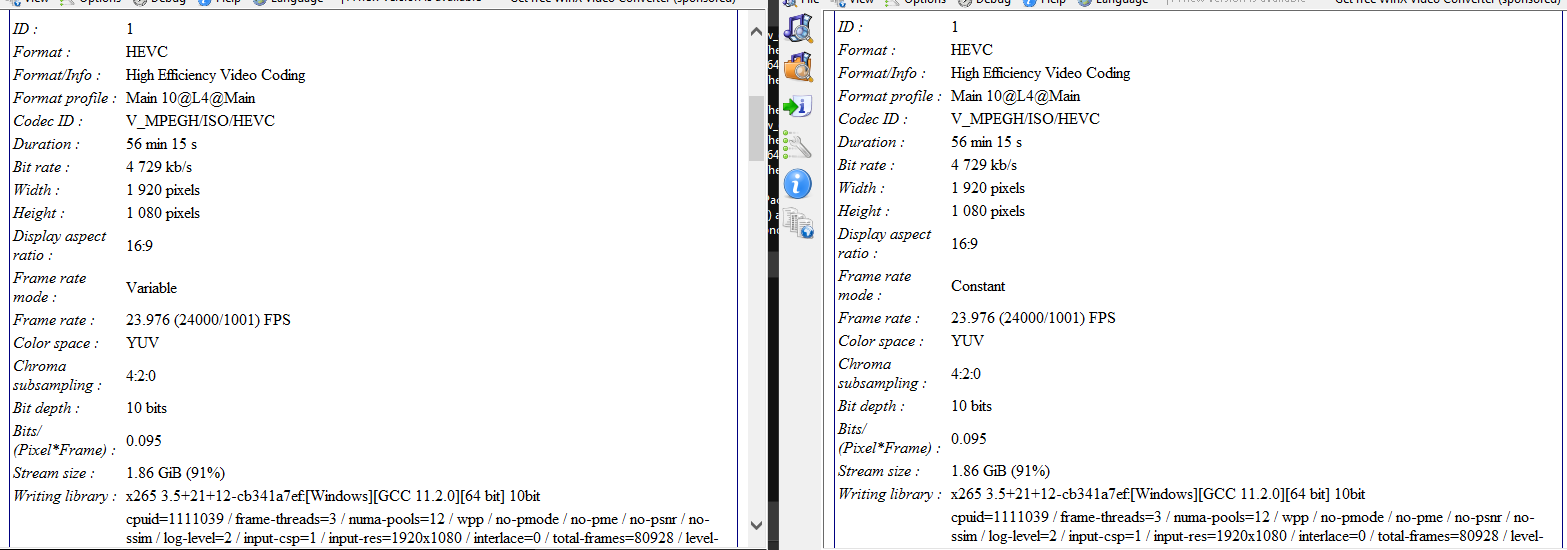 on the left mux up via StaxRip on the right manual via GUI
solution: Options -> Timestamps select BOTH options. then you will get constant
hi, go here: https://github.com/Dogway/Avisynth-Scripts. Download it and import dependent scripts
i've tried cut exactly 716 frames...
 on the left hand side you have key frame found by this command .\ffprobe.exe -select_streams v -show_entries packet=pts_time,flags -of compact -read_intervals 700%800 E:\HDR.mkv | findstr K on the right...
Avidemux was able to cut some frames and left only 24... which i could not cut further... this is how avidemux show frame 716 
hi, i use BM3DCUDA_AVS-test9 on my RTX 2060 with below call as prefilter: BM3D(sigma=10,preset="normal",radius=3,UV=1,gpuid=0,tv_range=true) and i saw that clock of RTX is set to 855MHz only....
@WolframRhodium at the end of my script i use this: Prefetch(6,12) and it can't brake 855MHz 