
Gabriele Mohr
Gabriele Mohr

## Reason * Needed for branded client 2.10.2 release (link to branded release ticket) ### Template [Release Template](https://github.com/owncloud/client/blob/master/.github/release_template.md) __TODO__: * Check if anything is missing from [release_template_outdated_2020.md](https://github.com/owncloud/client/blob/master/.github/release_template_outdated_2020.md) and merge here....
oCIS test systems: https://owncloud.dev/ocis/deployment/continuous_deployment/ oCIS demo users: https://owncloud.dev/ocis/getting-started/demo-users/ oCIS docker: https://owncloud.dev/ocis/getting-started/#docker oCIS server used for testing: ~https://ocis.owncloud.com~, https://ocis.ocis-traefik.released.owncloud.works (2.0.0 ~Beta1~ ~Beta2~ ~Beta3~ Beta4) or local docker oCIS server (owncloud/ocis) Daily...
Seen with ownCloud-3.0.0.7681-alpha2.7681.x64.msi on Windows 10 21H2 / ocis.ocis-traefik.released.owncloud.works (2.0.0-Beta1) Steps to reproduce: - create 'katherine' with role Space Admin on ocis.ocis-traefik.released.owncloud.works - start client and add account 'katherine' (VFS...
Seen with client ownCloud-2.10.0-rc1.6315.x64.msi on Windows 10 20H2 Steps to reproduce: - On server: create a subfolder EmptyFolder inside folder Test-Data, create 2 files having a file name clash Result:...
Seen with owncloud-client-2.10.1~rc2 (build 7080) on openSUSE 15.3 VirtualBox VM Steps to reproduce: - start the client and connect to demo.owncloud.org - wait several hours while the data are deleted...
### Pre-submission Checks - [X] I [checked for similar issues](https://github.com/owncloud/client/issues?q=), but could not find any. I also checked the closed issues. I could not contribute additional information to any existing...
Seen with version 3.0.0.0-git May 18 2022 09:21:53 on openSUSE 15.3 After deleting a space on the server the client shows a red error message: 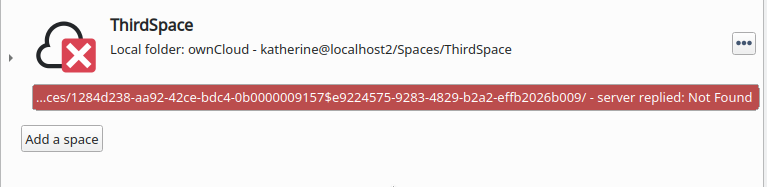 [deleted_space.log.gz](https://github.com/owncloud/client/files/8729602/deleted_space.log.gz)
Installed: owncloud-client-2.7.6 on openSUSE 15.2 Account: admin, sync root: ownCloud5 Server: 10.6.0 Steps done: - delete all folder and files on server - wait for 'Remove all / Keep files'...