
LabelMaker
 LabelMaker copied to clipboard
 cvg
cvg
LabelMaker
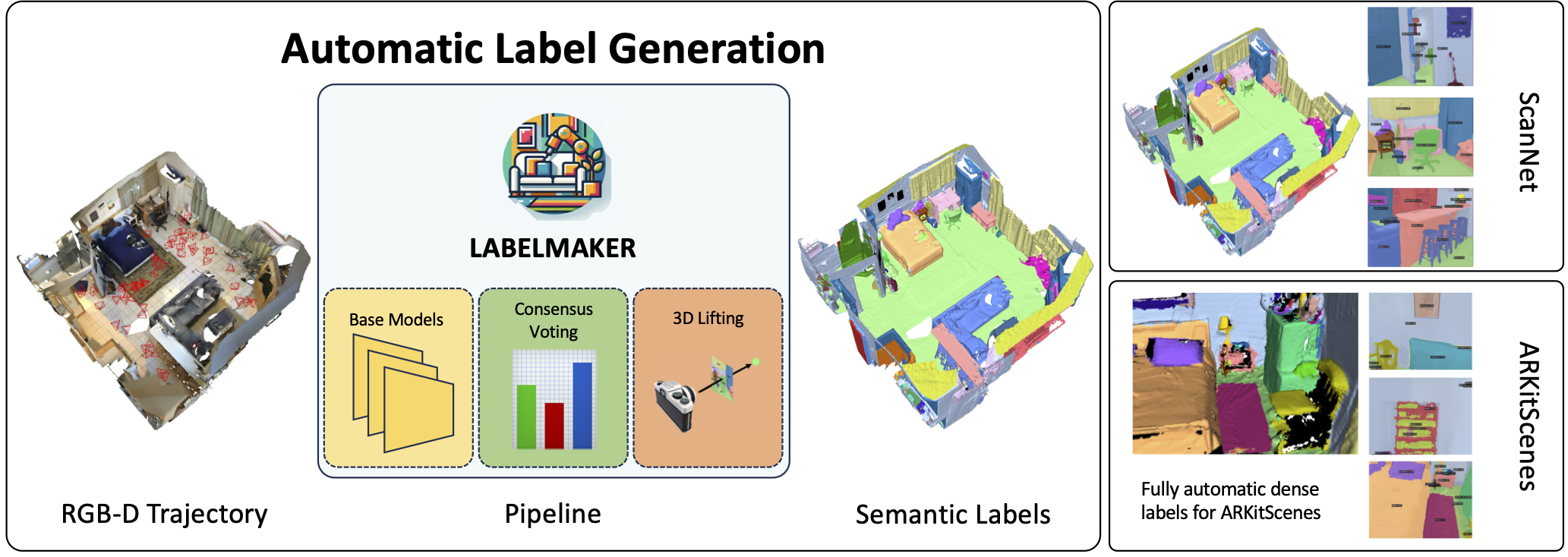
Installation
This is an example on Ubuntu 20.02 with cuda 11.8.
Environment for LabelMaker
This environment is used for semantic segmentation of several models, and it is also used for generating consensus semantic labels.
bash env_v2/install_labelmaker_env.sh 3.9 11.3 1.12.0 9.5.0
This command creates a conda environment called labelmaker with python version 3.9, cuda version 11.8, pytorch version 2.0.0, and gcc version 10.4.0. Here are possible sets of environment versions:
| Python | CUDA toolkit | PyTorch | GCC |
|---|---|---|---|
| 3.9 | 11.3 | 1.12.0 | 9.5.0 |
| 3.9 | 11.6 | 1.13.0 | 10.4.0 |
| 3.9 | 11.8 | 2.0.0 | 10.4.0 |
| 3.10 | 11.8 | 2.0.0 | 10.4.0 |
For python=3.10, I only tested with 3.10 11.8 2.0.0 10.4.0, others might also be possible.
conda activate labelmaker
Environment for SDFStudio
This environment is used for generating consistent consensus semantic labels. It use the previous consensus semantic labels (together with RGBD data) to train a neural implicit surface and get a view-consistent consensus semantic label. It uses a modified version of SDFStudio. SDFStudio need specific version of pytorch, therefore, it is made as a separate environment. To install the environment, run
bash env_v2/install_sdfstudio_env.sh 3.10 11.3
Python=3.10 and CUDA-toolkit==11.3 is the only tested combination. This version of SDFStudio requires torch==1.12.1, which only supports CUDA 11.3 and 11.6, therefore, it might be impossible to run it on newer GPUs.
conda activate sdfstudio
Download Model Checkpoints
bash env_v2/download_checkpoints.sh
Docker Image
Docker image based on Ubuntu 16.04
# Build
docker build --tag labelmaker-env-16.04 -f docker/ubuntu16.04+miniconda.dockerfile .

# Run
docker run \
  --gpus all \
  -i --rm \
  -v ./env_v2:/LabelMaker/env_v2 \
  -v ./models:/LabelMaker/models \
  -v ./labelmaker:/LabelMaker/labelmaker \
  -v ./checkpoints:/LabelMaker/checkpoints \
  -v ./testing:/LabelMaker/testing \
  -v ./.gitmodules:/LabelMaker/.gitmodules \
  -t labelmaker-env-16.04 /bin/bash
Docker image based on Ubuntu 20.04
# Build
docker build --tag labelmaker-env-20.04 -f docker/ubuntu20.04+miniconda.dockerfile .

# Run
docker run \
  --gpus all \
  -i --rm \
  -v ./env_v2:/LabelMaker/env_v2 \
  -v ./models:/LabelMaker/models \
  -v ./labelmaker:/LabelMaker/labelmaker \
  -v ./checkpoints:/LabelMaker/checkpoints \
  -v ./testing:/LabelMaker/testing \
  -v ./.gitmodules:/LabelMaker/.gitmodules \
  -t labelmaker-env-20.04 /bin/bash
Setup Scene
Download scene
export TRAINING_OR_VALIDATION=Training
export SCENE_ID=47333462
python 3rdparty/ARKitScenes/download_data.py raw --split $TRAINING_OR_VALIDATION --video_id $SCENE_ID --download_dir /tmp/ARKitScenes/ --raw_dataset_assets lowres_depth confidence lowres_wide.traj lowres_wide lowres_wide_intrinsics vga_wide vga_wide_intrinsics
Convert scene to LabelMaker workspace
WORKSPACE_DIR=/home/weders/scratch/scratch/LabelMaker/arkitscenes/$SCENE_ID
python scripts/arkitscenes2labelmaker.py --scan_dir /tmp/ARKitScenes/raw/$TRAINING_OR_VALIDATION/$SCENE_ID --target_dir $WORKSPACE_DIR
Run Pipeline on Scene
Run individual models
- InternImage
python models/internimage.py --workspace $WORKSPACE_DIR
- OVSeg
python models/ovseg.py --workspace $WORKSPACE_DIR
- Grounded SAM
python models/grounded_sam.py --workspace $WORKSPACE_DIR
- CMX
python models/omnidata_depth.py --workspace $WORKSPACE_DIR
python models/hha_depth.py --workspace $WORKSPACE_DIR
python models/cmx.py --workspace $WORKSPACE_DIR
- Mask3D
python models/mask3d_inst.py --workspace $WORKSPACE_DIR
- OmniData normal (used for NeuS)
python models/omnidata_normal.py --workspace $WORKSPACE_DIR
Run consensus voting
python labelmaker/consensus.py --workspace $WORKSPACE_DIR
Run 3D Lifting
Point-based lifting
python -m labelmaker.lifting_3d.lifting_points --workspace $WORKSPACE_DIR
NeRF-based lifting (required for dense 2D labels)
bash labelmaker/lifting_3d/lifting.sh $WORKSPACE_DIR
Visualization
Visualize 3D point labels (after running point-based lifting)
python -m labelmaker.visualization_3d --workspace $WORKSPACE_DIR
Bibtex
When using LabelMaker in acamdemic works, please use the following reference:
@inproceedings{Weder2024labelmaker,
  title = {{LabelMaker: Automatic Semantic Label Generation from RGB-D Trajectories}},
  author={Weder, Silvan and Blum, Hermann and Engelmann, Francis and Pollefeys, Marc},
  booktitle = {International Conference on 3D Vision (3DV)},
  year = {2024}
}
 cvg
cvg