
四维超立方体

四维超立方体
### 功能描述 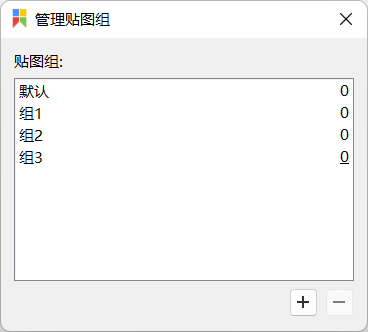 在“管理贴图组”窗口中,我们可以单击加号以创建,可以单击减号以删除,可以双击组名以重命名。但是,最重要的“激活指定贴图组”操作却没有对应的按钮。希望能够添加按钮以实现“激活指定贴图组”。 除此之外,这个窗口的交互逻辑可以进一步改进,经过一番思考,我的建议是这样的: - 激活指定贴图组:通过双击组名实施。 - 删除指定贴图组:在每个组名右侧放一个“叉”按钮,通过单击“叉”按钮实施。 - 重命名指定贴图组:在每个组名右侧放一个重命名按钮,同上。 - 重新排序贴图组:通过拖动组名实施(与现状一致)。 - 添加贴图组:通过单击加号按钮实施(与现状一致)。
### 发生了什么? 在设置界面中,我已经取消勾选`固定到所有虚拟桌面`,然而在使用过程中,贴图仍然是固定到所有虚拟桌面,就跟勾选了一样。 ### 运行平台 微软商店 ### 软件版本 2.7.3(pro)
I'm a vs code user. My `breakOnSingleNewLine` is set to `True` by default. The code in markdown ``` text A $$1+1=2$$ text B ``` rendering like ``` text A 1+1=2...

In the default markdown preview of vs code, there is a feature: when we `double click` the mouse in the preview, the cursor in the editor will automatically jump to...
More and more monitors support rotation, but they can't sense gravity. Could you support like [irotate](https://entechtaiwan.com/util/irotate.shtm).
### Is your feature request related to a problem? Please describe. 有时候,一旦重启电脑,我就无法上网。经过艰苦地排查,原因是这样的: (1)Clash启用系统代理,打开了`使用代理服务器`(如下图所示)。 (2)如果手动退出Clash,`使用代理服务器`会随之关闭,一切正常。但是,如果重启电脑,`使用代理服务器`仍然保持开启。 (3)电脑重启之后,Clash没有运行,而`使用代理服务器`开启,使得我无法正常上网。 ### Describe the solution you'd like 我希望重启电脑时,Clash在退出之前,能自动关闭`使用代理服务器`,就像手动退出Clash时一样。 ### Describe alternatives you've considered 让Clash保持开机自启可以解决(相当于把A情形变为B情形),但这会增大系统负担。 | 情形...
I have read your examples, but I can't find this function. I want to know if it exists.
I use pandoc 3.1.1 in Windows11. When converting ``` \begin{equation*} \begin{aligned} 1= & 2 & & 3 \\ = & 4 & & 5 \\ \end{aligned} \end{equation*} ``` from LaTeX...
My version is [1.16.0-beta5.3](https://github.com/xanderfrangos/twinkle-tray/releases/tag/v1.16.0-beta5.3). When hovering the cursor at the red area, we can adjust the brightness by mouse wheel.  However, the step is always 1. Although I have...
My version is 1.16.0-beta8 (45502c2). Default overlay hehavior is "Forced on." Sometimes a black edge appears around the UI, as shown in the figure.  