
Karl_wei
Karl_wei
应该是存在焦点问题,拖拽悬浮窗后,需要重新点击浮窗外的元素才能操作浮窗外的界面。
> @WxqKb 你说的这个问题是后面新增 focusable 才出现的,暂时没想到好的处理办法,所以默认是 false 可以配置到flutter层,由用户去传入是否要自动聚焦
非常期待windows的版本,我们flutter windows的多窗口也是用entry-point来实现
I have this problem too, it works on android but not on win10
> Here's my code:  > > Here's error I got: Unhandled Exception: PlatformException(captureFrame, captureFrame() path is null or empty, null, null) > > Please help me to solve it....
+1,在windows上,第一次读取theme里面的字体,大小使用sp,读取不到。 重载运行后,正常。  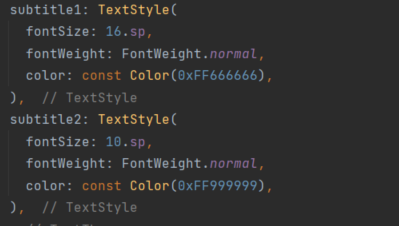
> Hello @WxqKb. Thank you for filing this issue. Can you please provide the following information? > > * A [complete and minimal, reproducible example](https://stackoverflow.com/help/minimal-reproducible-example). Ideally, a single `main.dart` file...
> Hello @WxqKb. Thank you for filing this issue. Can you please provide the following information? > > * A [complete and minimal, reproducible example](https://stackoverflow.com/help/minimal-reproducible-example). Ideally, a single `main.dart` file...
In fact, when I use the timer to draw the animation, the frame rate is controlled at 30 frames, and the gpu usage rate is only 27%. If the animation...
I also encountered this problem Mainly because of the center property