UnicornJoe42
UnicornJoe42
[Unboxed8941](https://github.com/Unboxed8941) Thanks, but it failed on wheel compilation this time
[YanWenKun](https://github.com/YanWenKun) Thanks! It works for CRM for 2 first stages and then i have error: ImportError: DLL load failed while importing nvdiffrast_plugin: the specified module cannot be found.
[YanWenKun](https://github.com/YanWenKun) I'm on windows 10. I have VS and CUDA installed, but I still get the error: ninja: build stopped: subcommand failed.
[YanWenKun](https://github.com/YanWenKun) Last error i have: ''' Error occurred when executing [Comfy3D] Load Convolutional Reconstruction Model: Error building extension 'nvdiffrast_plugin': [1/6] C:\Program Files\NVIDIA GPU Computing Toolkit\CUDA\v12.1\bin\nvcc --generate-dependencies-with-compile --dependency-output rasterize.cuda.o.d -Xcudafe --diag_suppress=dll_interface_conflict_dllexport_assumed...
I additionally checked this and did all the steps to connect the plugin from the beginning. This is the only plugin folder and manifest.json is definitely taken from it. But...
I'm using photoshop version v23. In the manifest.json file, the version has been changed from default 24 to 23. 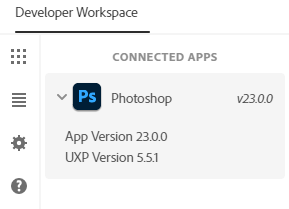 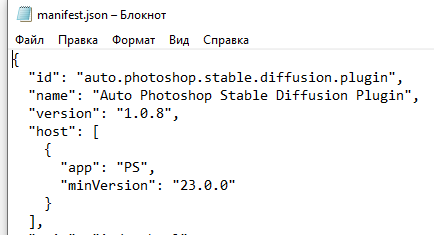 Images are saved in output directories. C:\Auto-Photoshop-StableDiffusion-Plugin\server\python_server\output\2022-12-27