
SnowWarri0r




SnowWarri0r
现在已经发布了稳定版,但是shellclash似乎还没有适配支持 报错如下: ``` iptables v1.8.7 (nf_tables): unknown option "--to" Try `iptables -h' or 'iptables --help' for more information. iptables v1.8.7 (nf_tables): unknown option "--to-ports" Try `iptables -h' or 'iptables --help'...
> 现在已经发布了稳定版,但是shellclash似乎还没有适配支持 报错如下: > > ``` > iptables v1.8.7 (nf_tables): unknown option "--to" > Try `iptables -h' or 'iptables --help' for more information. > iptables v1.8.7 (nf_tables): unknown option "--to-ports"...
> @SnowWarri0r 参考你的api设置成功了 那请问面板反代要怎么设置呢? 面板已经解压放在 /var/www/dashboard/ 想要访问 dashboard.domain.com/path 时显示面板 请问 location 部分要怎么配置 /path ? 你可以参照我的第一个配置,在后面加上 `ui/`,我这个是通过clash核心挂载的所以是如上的配置
> 黑名单设备DNS不会走clash 如果使用的dnsmasq转发,请取消 使用的是白名单,没有使用dnsmasq转发 混合模式+fakeip,未在白名单设备dns解析是如上图,改成redir则是上图的下半部分
> @SnowWarri0r 请检查相关依赖 或者重启设备重试 检查依赖后发现没装ip6tables-mod-nat 安装后目前已恢复正常
> > @SnowWarri0r 请检查相关依赖 或者重启设备重试 > > 检查依赖后发现没装ip6tables-mod-nat 安装后目前已恢复正常 发现只是dns缓存使得可以访问,其他网页还是会通过clash内核进行dns解析,但是不在白名单的设备无法进行解析
切换黑名单模式后,被过滤设备依旧通过clash dns 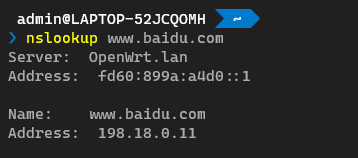
脚本有提示过我的硬件设备可能不支持tun模式和混合模式,然后我用了clash pre的内核,依旧提示,是不是因为硬件的原因导致的?
尝试着改造自己的内核成多道程序加载执行,然后对于最后的执行,把用户栈改造成多个栈供用户程序使用,然后run_next_app关于restore程序传入,改造成如下代码 ```rust __restore( KERNEL_STACK.push_context(TrapContext::app_init_context( APP_BASE_ADDRESS + current_app * APP_SIZE_LIMIT, USER_STACK[current_app].get_sp(), )) as *const _ as usize, ); ``` 然后执行到第二个程序就开始报错 ``` Loaded app 0 within 0x80400000 to 0x804014B0 Loaded app 1...
> > 补充:vscode上如果加上`#[no_std]`提示`cann't find crate for test` refer > > > [rust-analyzer/rust-analyzer#3801](https://github.com/rust-analyzer/rust-analyzer/issues/3801) > > 不起作用。我的配置: > > ```js > { > "rust.target": "riscv64gc-unknown-none-elf", > "rust.all_targets": false, > "rust-analyzer.cargo-watch.allTargets": false, >...