
Whalko


Whalko

- PT 助手版本: - PT 助手安装方式:(市场安装,或zip包安装) - 浏览器名称及版本: - 浏览器是否安装了其他插件: - 停用其他插件后是否正常工作: - 问题描述: 如我在上一个issue里面提到的 #556 一般的NP架构的站点种子直链都是这样的 `https:///download.php?id=&passkey=&https=1` 但是HDChina是这样的 `https://hdchina.org/download.php?hash=&uid=&https=1` 导致的问题就是,我在站点设置里面填入了我的passkey。HDChina复制出来的链接是这样的 `https://hdchina.org/download.php?hash=&passkey=&https=1` 然后访问会显示:您访问的页面不存在 如何解决这个问题: 1、对HDChina进行单独适配,修改种子链接的模板 2、在HDChina站点设置中,把“密钥”这一栏换一种说法,变成UID。 3、解决问题 - 相关截图: 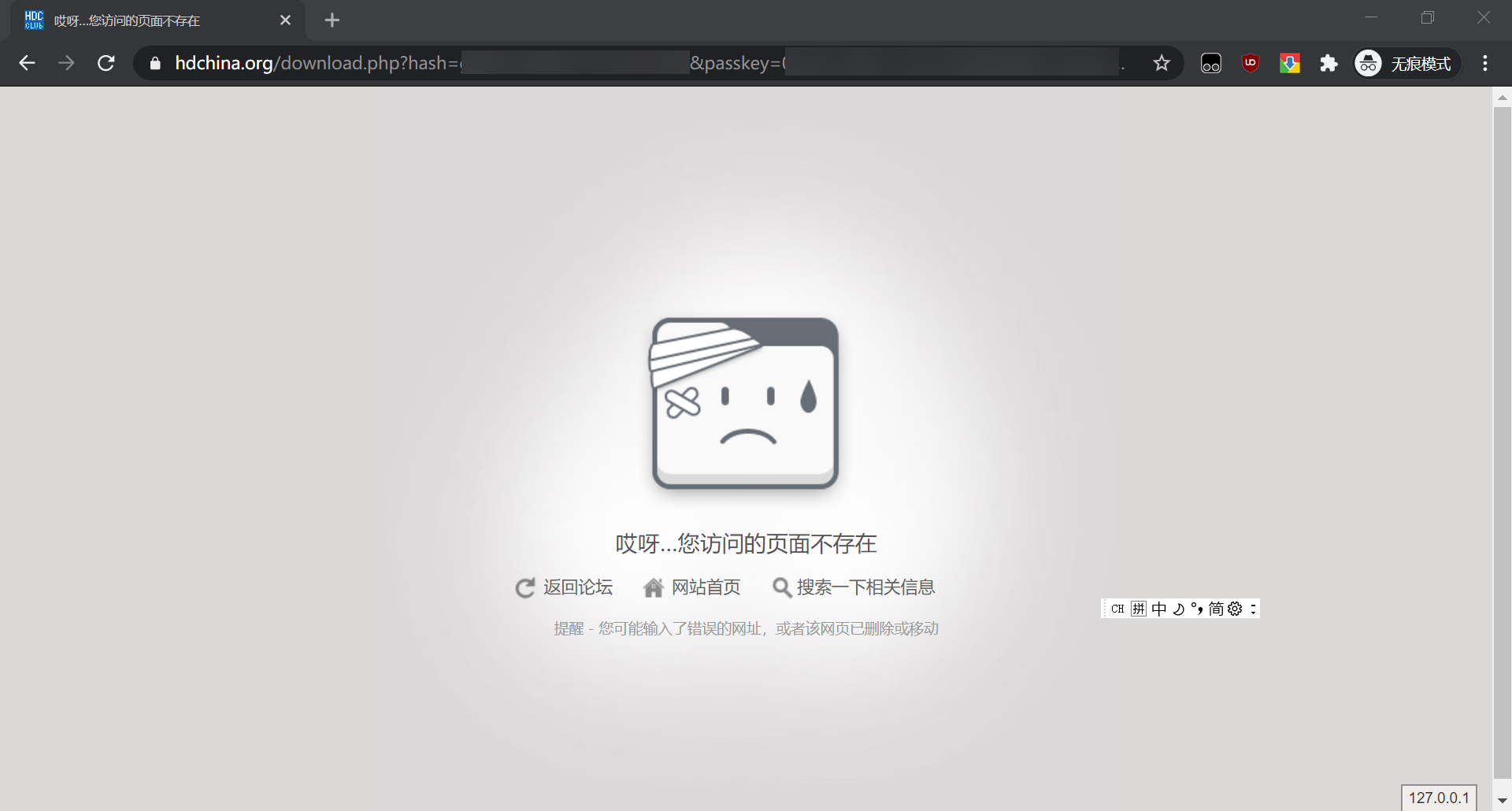...
有几点,一页一页说吧…… 1、排行页,希望能换个图标 [label](https://material.io/resources/icons/?icon=label&style=baseline)/[explore](https://material.io/resources/icons/?icon=explore&style=baseline)/[bookmarks](https://material.io/resources/icons/?icon=bookmarks&style=baseline)/[favorite](https://material.io/resources/icons/?icon=favorite&style=baseline) 都比现在右上角这个合适……  2、速览页面,移除右上角图标,换到什么地方后面说。 3、搜索页 右上角的链接直达感觉可以删了,现在我觉得比较鸡肋还难看,要么从浏览器开能直接选择PixEz,要么就多一步进搜索框手动粘贴就行了(真想做感觉可以搞个自动开?进app读取到pixiv链接弹toast询问是不是要打开,不过这样要读取剪贴板和尊重隐私的初衷相违背……) 以图搜图整合到搜索里面……现在那个位置太迷惑了。友商的经验也不是不可以学习一下嘛。  还可以选择做在第四个分类,放在最右边也就是画师ID的旁边? 4、设置页 不得不说这是整个app最混乱最反人类的页面了,还夹杂了一些非“设置”的功能。所以先把页面名字改成“更多”吧……图标就用[more_horiz](https://material.io/resources/icons/?icon=more_horiz&style=baseline)。这样“偏好设置”可以变成“设置”,“偏好设置”和右上角的“平台设置”变成“设置”下的二级菜单,“皮肤“也可以在”偏好设置“之下了。”屏蔽设定“和”清除缓存“感觉也可以塞在设置下面。  速览页右上角的应该移到本页本来是”账号切换“的那个大头像位置,昨天我第一次点击那里发现那里居然是”切换账号“的时候我心里是非常震惊的……”账号切换“可以放在设置里面,我个人认为这个功能的使用频率还是比较低的。 现在关于的图标有点像[chat](https://material.io/resources/icons/?icon=chat&style=baseline),又有点像[comment](https://material.io/resources/icons/?icon=comment&style=baseline)。我觉得应该改成[info](https://material.io/resources/icons/?search=info&icon=info&style=outline) 以上是我的一点拙见,希望能有所帮助。
 既然大量使用了圆角矩形能不能一起改改?统一一下,画了个简单的样例,其它类似的地方也可以这么改?
我在设置里选择“小图”,我点进详情页之后点击大图,大图也被缓存,能否实现用这个大图缓存替换掉原来的小图缓存显示在主页?
RT
### 这是一个什么样的功能? 希望财新 RSS 支持付费用户输出全文 ### 这个功能可以解决什么问题? 财新有些文章会消失……希望能通过 RSS 输出全文保存 ### 额外描述 参考 https://docs.rsshub.app/install/#pei-zhi-bu-fen-rss-mo-kuai-pei-zhi 内端传媒的部分  ### 这不是重复的功能请求和 RSS 提案 - [X] 我已经搜索了 [现有 issue](https://github.com/DIYgod/RSSHub/issues),以确保这项功能尚未被请求及不是 [新的 RSS 提案](https://github.com/DIYgod/RSSHub/issues/new?assignees=&labels=RSS+proposal&template=rss_request_zh.yml)。
### 描述bug 如题,e.g. https://live.bilibili.com/999 ### 重现bug 啥也没做,就开了脚本 ### 预期行为 能看见直播间 ### 截图  ### 运行日志 无 ### 操作系统 Windows 10 ### 浏览器 chrome 105.0.5195.127 ### 用户脚本管理器 tempermonkey 4.16.1 ### 挂机助手版本...
### Category Programming ### Website URL https://github.com/dashboard-feed ### Website description GitHub ### What content should be included? The traditional GitHub private feed. ### Additional description Ever since the FUCKING GitHub...
### Please search before asking - [X] I searched in the [issues](https://github.com/yetone/openai-translator/issues) and found nothing similar. ### Please read README - [X] I have read the troubleshooting section in the...
### Clear and concise description of the problem The current uniform vertical spacing around date headers causes them to feel disconnected from their content. This weakens the visual grouping of...