
logseq-plugin-task-check-date
 logseq-plugin-task-check-date copied to clipboard
 DimitryDushkin
Unfortunately I haven't find a way to consistently reproduce this. But it happened to me from time to time the the double bracket of completion time being silently changed to...


Please note that I have ticked the TODO today, so it shows 17th Oct.  Now, if on another page, I try to query it, it does not show up....


Display the completed time in the complete property. I wish after the [[date]], there will be a HH:mm, to tell me more information about when I did that and the...

If you want to query for dates, I think you need to change the timestamp format to just, e.g., 20230306 . I've tested it locally (today is 20230306): 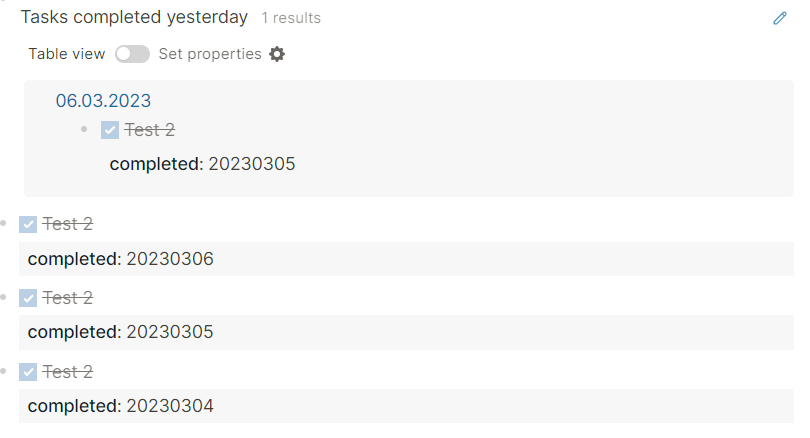 Query...

Thanks for working on this plugin, it is something I've wanted for a long time. But I don't always want it to mark tasks as completed. It would be nice...

I recently discovered a bug/missing feature but my understanding of the logseq database is insufficient to fix it myself: GIVEN a task that changes from uncompleted to completed on Date...

Thanks for your plugin. I can't seem to get the time format to display unix time. According to [Day.js](https://day.js.org/docs/en/parse/string-format), this should just be a `x`, but when testing this, my...
