
CNMan
CNMan
> So? 文件名中的`CN`标识并不是英文版独有。
问了客服,他说有`CN`的是中文版... > Thank you for contacting Wolfram Technical Support. >CN refers to Chinese and Mathematica_12.1.1_WIN_CN.zip is the installer filename for the Chinese version of Mathematica.
13.1.0 发布 ``` FinancePlatform_13.1.0_BNDL_LINUX.iso FinancePlatform_13.1.0_BNDL_LINUX.sh FinancePlatform_13.1.0_BNDL_LINUX_CN.iso FinancePlatform_13.1.0_BNDL_LINUX_CN.sh FinancePlatform_13.1.0_BNDL_MAC_EXP.dmg FinancePlatform_13.1.0_BNDL_MAC_EXP_CN.dmg FinancePlatform_13.1.0_BNDL_WIN_EXP.exe FinancePlatform_13.1.0_BNDL_WIN_EXP_CN.exe FinancePlatform_13.1.0_MAC.dmg FinancePlatform_13.1.0_MAC_CN.dmg FinancePlatform_13.1.0_MAC_EXP.dmg FinancePlatform_13.1.0_MAC_EXP_CN.dmg FinancePlatform_13.1.0_WIN.iso FinancePlatform_13.1.0_WIN.zip FinancePlatform_13.1.0_WIN_CN.iso FinancePlatform_13.1.0_WIN_CN.zip FinancePlatform_13.1.0_WIN_EXP.exe FinancePlatform_13.1.0_WIN_EXP_CN.exe gridMathematica_13.1.0_LightweightGridManager_LINUX.iso gridMathematica_13.1.0_LightweightGridManager_LINUX.sh gridMathematica_13.1.0_LightweightGridManager_LINUX_CN.iso gridMathematica_13.1.0_LightweightGridManager_LINUX_CN.sh gridMathematica_13.1.0_LightweightGridManager_MAC.dmg gridMathematica_13.1.0_LightweightGridManager_MAC_CN.dmg gridMathematica_13.1.0_LightweightGridManager_MAC_EXP.dmg gridMathematica_13.1.0_LightweightGridManager_MAC_EXP_CN.dmg gridMathematica_13.1.0_LightweightGridManager_WIN.iso...
http://hugozhu.myalert.info/2013/06/01/36-use-ping-to-check-network-connectivity.html pi的源里面居然没有netcfg了,上游debian是有的啊 /etc/apt/sources.list deb http://archive.raspbian.org/raspbian stable main contrib non-free deb-src http://archive.raspbian.org/raspbian stable main contrib non-free pi@raspberrypi ~ $ sudo apt-get install netcfg Reading package lists... Done Building dependency tree Reading...
goagent也用不了了,该怎么改?多谢 https://github.com/CNMan/goagent
debian 或 ubuntu ``` apt-get install python-crytography python-pyopenssl ``` RHEL 或 Fedora ``` yum install python-crytography python-pyopenssl ```
看了看openwrt的[wiki](https://wiki.openwrt.org/doc/techref/opkg),你试试 ``` opkg install python-crytography python-pyopenssl ```
还有两个产品 Wolfram Finance Platform https://www.wolfram.com/finance-platform/  Wolfram Enterprise Private Cloud (EPC) https://www.wolfram.com/enterprise-private-cloud/ 
你装的是海峰“中日韩汉字超大字符集(SuperCJK)通用字体支持包6.0”即Unifonts 6.0吧,那个本身不支持CJK-F,五笔吧小吧主LSJ天道酬勤有扩补版本[https://pan.baidu.com/s/1hq5kedm](https://pan.baidu.com/s/1hq5kedm),不过貌似是按草案扩补的,该区字符与编码和Unicode 10.0.0正式版不一致,也是不能用。 除了花园明朝,建议用方正字库给制作的中华书局宋体 http://www.ancientbooks.cn/helpcore?font ,也可以用字海网站长DIY的天珩全字库 http://yedict.com/download/ ,这两个真支持CJK-F 参考:https://github.com/CNMan/UnicodeCJK-WuBi06/issues/17 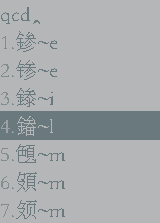
CJK 编码区前20902字国家有三个笔顺相关规范,这291个就是这里面的,其他字没有问题。扩展A/B目前无规范。 《GB13000.1字符集汉字笔顺规范》(GF3002-1999) 《GB13000.1字符集汉字字序(笔画序)规范》(GF3003-1999) 《GB13000.1字符集汉字部首归部规范》(GF0012-2009)