
Billyas
Billyas
[this version may be help](https://github.com/SagerNet/SagerNet/releases/download/hysteria-plugin-1.1.0/hysteria-plugin-1.1.0-arm64-v8a.apk) it useful to me and need restart the server
Follow this order - Python version: 3.9 64-bit - Operating System: Windows 11 - Pip Support version: cp39-cp39-win_amd64 and then download this whl file [dlib-19.23.0-cp39-cp39-win_amd64.whl](https://gitee.com/billyme/python-dlib/blob/master/dist/dlib-19.23.0-cp39-cp39-win_amd64.whl) [dlib-19.23.0-cp39-cp39-win_amd64.whl (github)](https://raw.githubusercontent.com/Billyas/python-dlib/master/dist/dlib-19.23.0-cp39-cp39-win_amd64.whl) open the powershell...
> i think you need this version - Python version: 3.9 64-bit
> My python version is 3.10.6 OS is windows 11 This is the error I'm getting: > > **ERROR: dlib-19.23.0-cp39-cp39-win_amd64.whl is not a supported wheel on this platform.** > >...
您好!我 之前也遇见过相同问题,我已经解决。 参考该[链接](https://github.com/BNDong/Cnblogs-Theme-SimpleMemory/issues/333) 我已经提交PR,但是由于原作者一直没有更新,无奈关闭。 然后可以将链接转移到我fork的仓库。具体参考链接内教程
### 博客时间问题,已修复方案 修复过程,原本找到了js的代码位置,仅仅是一个substring的问题,但是苦于环境无法编译 我最后只能直接修改生产的dict文件,该文件位于`page-common-comArticle.b054622b.js`,仅仅删除其substring [page-common-comArticle.b054622b.js](https://github.com/Billyas/Cnblogs-Theme-SimpleMemory/commit/cd7c34364c979447a0813f0aba87cfee5891a70e),由于jsdelivr缓存问题,我新生成了一个tage [v2.1.1](https://github.com/Billyas/Cnblogs-Theme-SimpleMemory/tree/v2.1.1),可直接引用我的Fork仓库 [https://github.com/Billyas/Cnblogs-Theme-SimpleMemory.git](https://github.com/Billyas/Cnblogs-Theme-SimpleMemory.git)。 配置时仅需进行如下修改  [https://cdn.jsdelivr.net/gh/Billyas/[email protected]/dist/simpleMemory.js](https://cdn.jsdelivr.net/gh/Billyas/[email protected]/dist/simpleMemory.js) 经过校验发现,必须是2022-04-08 这种格式方能被bing搜索识别位置正确日期。重新修改。 [https://cdn.jsdelivr.net/gh/Billyas/[email protected]/dist/simpleMemory.js](https://cdn.jsdelivr.net/gh/Billyas/[email protected]/dist/simpleMemory.js) _Originally posted by @Billyas in https://github.com/BNDong/Cnblogs-Theme-SimpleMemory/issues/333#issuecomment-1088690174_
版本1.33 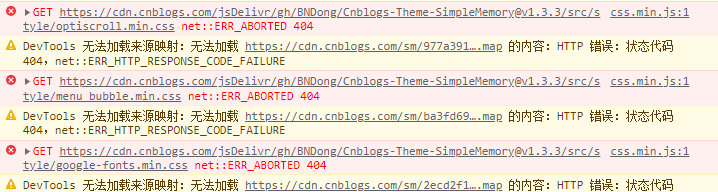 如上报错。之前一直可以正常使用。
大概明白了, 访问连接问题 原本连接地址是https://cdn.cnblogs.com/jsDelivr/gh/BNDong/[email protected]/src/style/optiscroll.min.css 但是仓库内已经没有min.css文件了,只有一个optiscroll.css 然后,自然访问不到报错了, optiscroll.min.css menu_bubble.min.css google-fonts.min.css 这三个文件不存在,导致页面显示失败。
当前解决办法只有升级最新版本了, 1.x的好像都不行。