

 zyedidia
Numeric keypad: the Enter key does not generate newline
System: Arch Linux
Data about micro: Version: 2.0.11 Commit hash: 225927b9 Compiled on August 09, 2022
Problem: when pressing the Enter key (numeric keypad) it does not generate newline (as expected). All the other keys in the numeric keypad work fine (both with numlock on, and with numlock off).

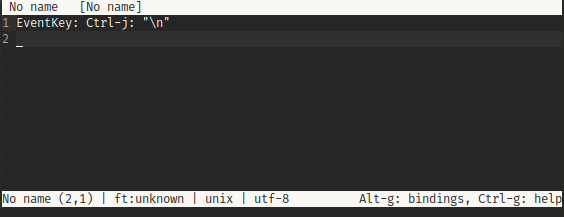
If you use the > raw command does pressing the enter key on the keypad send an escape sequence? (And if so what does it send)


The keyboard is connected to a Intel NUC, maybe this is the source of incompatibility
Em sex., 14 de abr. de 2023 às 13:14, Mehrad Mahmoudian < @.***> escreveu:
Yes, it sends EventKey: Ctrl-j: "\n"
[image: image] https://user-images.githubusercontent.com/390889/232099180-d0f4c904-2810-4020-acf9-a79739380127.png
— Reply to this email directly, view it on GitHub https://github.com/zyedidia/micro/issues/2774#issuecomment-1508908125, or unsubscribe https://github.com/notifications/unsubscribe-auth/AQAYBAF4FRJE27G2AKXXSKTXBFZVPANCNFSM6AAAAAAVYMDZHU . You are receiving this because you authored the thread.Message ID: @.***>
Ok, understood! Just sending some info that might be of interest:
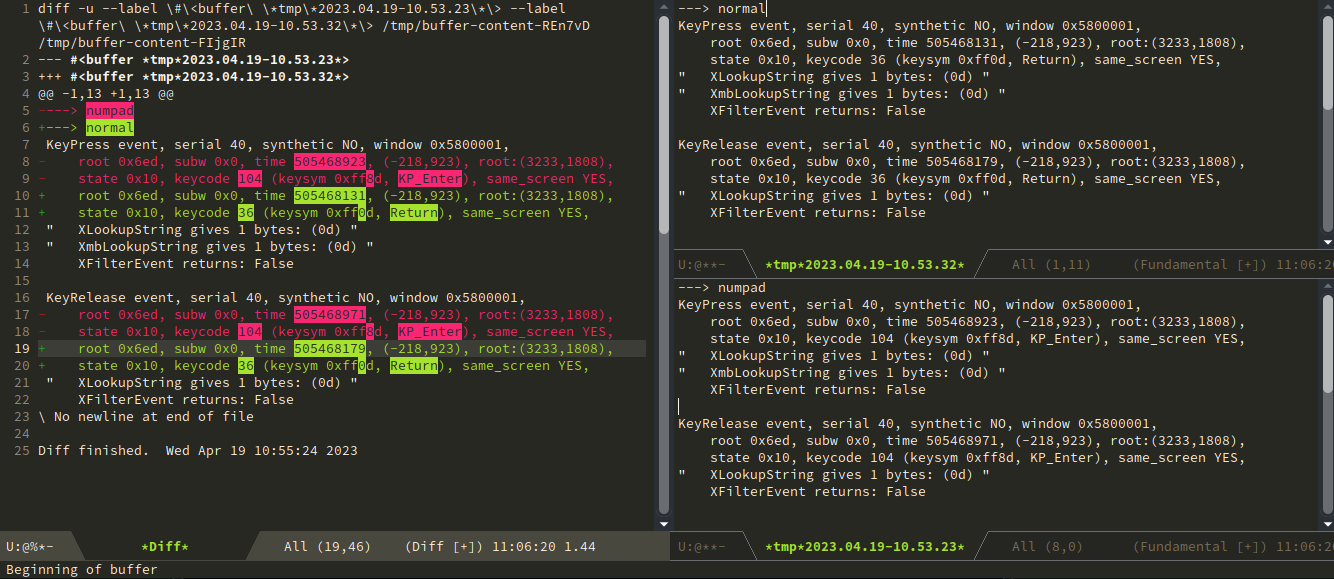
Using 'xev' on command line to differentiate keys: Normal => keycode 36 (keysym 0xff0d, Return) Keypad => keycode 104 (keysym 0xff8d, KP_Enter)
These are what I get from xev when pressing and releasing normal Enter and then numpad enter:
KeyPress event, serial 40, synthetic NO, window 0x5800001,
    root 0x6ed, subw 0x0, time 505468131, (-218,923), root:(3233,1808),
    state 0x10, keycode 36 (keysym 0xff0d, Return), same_screen YES,
"   XLookupString gives 1 bytes: (0d) "
"   XmbLookupString gives 1 bytes: (0d) "
    XFilterEvent returns: False

KeyRelease event, serial 40, synthetic NO, window 0x5800001,
    root 0x6ed, subw 0x0, time 505468179, (-218,923), root:(3233,1808),
    state 0x10, keycode 36 (keysym 0xff0d, Return), same_screen YES,
"   XLookupString gives 1 bytes: (0d) "
    XFilterEvent returns: False

KeyPress event, serial 40, synthetic NO, window 0x5800001,
    root 0x6ed, subw 0x0, time 505468923, (-218,923), root:(3233,1808),
    state 0x10, keycode 104 (keysym 0xff8d, KP_Enter), same_screen YES,
"   XLookupString gives 1 bytes: (0d) "
"   XmbLookupString gives 1 bytes: (0d) "
    XFilterEvent returns: False

KeyRelease event, serial 40, synthetic NO, window 0x5800001,
    root 0x6ed, subw 0x0, time 505468971, (-218,923), root:(3233,1808),
    state 0x10, keycode 104 (keysym 0xff8d, KP_Enter), same_screen YES,
"   XLookupString gives 1 bytes: (0d) "
    XFilterEvent returns: False
The following is the diff. I've just added two lines to the beginning of each buffer to clarify which one is from which key
One thing I noticed recently, is that this problem happens in IceWM (the window manager I was using some time ago).
In Cinnamon this does not happen. Both enter keys (alphabetic keyboard and numeric keyboard) generate newlines.
I probably closed it by mistake. Should I reopen it?
Yes, I tested it now with 2.0.13 (commit hash 68d88b57) and still cannot insert new line with numpad enter key
As a workaround you can add whatever event you get to your ~/.config/micro/bindings.json (check the actual key code your keyboard is sending with > raw as I'm not entirely sure if Ctrl-j is some kind of standard that some keyboards or operating systems follow):
"Ctrl-j": "InsertNewline",

@Andriamanitra kiitos, mutta se ei ole sopi ;)
Because a user might bind Ctrl-j to an actual legit action already. Therefore I suggest opening the issue in order to getting it fixed. Afterall terminal gets the key, nvim, emacs (interminal), and etc are accepting numpad enter. The only exception I've found in terminal is nano which registers Ctrl-j
I noticed that:
When starting micro from Alacritty, numkeypad Enter doesn't work.
With other terminals, like xterm, for instance, it works.