

 zaproxy
[WIP] Add UI for WebSocket Tree Map
Adds a WebSocketTree Map side panel representing the websocket messages tree structure. There are also some changes to the current WebSocket tree map infrastructure.
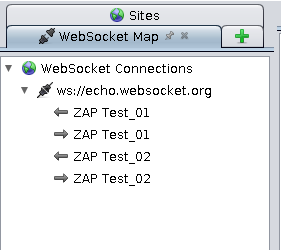
Some help needed:
- How does it looks like? @kingthorin, @psiinon, @thc202
- How to display the selected websocket messages in request/response panel? Where I have to look for? @kingthorin, @psiinon, @thc202
- Feedback about current code structure. @thc202
ToDo:
- [x] Add Selective listener & display websocket messages in request/response panel
- [x] Display correct icon when a channel is disconnected
- [ ] Write some doc
- [ ] Tidy up code
Refactor of: #1742 Based on: #2135

I had a quick test of this earlier today. Here's Some feedback.
- Yes the interface seems fine to me. (Good even :+1: )
- It would be nice if the item selected in the tree displayed in the Request/Response (I think that's what you meant with your first todo bullet?)
- From the tree it would be nice if there was a context menu to add ws stuff to context.
- The tree panel should have a set of buttons like the standard panel does (primarily I was thinking the target 'Show only in scope' button.)
Note my testing was with pretty low volume WS apps/sites. I looked for a game or something and found lots of tutorials but nothing actually live :disappointed:
Anyway, thanks for tackling this! Looking forward to more awesomeness :tada:

Interesting UI idea here: https://snyk.io/blog/socketsleuth-improving-security-testing-for-websocket-applications/
Not that it’s necessarily workable for ZAP but still good for thought.