

 z-------------
Download Icon doesn't always appear for local downloads even when the file exists locally.
CPod version: Latest Stable
Platform: Ubuntu 18
Install type (.deb, Snap, etc.): deb
Description: when a file is downloaded locally it doesn't always show the download icon properly highlighted
Did the bug only appear after a CPod update? Version before, after: unsure, first version I've used
Steps to reproduce: download a file and the icon doesn't download. Also happens when you have auto download queue - icon doesn't show the proper download icon there either
*Other helpful information (e.g. Developer Tools console log, screenshots) if possible:
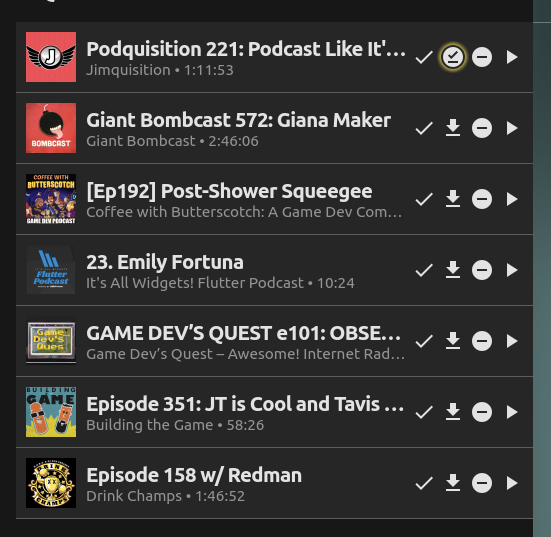 all these files have a local download, but if i click on download icon again it says 'removing download' so it's not understanding that the download icon exists for w/e reason.

I have a similar problem; if I move a downloaded episode to a different directory, the app occasionally thinks that the episode is still downloaded, even though it is no longer in the download directory.

@exts Would it be possible for you to give the latest CPod (v1.27.0) a try and let me know if the bug persists? There have been a number of download-related bugfixes since the last stable.
@elyisgreat CPod only checks the download folder upon app start; does the problem persist after exiting and restarting CPod?

@exts This is what I've managed to reproduce:
- Download an episode
- Add it to Queue
- Episode when displayed in Queue does not reflect download status
The above has been fixed in v1.27.1. Please try that out and let me know if it solves the issue.
@exts Would it be possible for you to give the latest CPod (v1.27.0) a try and let me know if the bug persists? There have been a number of download-related bugfixes since the last stable.
@elyisgreat CPod only checks the download folder upon app start; does the problem persist after exiting and restarting CPod?
Yes