

 yonaskolb
Support bundling directory in copy bundle resources
The following resources
Resources/file1.txt
Resources/file2.txt
will be bundled in the app bundle as:
MyApp.app/file1.txt
MyApp.app/file2.txt
Is there any way to specify the resources to be bundled as the following? Xcode supports it if you drag the whole directory into the Copy Bundle Resources build phase.
MyApp.app/Resources/file1.txt
MyApp.app/Resources/file2.txt
Currently there's a workaround for that by adding an arbitrary extension to the resource directory (e.g. Resources.mybundle), so XcodeGen will think that it is a file.

Yes, that's possible. You can do this:
sources:
  - path: Sources
    excludes:
    - Sources/Resources
  - path: Sources/Resources
    type: folder

I'm not sure your situation, but maybe I have the same problem with yours and solved now.
My project folder:
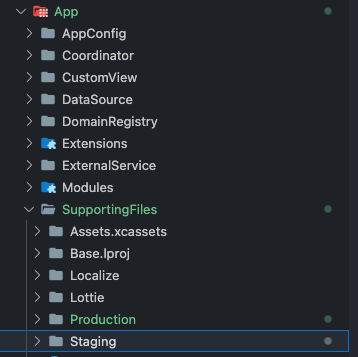
I have two Info.plist files for production and staging environments in App/SupportingFiles/Production and App/SupportingFiles/Staging folders. I need to split them into different targets.
And here is my solution in project.yml:
targetTemplates:
  App:
    type: application
    platform: iOS

targets:
  AppProduction:
    templates:
      - App
    sources:
      - path: App
        excludes:
          - SupportingFiles/Staging

  AppStaging:
    templates:
      - App
    sources:
      - path: App
        excludes:
          - SupportingFiles/Production
