
EECircularMusicPlayerControl
 EECircularMusicPlayerControl copied to clipboard
 yoichitgy
UI control to play a music and indicate its progress for iOS
EECircularMusicPlayerControl
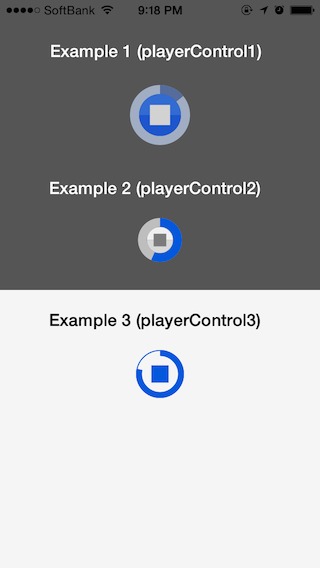
EECircularMusicPlayerControl is a UI control to play a music and indicate its progress. It's easy to use in your project, and supports customization of the colors applied to the component parts.
Supported Environment
iOS 5 or later.
Installation
EECircularMusicPlayerControl can be installed by CocoaPods with your Podfile containing the following line.
pod 'EECircularMusicPlayerControl'
Or, just copy the files in "EECircularMusicPlayerControl" directory to your project. In this case, you have to add the -fobjc-arc compiler flag to the EEToolbarCenterButton source (.m) files if your project doesn't use ARC.
Usage
First, create a class that conforms to EECircularMusicPlayerControlDelegate protocol, which has currentTime method. Usually it can be a UIViewController where an EECircularMusicPlayerControl is placed.
Then, set delegate property of the EECircularMusicPlayerControl.
self.yourCircularMusicPlayerControl.delegate = self; // Or any delegate.
At last, set duration property of the control.
self.yourCircularMusicPlayerControl.duration = self.yourAudioPlayer.duration;
That's all you have to do! The example app in "EECircularMusicPlayerExample" directory shows a practical example to use the control with AVAudioPlayer. There is another way to use EECircularMusicPlayerControl without the delegate. Refer to example #2 in the example app to see how to use it without the delegate.
Demo Project
Open EECircularMusicPlayer.xcodeproj and run.
Customization
The following properties can be customized to make your own appearance:
- progressTrackRatio
- trackTintColor
- highlightedTrackTintColor
- disabledTrackTintColor
- progressTintColor
- highlightedProgressTintColor
- disabledProgressTintColor
- buttonTopTintColor
- highlightedButtonTopTintColor
- disabledButtonTopTintColor
- buttonBottomTintColor
- highlightedButtonBottomTintColor
- disabledButtonBottomTintColor
- iconColor
- highlightedIconColor
- disabledIconColor
- borderColor
- highlightedBorderColor
- disabledBorderColor
- borderWidth
Roadmap
The following features shall be implemented in the next update. If you implement one of the features, please feel free to send a pull request.
- Add paused state. Current version has only playing and stopped states.
Legal
DACircularProgress
EECircularMusicPlayerControl contains a modified version of DACircularProgress created by Daniel Amitay and distributed under MIT license. Refer to "LICENSE.md" and "README.md" files in "DACircularProgress" directory for more information.
- Website: http://www.amitay.us
XTC of Gold (Sample Audio)
The example project contains the music "XTC of Gold" by Beatnabob, also known as Jimdubtrix, available under a Creative Commons Attribution-NoDerivs license.
- Music filename: Jimdubtrix_XTC-of-Gold-160.mp3
- Website: http://www.dubpram.co.uk
- Download: http://www.sampleswap.org/artist/jimdubtrix
- License: Creative Commons Attribution-NoDerivs license
License
EECircularMusicPlayerControl is available under MIT license. Refer to "LICENSE.txt" file for details.
Credits
If you are going to use EECircularMusicPlayerControl in your project, proper attribution would be nice.
 yoichitgy