

 yandeu
Host argument not working & hosts aliases suggestion
Describe the bug Host doesn't seem to be working (or at least not correctly diplayed in the console)
five-server --host=0.0.0.0
Question
Also, is it possible to make host a virtual host defined by the user /etc/hosts
So for example web 127.0.0.1 (in the hosts file)
using five-server --host=web
correspond to http://web:5500

The default host is 0.0.0.0.
When using os.networkInterfaces(), you get 127.0.0.1 and 192.168.1.67.
127.0.0.1 will be displayed as localhost.
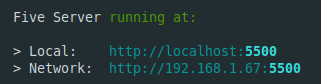
So you will see:
Five Server running at:

> Network:  http://192.168.1.67:5500
> Local:    http://localhost:5500
I tried to set web 127.0.0.1 and it worked:
Five Server running at:

> Local: http://web:5500

Oh so 0.0.0.0 is by default, thanks for this details!
You are right, I realized it's working using --host=web if set in the /etc/hosts, I don't know why I was struggling with that
Regarding this option, I saw that it's not availaible in the VSCode extension (https://github.com/yandeu/five-server-vscode), is it possible to add it?