

 xarray-contrib
enforce dimension ordering?
@dcherian I haven't gotten to integrate cf-xarray into my workflow yet, but, looking ahead, could cf-xarray be a tool for enforcing certain dimension ordering for xarray DataArrays? I find that after calculations sometimes the ordering changes and I haven't figured out a good way to automate dimensional order [time x vertical x y-coord x x-coord]. Sometimes it matters, too. Any thoughts?

the way to do this in xarray is .transpose(); you can do .cf.transpose("T", "Z", "Y", "X") for example. Let me know if it doesn't work for some cases.

Oh right, sorry I should have been specific. Yes, I know transposing works, but you have the know the dimensions ahead of time to call transpose properly. I would hope for something that transposes but given whatever number of the 4 possible dimensions (T, Z, Y, X), puts them in the proper order.
the challenge is that you may pass a Dataset that has an X coordinate with axis: X missing (maybe attrs got cleared somehow). Right now that would raise an error, which is good IMO. If cf_Xarray ignored that error then things may silently fail later.
The current solution is
ds.cf.transpose(*[dim for dim in ["T", "Z", "Y", "X"] if dim in ds.cf.get_valid_keys()])
What are you trying to do by enforcing dimension order? Maybe there's something else cf_xarray can do elsewhere
That would work if the cf xarray attributes work for a Dataarray for ROMS output. I could have that check as needed in code. I ran across this recently when I did some calculation that changed the order of dimensions in a DataArray and then I used xESMF which assumes typical ordering. So either I would like for my arrays to always be put into proper ordering with a quick command like you listed after anything I run (thinking about xroms here), or all commands to DataArrays should be able to be called by a keyword ordering instead of assuming typical array ordering (in this example that would be a change to xESMF).
That would work if the cf xarray attributes work for a Dataarray for ROMS output.
if you want X, Y you may have to add some attrs when you create a dataset in xroms; or change ROMS...
(in this example that would be a change to xESMF).
This would be desirable. We would like packages that build on xarray to not depend on dimension order. Can you open an issue at https://github.com/pangeo-data/xESMF/issues
I'm working on integrating adding the attributes into xroms. I have another question. I had been thinking that cf-xarray Axes were analogous to dimensions in xarray, and Coordinates analogous to xarray coords. Is this correct? It looks to me like it might not be when I try the code from above:
ds.cf.transpose(*[dim for dim in ["T", "Z", "Y", "X"] if dim in ds.cf.get_valid_keys()])
I have assigned attributes to coordinates in my ROMS output, but then the Axes are pointing to lon_rho, lat_rho, etc. I think they should point to eta_rho, xi_rho, etc, if transpose is going to work with them. However, I don't seem to be able to assign any attributes to xarray dimensions. Any ideas on this?
(in this example that would be a change to xESMF).
This would be desirable. We would like packages that build on xarray to not depend on dimension order. Can you open an issue at https://github.com/pangeo-data/xESMF/issues
Ok added to my list.
You'll have to create an actual array for xi_rho. There are no values ssociated with xi_rho in the file; so xarray uses np.arange on the fly. See https://github.com/xarray-contrib/cf-xarray/issues/84#issuecomment-695023001
I had been thinking that cf-xarray Axes were analogous to dimensions in xarray, and Coordinates analogous to xarray coords.
cf_xarray just has special names X, Y, Z, T, latitude, longitude, vertical, time which are in the CF conventions (I think the X, Y , Z, T comes from COARDS or something). For each name, cf_xarray will look for certain attributes and if found will replace the name with an appropriate variable name.
I agree with you: for ROMS I would set xi_* as X and eta_* as Y (after assigning arrays); lat_*; lon_* should be latitude, longitude. This should be most useful for curvilinear grids. E.g. .cf.sum("X") will work but .cf.sum("longitude") won't because sum expects a dimension name. .cf.plot(x="longitude", y="latitude") will do the right thing
(in this case, your Axes vs Coordinates distinction works)
For regular grids: xi_* and lon_* should be exactly the same with appropriate attributes for longitude and X
(in this case, your Axes vs Coordinates distinction doesn't work)
As I read this I realized you had addressed this before (#84) but it didn't stick in my head bc I hadn't run across it and thought about it yet. Thank you for your patience. I will try this.
I am able to get the dataset to recognize eta_rho, xi_rho, etc, as Axes now, but not individual variables like temp. The other parts are filling in nicely, but the Axes are the sweet spot I think. What connects the Axes to a particular variable that could be breaking here?
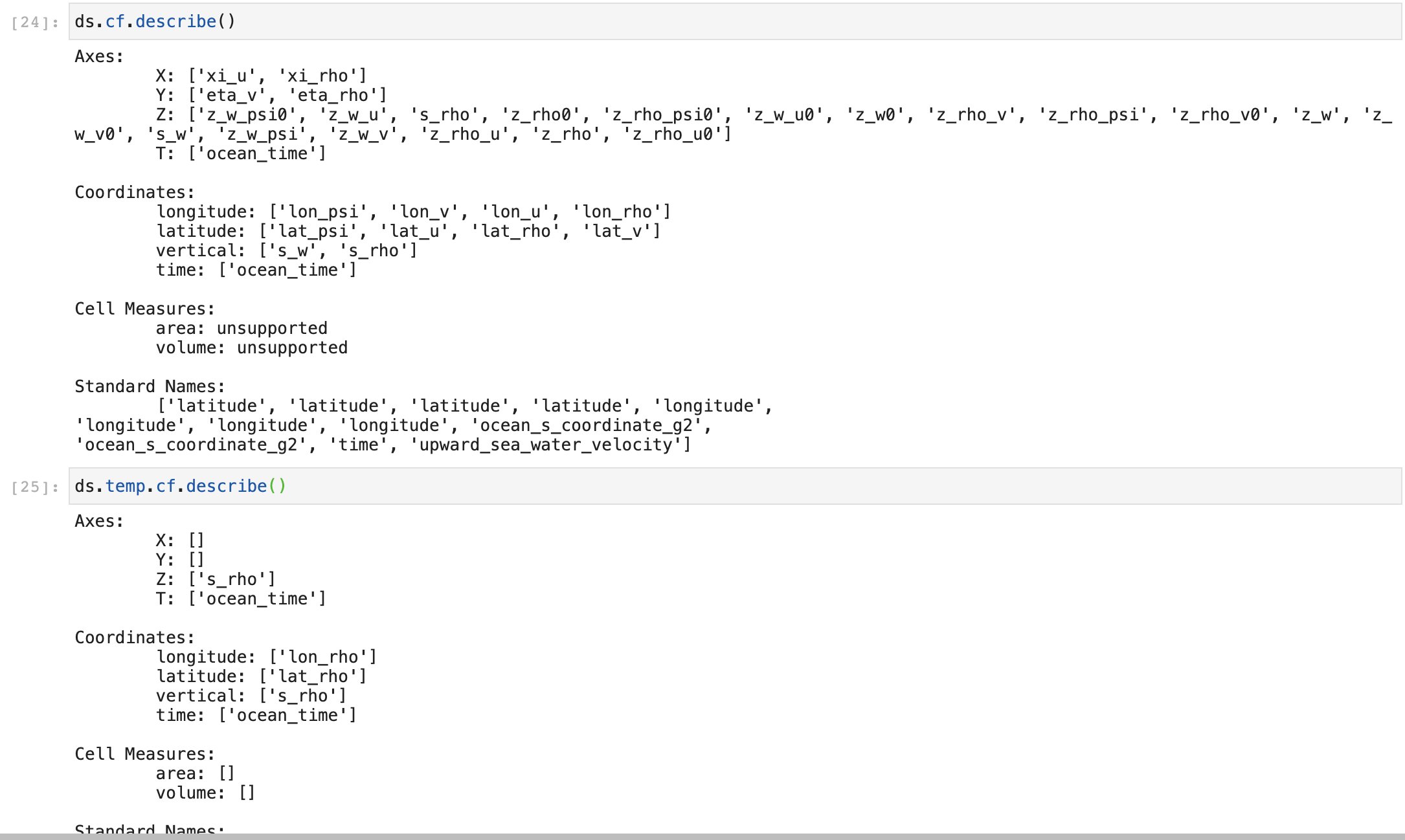
What connects the Axes to a particular variable that could be breaking here?
Just the dimension name: so ds.temp.cf["X"] will give you xi_rho back.
For temp and friends, you need to set the standard_name attribute: sea_water_potential_temperature in this case. http://cfconventions.org/Data/cf-standard-names/75/build/cf-standard-name-table.html
Thanks @kthyng. I found the bug...
also while trying to reproduce, I found a clear way of converting xi_rho and friends to proper dataarrays
# set dimensions as X, Y
pop["nlon"] = ("nlon", np.arange(pop.sizes["nlon"]), {"axis": "X"})
pop["nlat"] = ("nlat", np.arange(pop.sizes["nlat"]), {"axis": "Y"})
As I noted elsewhere, this worked for me, thanks!

also while trying to reproduce, I found a clear way of converting
xi_rhoand friends to proper dataarrays# set dimensions as X, Y pop["nlon"] = ("nlon", np.arange(pop.sizes["nlon"]), {"axis": "X"}) pop["nlat"] = ("nlat", np.arange(pop.sizes["nlat"]), {"axis": "Y"})
I tried out these lines and they are indeed a shorter way to convert a dimension to a coordinate and then set the attribute, so I switched over to that, thanks.
So with this change, I can close this issue! I am able to use
var.cf.transpose(*[dim for dim in ["T", "Z", "Y", "X"] if dim in var.cf.get_valid_keys()])
to transpose an array from ROMS without needing to know if it actually has all the dimensions a priori. I know it is better to not require arrays to be in the correct order (will try to follow up with xESMF with about that), but it will also be helpful to have this available. Thanks again.
Sorry to reopen this, but wouldn't this be a nice convenience function for cf-xarray to have? I was just thinking about wrapping it in xroms, but why not have this package have it? Something like:
da.cf.enforce_ordering()
which returns da but in conventional order of ["T", "Z", "Y", "X"].
Also I realize that the vertical Axes and Coords are not what I was expecting but my eyes glossed over them earlier.

Probably s_rho should be the Axes Z (and I am setting this in xroms for this to appear here). But then the associated coord should be z_rho, in analogy to the relationship between xi_rho and lon_rho. Is there an adjustment I can make so that z_rho will become linked as a coord to s_rho in DataArrays?
Maybe something like .cf.force_dim_order(order=("T", "Z", "Y", "X"), error="ignore") # this is the default kwarg value?
That would work fine for me. But, why not essentially force it with this convenience function to a specific ordering? One can always transpose to other dimension ordering if they don't want this one for some reason, but doesn't CF convention dictate this order?