

 xamarin
Google Sign-In Sample Confusion
Sample link
https://developer.xamarin.com/samples/monodroid/google-services/SigninQuickstart/ https://github.com/xamarin/monodroid-samples/tree/master/google-services/SigninQuickstart
Issue description
Readme is unclear about how to add the Client ID. It talks about replacing the google-services.json file with one downloaded from the Google developers console, but the sample does not have a google-services.json file nor can one be downloaded from the Google Developers API console Credentials page.
From the readme:
You must follow the next guide to configure the Sign-In feature: https://developers.google.com/identity/sign-in/android/start
That link is to Android directions that indicate using the Google Developers API console (not Firebase).
On Step 2 (Configuration File), you can open [this URL](https://developers.google.com/mobile/add?platform=android&cntapi=signin&cntapp=SignInQuickstart&cntpkg=com.xamarin.signinquickstart&cnturl=https:%2F%2Fdevelopers.google.com%2Fidentity%2Fsign-in%2Fandroid%2Fstart%3Fconfigured%3Dtrue&cntlbl=Continue%20with%20Try%20Sign-In) for this specific sample.
this URL goes to the Firebase home, not related to signing in with Google OAuth.
Replace the google-services.json file by your generated file.
As noted, the sample does not have a google-services.json file (normally used with Firebase).
To use the sample and have sign in work, all I had to do was paste the Client ID from the Google Developers API console Credentials page:
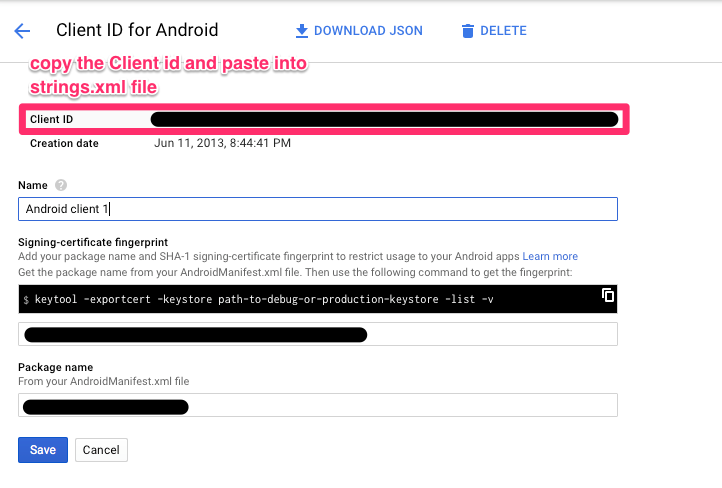
into the strings.xml file where it says "PASTE HERE YOU CLIENT-ID", e.g.:
<string name="server_client_id">PASTE HERE YOU CLIENT-ID</string>
