react-native-pdf

react-native-pdf copied to clipboard
 wonday
Cannot remove padding
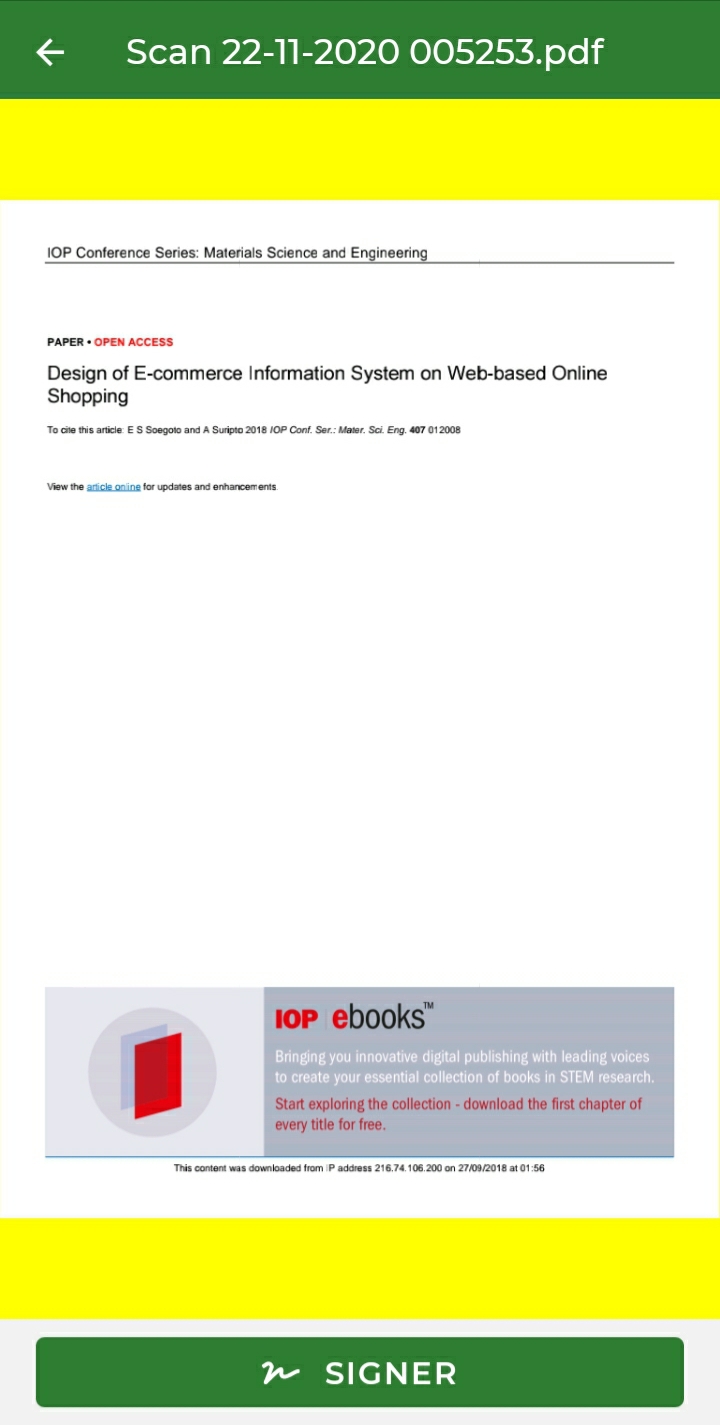
Hi guys, I used enablePaging={true} and I need to remove the paddings as shown on the screenshot bellow (yellow). The issue is that onLoadComplete outputs a height that includes the paddingTop and paddingBottom. However I need the height of the content only. Is there any solution or work around for this ??
`<View style={styles.container}>
<Pdf
minScale={1.0}
maxScale={1.0}
scale={1.0}
spacing={0}
fitPolicy={0}
enablePaging={true}
source={{ uri: filePath }}
                onLoadComplete={(numberOfPages, filePath, { width, height }) => {
                    console.log(`number of pages: ${numberOfPages}`);
                    console.log(`width: ${width}`);
                    console.log(`height: ${height}`);
                }}
                onPageChanged={(page, numberOfPages) => {
                    console.log(`current page: ${page}`);
                }}
                onError={(error) => {
                    console.log(error);
                }}
                onPressLink={(uri) => {
                    console.log(`Link presse: ${uri}`)
                }}
                style={styles.pdf} />
        </View>
const styles = StyleSheet.create({ container: { flex: 1, alignItems: "center", marginTop: 25, backgroundColor: "#f4f4f4" }, pdf: { width: Dimensions.get("window").width, height: Dimensions.get("window").height, paddingTop: 0 } });`