

 wodby
wodby
MariaDB / MySQL container stops: Exit 139
For some unknown reason after working 3 days on set up my MariaDB container no longer starts. I went to portainer and saw this log:
2018-04-24 9:01:08 140310144842632 [Note] mysqld (mysqld 10.2.12-MariaDB) starting as process 1 ... 2018-04-24 9:01:08 140310144842632 [Note] InnoDB: Mutexes and rw_locks use GCC atomic builtins 2018-04-24 9:01:08 140310144842632 [Note] InnoDB: Uses event mutexes 2018-04-24 9:01:08 140310144842632 [Note] InnoDB: Compressed tables use zlib 1.2.11 2018-04-24 9:01:08 140310144842632 [Note] InnoDB: Using Linux native AIO 2018-04-24 9:01:08 140310144842632 [Note] InnoDB: Number of pools: 1 2018-04-24 9:01:08 140310144842632 [Note] InnoDB: Using SSE2 crc32 instructions 2018-04-24 9:01:08 140310144842632 [Note] InnoDB: Initializing buffer pool, total size = 1G, instances = 4, chunk size = 128M 2018-04-24 9:01:08 140310144842632 [Note] InnoDB: Completed initialization of buffer pool 2018-04-24 9:01:08 140308669704936 [Note] InnoDB: If the mysqld execution user is authorized, page cleaner thread priority can be changed. See the man page of setpriority(). 2018-04-24 9:01:08 140310144842632 [Note] InnoDB: Highest supported file format is Barracuda. 2018-04-24 9:01:08 140310144842632 [Note] InnoDB: Starting crash recovery from checkpoint LSN=1969898765 2018-04-24 9:01:10 140310144842632 [Note] InnoDB: 128 out of 128 rollback segments are active. 2018-04-24 9:01:10 140310144842632 [Note] InnoDB: Removed temporary tablespace data file: "ibtmp1" 2018-04-24 9:01:10 140310144842632 [Note] InnoDB: Creating shared tablespace for temporary tables 2018-04-24 9:01:10 140310144842632 [Note] InnoDB: Setting file './ibtmp1' size to 12 MB. Physically writing the file full; Please wait ... 2018-04-24 9:01:10 140310144842632 [Note] InnoDB: File './ibtmp1' size is now 12 MB. 2018-04-24 9:01:10 140310144842632 [Note] InnoDB: 5.7.20 started; log sequence number 1969898774 2018-04-24 9:01:10 140308698704616 [Note] InnoDB: Loading buffer pool(s) from /var/lib/mysql/ib_buffer_pool 2018-04-24 9:01:10 140310144842632 [Note] Plugin 'FEEDBACK' is disabled. 2018-04-24 9:01:11 140310144842632 [Note] Server socket created on IP: '0.0.0.0'. 2018-04-24 9:01:11 140310144842632 [Warning] 'proxies_priv' entry '@% root@9d4a655682aa' ignored in --skip-name-resolve mode. 2018-04-24 9:01:11 140310144842632 [Note] Reading of all Master_info entries succeded 2018-04-24 9:01:11 140310144842632 [Note] Added new Master_info '' to hash table 2018-04-24 9:01:11 140310144842632 [Note] mysqld: ready for connections. Version: '10.2.12-MariaDB' socket: '/var/run/mysqld/mysqld.sock' port: 3306 MariaDB Server 2018-04-24 9:03:08 140308698704616 [Warning] InnoDB: Retry attempts for reading partial data failed. 2018-04-24 9:03:08 140308698704616 [ERROR] InnoDB: Tried to read 16384 bytes at offset 163840, but was only able to read 0 2018-04-24 9:03:08 140308698704616 [ERROR] InnoDB: Operating system error number 5 in a file operation. 2018-04-24 9:03:08 140308698704616 [ERROR] InnoDB: Error number 5 means 'I/O error' 2018-04-24 9:03:08 140308698704616 [Note] InnoDB: Some operating system error numbers are described at http://dev.mysql.com/doc/refman/5.7/en/operating-system-error-codes.html 2018-04-24 9:03:08 140308698704616 [ERROR] InnoDB: File (unknown): 'read' returned OS error 205. Cannot continue operation 180424 9:03:08 [ERROR] mysqld got signal 6 ;
This could be because you hit a bug. It is also possible that this binary or one of the libraries it was linked against is corrupt, improperly built, or misconfigured. This error can also be caused by malfunctioning hardware.
To report this bug, see https://mariadb.com/kb/en/reporting-bugs
We will try our best to scrape up some info that will hopefully help diagnose the problem, but since we have already crashed, something is definitely wrong and this may fail.
Server version: 10.2.12-MariaDB key_buffer_size=134217728 read_buffer_size=131072 max_used_connections=0 max_threads=102 thread_count=6 It is possible that mysqld could use up to key_buffer_size + (read_buffer_size + sort_buffer_size)*max_threads = 355179 K bytes of memory Hope that's ok; if not, decrease some variables in the equation.
Thread pointer: 0x0 Attempting backtrace. You can use the following information to find out where mysqld died. If you see no messages after this, something went terribly wrong... Cannot determine thread, fp=0x7f9c2a2506f0, backtrace may not be correct. Stack range sanity check OK, backtrace follows: 0x55eb2443034d 0x7f9c803318e3 0x1 New value of fp=0x87007 failed sanity check, terminating stack trace! Please read http://dev.mysql.com/doc/refman/5.1/en/resolve-stack-dump.html and follow instructions on how to resolve the stack trace. Resolved stack trace is much more helpful in diagnosing the problem, so please do resolve it The manual page at http://dev.mysql.com/doc/mysql/en/crashing.html contains information that should help you find out what is causing the crash.`
I need to recover the drupal database in this container but as soon as i perform bash and do mysqldump the container goes away and dump do not proceed.
I'm running in Windows machine with Version 17.12.0-ce-win47 (15139) of Docker CE.
I've also noticed my virtual drive ballooned to 22GB even after cleaning several images and containers.
Is my database corrupted? I noticed also quickly after starting the container i can still access the page fine, not losing a single element but as soon as I go to another page, this shows:
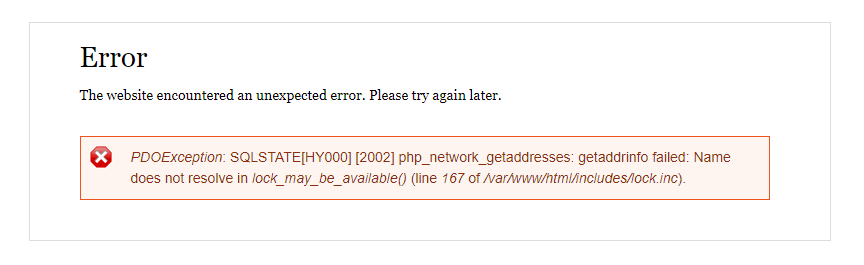
Deleting tc.log doesn't help too.
The database is pretty large though, with Backup and Migrate backups of 40MB-45MB and increases 400MB when downloaded in a browser from BaM interface.
I really need your help guys. Please advise. Thanks!

Do you mount any volumes from the host machine for MariaDB?
I've also noticed my virtual drive ballooned to 22GB even after cleaning several images and containers.
Deleting images does not clean up docker volumes

Do you mount any volumes from the host machine for MariaDB?
with mount do you mean putting an init .sql file at /mariadb-init dir? NO. my usual installation routine is installing via Minimal profile then restore from a BaM restore file.
will docker system prune do the job in cleaning and freeing up some space in my VHD? does that even relate to the mariadb error in the first place?
Thanks for the answers so far @csandanov. I would really appreciate more advice from you.
with mount do you mean putting an init .sql file at /mariadb-init dir?
I mean mariadb-data
will docker system prune do the job in cleaning and freeing up some space in my VHD? does that even relate to the mariadb error in the first place?
I don't know whether it's related, you asked about occupied space I'm telling you it's probably occupied by volumes managed by docker, since docker 17.06 you have to run docker system prune --volumes to clean up volumes as well but be careful, you will lose all of your data on volumes
because i thought my error is related to my VHD ballooning.. i don't want to prune volumes though as i said i have important data that i dont want to lose.