

 wix
wix
In react native debugger-ui, when reloading the APP, sometimes the screen will be loaded twice
🐛 Bug Report
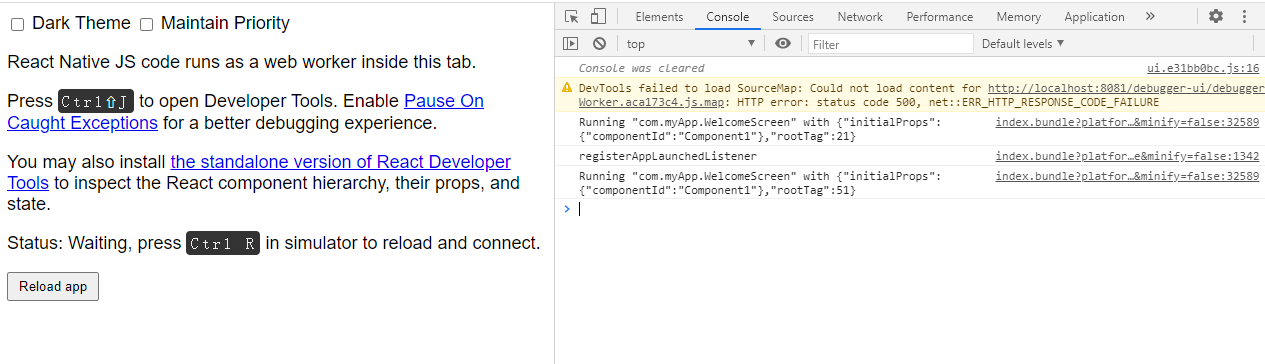
In react native debugger-ui, when reloading the APP, sometimes the screen will be loaded twice (the first time is executed before the registerAppLaunchedListener event is issued)
Have you read the Contributing Guidelines on issues?
Yes it is
To Reproduce
- Bash run:
react-native init test --version 0.63.4
cd test
yarn add react-native-navigation
npx rnn-link
- Update index.js file
import {Navigation} from "react-native-navigation";
import App from "./App";
Navigation.registerComponent('com.myApp.WelcomeScreen', () => App);
Navigation.events().registerAppLaunchedListener(() => {
  console.log('registerAppLaunchedListener')
  Navigation.setRoot({
     root: {
       stack: {
         children: [
           {
             component: {
               name:'com.myApp.WelcomeScreen'
             }
           }
         ]
       }
     }
  });
});
- Run
npm run android - Open the developer menu and select "Debug", which will automatically open the browser and open react native debugger-ui in the browser
- Open the developer tools of the browser, and then click the "reload" button on the page, try "reload" several times to see the problem
Expected behavior
Click the "reload" button to load the page only once
Actual Behavior
Sometimes the reload page is loaded twice (The first time is loaded before the registerAppLaunchedListener event is launched, and the other time is loaded after the registerAppLaunchedListener event is launched)
Your Environment
- React Native Navigation version: 7.11.3
- React Native version: 0.63.4
- Platform(s) (iOS, Android, or both?): Android (not tested on other platforms)
- Device info (Simulator/Device? OS version? Debug/Release?): Simulator (Android 7.1.4) and Device (Android 10), Debug mode
Reproducible Demo
Since the steps to reproduce this problem are relatively simple, I have not created a repo now, but if you really need it, I can create it later


Issue is still occurring in latest version of react-native and react-native-navigation as of this comment.
