
vocable-android

vocable-android copied to clipboard
 willowtreeapps
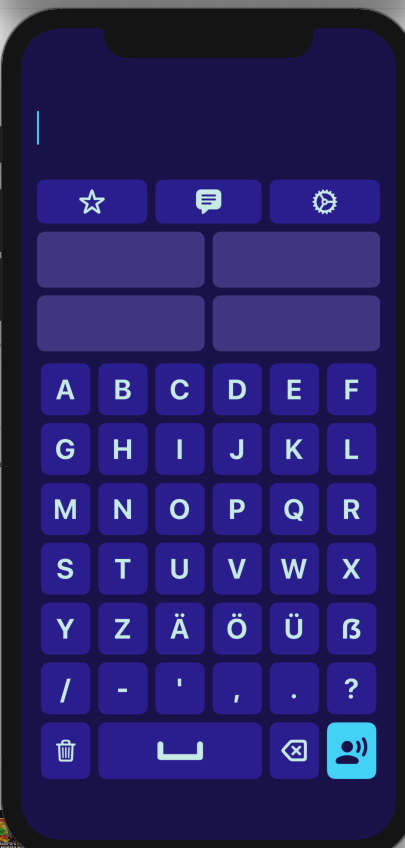
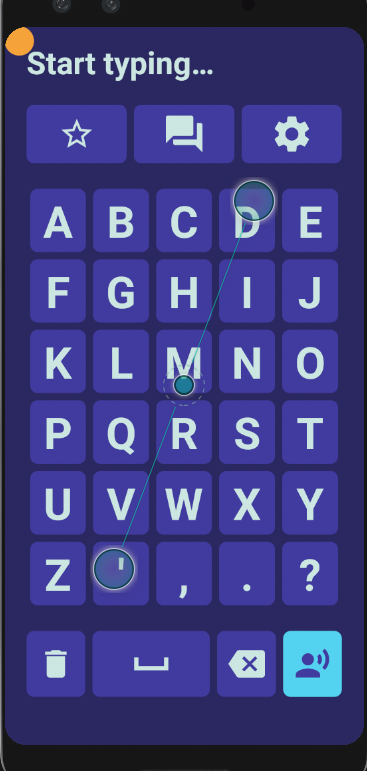
When navigating to the custom phrase creation screen show a blinking cursor instead of the "Start typing..." message
iOS has implemented cursor functionality when navigating the custom phrase screen. This cursor is just a placeholder and does not allow you to move within the actual phrase.
Steps:
- Launch application
- Bring up the custom phrase keyboard
Result: Start Typing... message is displayed
Expected: We should show a typing cursor instead and remove the "Start typing..." text to match iOS
iOS:
Android:

Probably need to find a better way to disable the EditText, so that the system keyboard doesn't pop up when you tap it, but also keep the cursor. Not sure how to do this.
