

 webcompat
Form data loss after logging in with GitHub via Sign-in button
URL: https://webcompat.com
Browser / Version: Firefox 66.0 Operating System: Linux Tested Another Browser: No
Problem type: Something else Description: Keep form data after logging in to GitHub Steps to Reproduce:
- Fill out form.
- Click on the top right to login to GitHub.
What happens: All your previously entered form data is lost. What should happen: No loss of form data.
Browser Configuration
- None
From webcompat.com with ❤️

This can be considered a follow-up of https://github.com/webcompat/web-bugs/issues/23953, as it would also solve the problem outlined there, just in a different way.
Thanks for the report @rugk. I think I experienced this once before as https://github.com/webcompat/webcompat.com/issues/2718. Let's move this issue over to the webcompat.com repo.

@rugk did this happen on the first time you ever gave permission to webcompat.com? Or has it happened even after that? thanks.
i just revoked perms on staging.webcompat.com, but was able to file https://staging.webcompat.com/issues/1738. @rugk do you have 2 factor auth enabled? I wonder if there's a timeout or something like that at play.
@rugk did this happen on the first time you ever gave permission to webcompat.com? Or has it happened even after that?
It's always reproducible.
@rugk do you have 2 factor auth enabled?
Yes.
Also note it seems to work, when I use the "Open with GitHub" button. It's really just that it is missing the data when I use the top-right "Login" button. After it redirects me back to WebCompat, the previously entered data is gone.
It's always reproducible.
Very interesting. Can you test a theory for me @rugk ?
- go to https://github.com/settings/applications
- revoke authorization for "webcompat.com issues"
- go to https://webcompat.com/issues/new and file a test bug with Report via GitHub
After you auth, is the test bug blank? Or did it work?
a test bug with Report via GitHub
How often should I say it is not the button "Report via GitHub"? It's still the top right "Login" button!
So as per my STR above, I've tried it again, and yes also with completely fresh permissions it's the same.
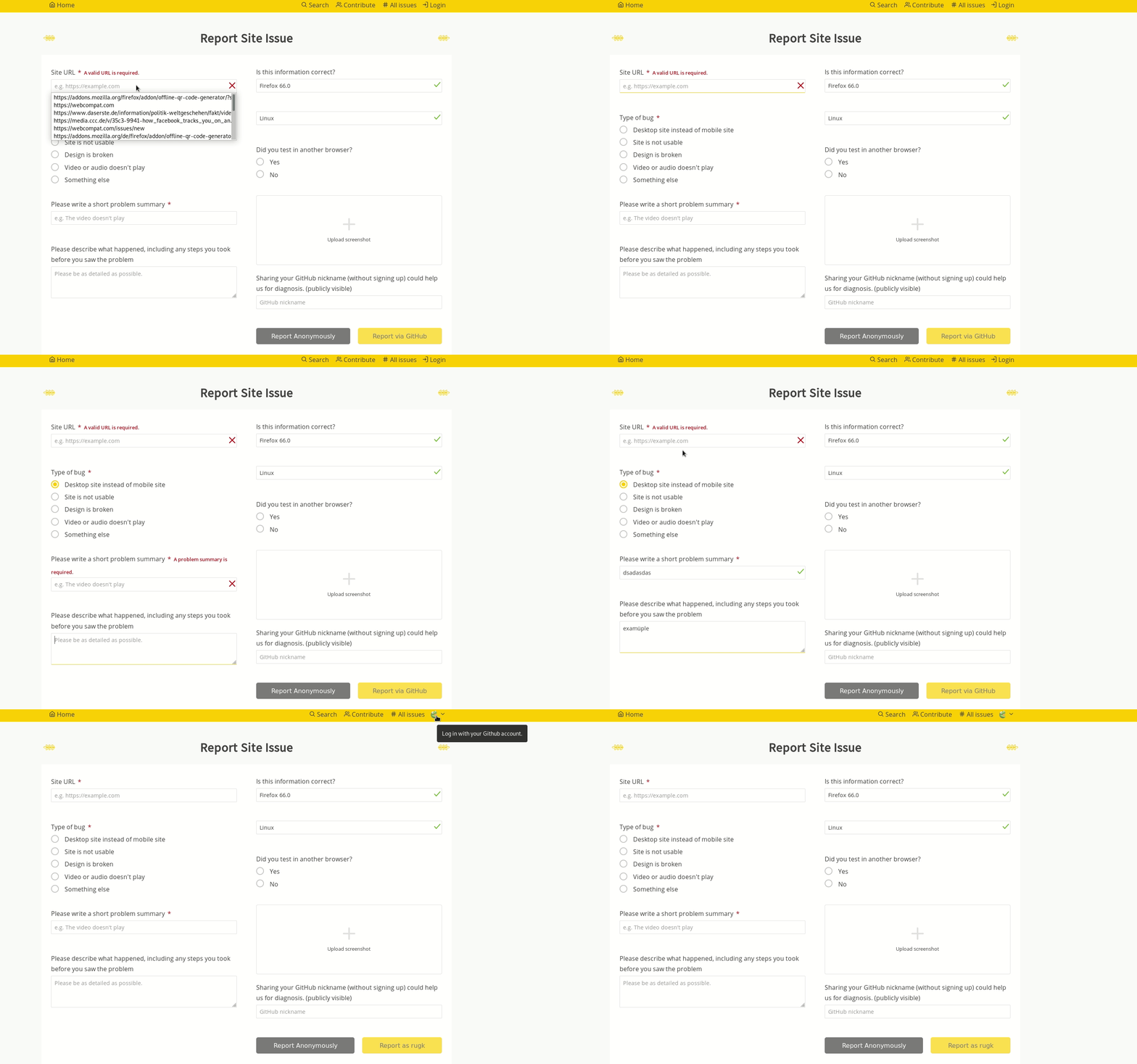
no URL was set in this screencast. A form without a valid URL is incomplete and data will be lost.
The Report via GitHub is usually blocked until there is a URL (mandatory input). Maybe we should do the same for login? Though that would create other type of issues for UX. Someone who just want to log in.

How often should I say it is not the button "Report via GitHub"? It's still the top right "Login" button!
Ah, yeah. I missed this. OK! We can work with this. The GIF is super helpful.
ok I reproduced with a fresh profile indeed. And kind of expected, but indeed the UX is confusing.
-
The top right link goes to: https://staging.webcompat.com/login And we do not save the form content (Firefox does btw, by navigating back to the step before clicking login).
-
The Report via GitHub takes a different path, where we save the data before doing the Oauth dance and we restore these data when we go back to the form.
There are two places this issue can happen.
-
/homepage -
/issues/new
The login link is on the other hand available on all pages. Probably we could test that there is a form with content when someone is clicking on login save the data and restore them after the login. That said this is the first time this is happening in 5 years.
This has to be done client side.
once /login, there is no way server side to know the content of the page. So we should store a form.json in local storage, that will be read again after the auth dance.
Hi, I've just hit the behavior/bug again and I think it is still relevant and the UX could thus be improved here. So I've just reproduced it with Firefox 102 and still a seamless transition between logged-out (filling in issue and describing it) and logged in (after finding out I can report it via GitHub :upside_down_face:). I think this should be quite a common user flow, actually, I guess, and I thus wonder not more people reacted on this issue here…
Also I'd like to apologize for my past me of being kinda rude with that bug. I likely was frustrated I lost my form input there… :see_no_evil:
Reporting another issue and falling into that trap again, I know it may not be trivial technically, but UX-wise IMHO this should be given a little priority (it's old and so I thought let's raise it again that may be ok...).
(And BTW let me apologize for the rude tone of my 2019 self at times here… :see_no_evil: – I should read issues until the end, oh dear, …)
BTW thoughs
To add my thoughts to the STRs…
- Begin filling out the form.
- Remembering you should use GitHub/login with GitHub/report it via GitHub, so it is assigned to your user…
- Being scared that you accidentally report it anonymously and then you can edit it and loose karma whatever :wink:
- So you want to login as fast as possible (that is maybe the point why I never go until that "Report via GitHub button", but always instantly to that "ah yeah, where was it – ah, yes, login."
- You get back and your form is lost…
That said, nowadays I actually remember there was that bug and copy my form content… :see_no_evil: