

 webcompat
www.realtor.ca - Site recommends Chrome when viewing 3D content
URL: https://www.realtor.ca/Residential/Single-Family/19708994/41-PEARSON-DR-Hamilton-Ontario-L8W3H2-Templemead
Browser / Version: Firefox 64.0 Operating System: Mac OS X 10.13 Tested Another Browser: Yes
Problem type: Site is not usable Description: Site says issues with 3D content in Firefox, recommends Chrome Steps to Reproduce:
- Click play button on 3D tour
- Dialog opens up
- Click the 360 Click to Explore button
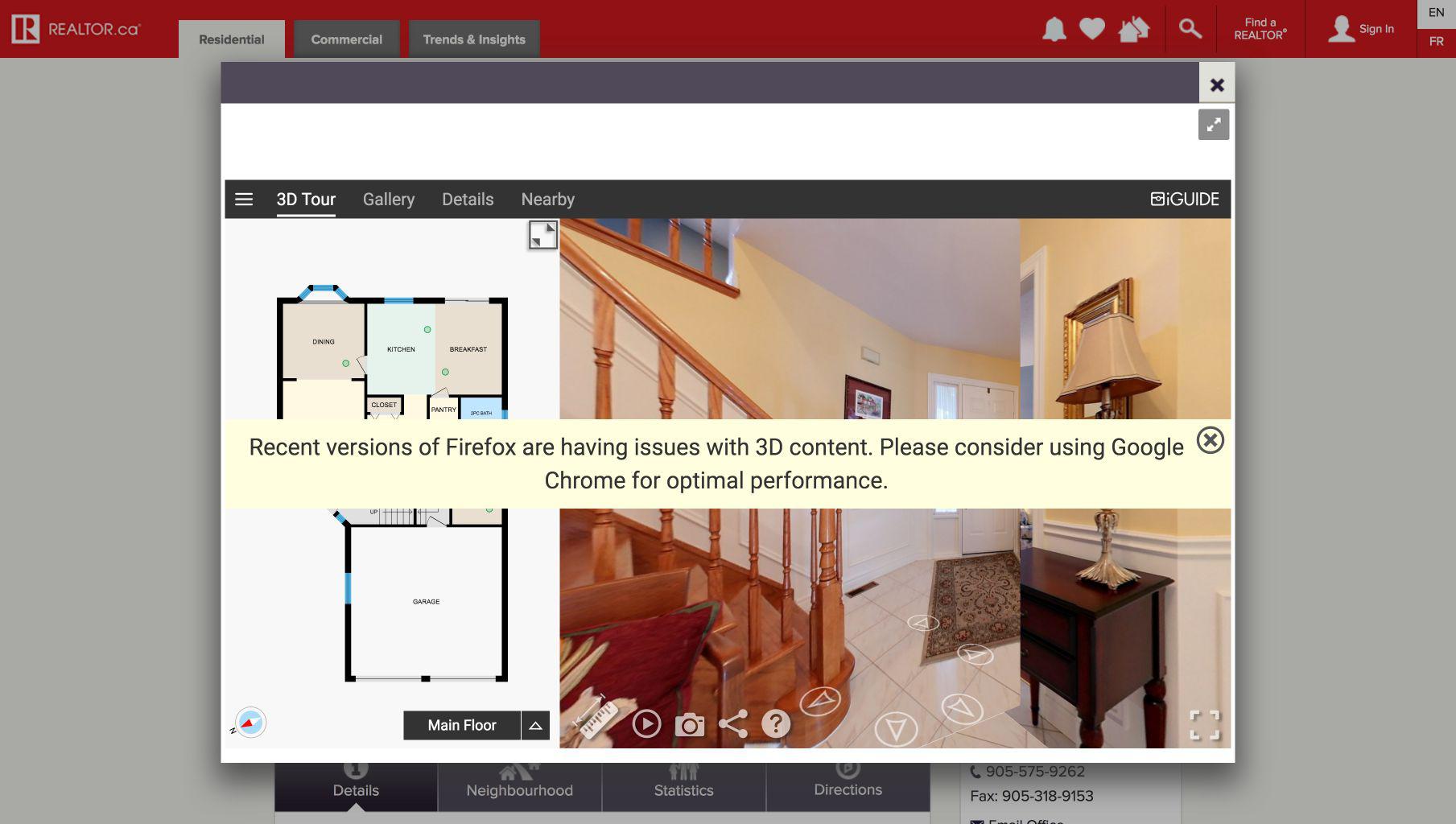
Displays banner about Firefox.
https://goiguide.com/contact
Browser Configuration
- mixed active content blocked: false
- buildID: 20180917100342
- tracking content blocked: false
- gfx.webrender.blob-images: true
- gfx.webrender.all: false
- mixed passive content blocked: false
- gfx.webrender.enabled: false
- image.mem.shared: true
- channel: nightly
From webcompat.com with ❤️

Thanks for the report @adamopenweb , I was able to reproduce the issue. Note: dismissing the message the house can be explored 3D 360.
Message:
<div class="vf-tour__warning" data-viewer-bs-show="isFirefox">Recent versions of Firefox are having issues with 3D content. Please consider using Google Chrome for optimal performance.
	<div class="right top vf-tour__warning__dismiss-container">
		<span class="button floorplan-icons icomoon-cancel-circle vf-tour__warning__dismiss" data-ng-click="isFirefox = false"></span>
	</div>
</div>
Tested with: Browser / Version: Firefox Nightly 64.0a1 (2018-09-17) Operating System: Windows 10 Pro
Moving to Needsdiagnosis for further investigation.

Hi there. I work for Planitar, the company behind iGUIDE. I would like to give you some context for the issue.
The iGUIDE is basically a 360 viewer for an interior space. The viewer heavily relies on CSS 3D transforms rather than WebGL. Unfortunately, the CSS 3D transforms do not properly function in Firefox. For example, check out the following video: https://www.youtube.com/watch?v=sGXA4FgcNS4. The video shows Firefox issues when HW acceleration is enabled: the viewer is still usable, but the cube tiles flicker during pano transitions. When the HW acceleration is disabled, everything becomes much worse.
We have been having these issues for years and have multiple bugs reported to Bugzilla:
- https://bugzilla.mozilla.org/show_bug.cgi?id=1431778 (The bug is marked as fixed but the issues are still there, so I suppose they considered browser crashes only).
- https://bugzilla.mozilla.org/show_bug.cgi?id=1323005
- https://bugzilla.mozilla.org/show_bug.cgi?id=1439623
- https://bugzilla.mozilla.org/show_bug.cgi?id=1431745
Since we did not see much interest from the Firefox team to fix these issues, we decided to display the banner in order to ensure our users get the best experience.
If you guys can prioritize the issues and get them fixed, we would be happy to remove the banner.
Some more iGUIDE URLs you test with:
- https://youriguide.com/sample-full/
- https://youriguide.com/api-docs-sample

@korya Thank you for all the detailed information 😄.
I apologize that there hasn't been much movement on these bugs. I believe most of the efforts from that team have been focused on shipping our Webrender feature.
We were unable to reproduce the issues with Webrender enabled. Do you think you could test with Firefox Nightly and turn on Webrender if it's not already enabled?
In Firefox Nightly navigate to about:config in the address bar. Then search for gfx.webrender.all and set to True.
Just did it with the latest nightly and gfx.webrender.all set to true. The video is available at https://www.youtube.com/watch?v=a0ViJT1T_w8.
The results are:
- The flickering during pano transition is still there: https://youtu.be/a0ViJT1T_w8?t=1m3s.
- Moreover, there are some new issues:
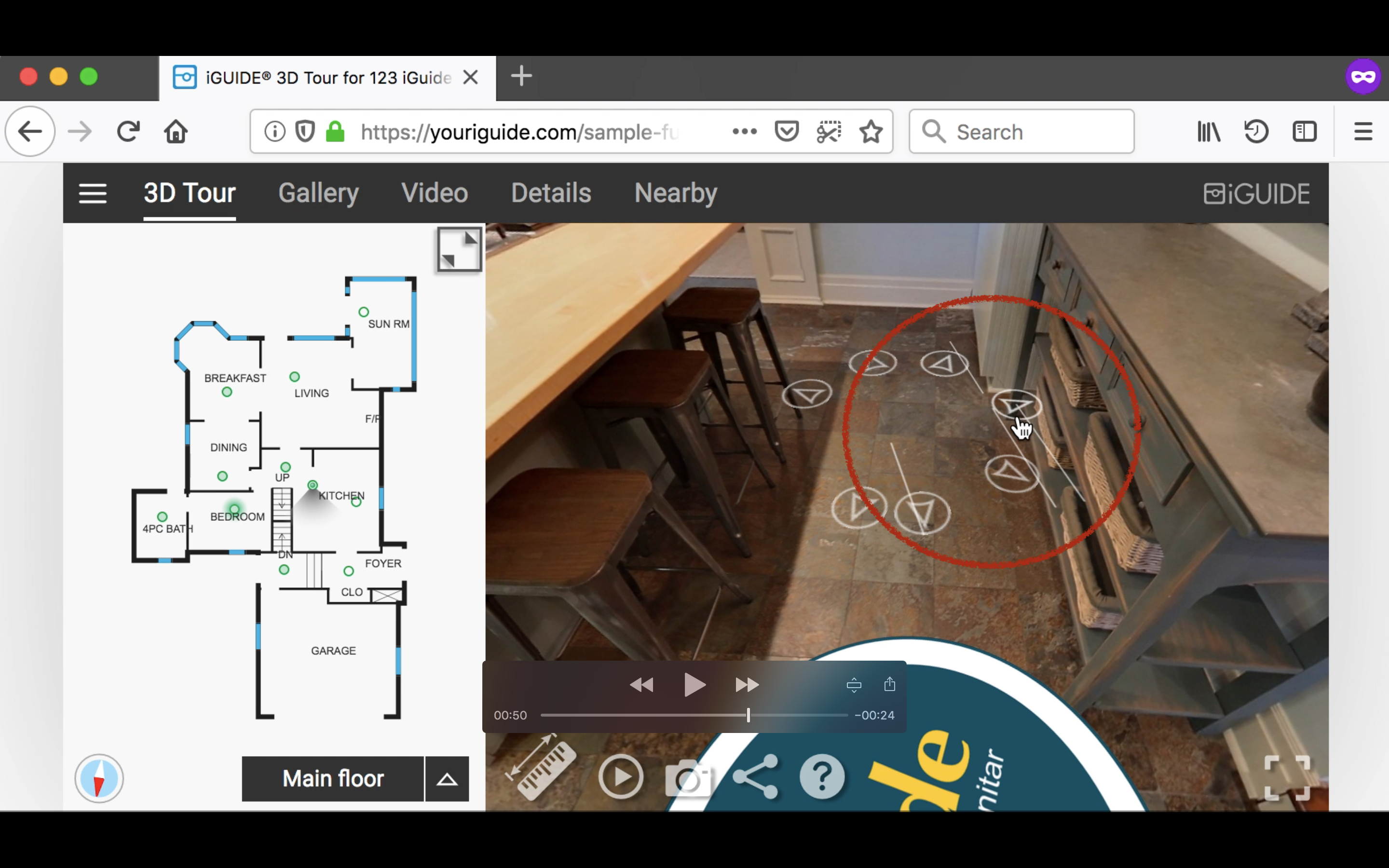
- tiny parallel white lines sometimes appear around navigation arrows on hover: https://youtu.be/a0ViJT1T_w8?t=46s
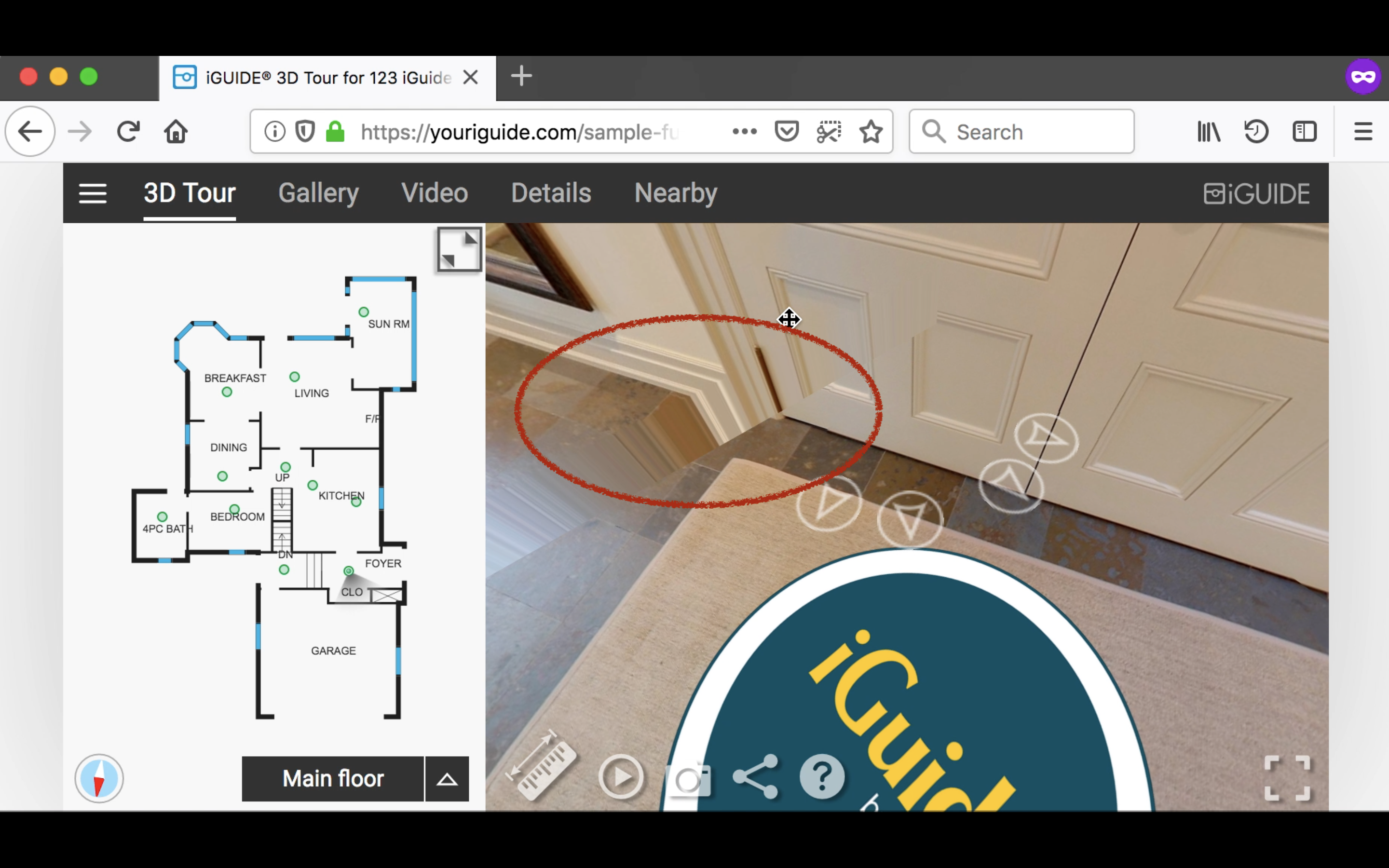
- sometimes the cube is not rendered properly: https://youtu.be/a0ViJT1T_w8?t=31s
- tiny parallel white lines sometimes appear around navigation arrows on hover: https://youtu.be/a0ViJT1T_w8?t=46s
The video is available at https://www.youtube.com/watch?v=a0ViJT1T_w8

Yes, I did it. The video was recorded after I set the value of gfx.webrender.all to true and restarted the browser.
I just tried the Nightly from 2018-09-17 and it was broken on Linux. 2018-09-20 looks ~fine~ better. Edit: I filed https://bugzilla.mozilla.org/show_bug.cgi?id=1492859.
Thanks! That's a great Christmas gift! I really appreciate it!! Happy holidays!
I am not able to find a listing with a 3D interactive viewer, but when visiting https://youriguide.com/api-docs-sample is I get no message.
Not sure if the layout changed on the website.
@adamopenweb can you please confirm?

Since the time this issue was opened, we have rewritten a lot of code in our viewer. We have also fixed some bugs in our transitions and switched to using Web Animations API. I am not sure whether there are any critical issues in Firefox right now. @adamdupuis Are you aware of any discrepancies in our Viewer between Chrome and Firefox?
Not to my knowledge @korya. Everything seems to be working well in Firefox.

We've got a report that the same message is shown in https://github.com/webcompat/web-bugs/issues/67444.
I have tried the tour in Firefox release and it seems to be working good. However in Firefox Nightly there appears to be a distortion in the view, which is a recent regression and I filed https://bugzilla.mozilla.org/show_bug.cgi?id=1694750

https://bugzilla.mozilla.org/show_bug.cgi?id=1694750 (distortion) has been addressed https://bugzilla.mozilla.org/show_bug.cgi?id=1695318 (black patches) is still remaining
Hi @korya and @adamdupuis, wanted to see if there is anything else remaining to address on the Firefox side.
There is "black patches" issue that still remains https://bugzilla.mozilla.org/show_bug.cgi?id=1695318, so maybe we can prioritize it. Wonder if there is anything else?
Hi @korya and @adamdupuis, wanted to see if there is anything else remaining to address on the Firefox side.
There is "black patches" issue that still remains https://bugzilla.mozilla.org/show_bug.cgi?id=1695318, so maybe we can prioritize it. Wonder if there is anything else?
@ksy36 not that I am aware of. Just the "black patches" issue.
Thanks! I've asked Dzmitry if this can be prioritized https://bugzilla.mozilla.org/show_bug.cgi?id=1695318#c5
Looks like all remaining issues are resolved now. I've tried the sample on https://youriguide.com/api-docs-sample and it works as expected. Hi @adamdupuis , wonder if there are any problems in Firefox that you might have noticed? If not, could you possibly remove the "non optimized" message?