

 webcompat
ceskekormidlo.cz - Downloaded form displays incorrect characters
URL: https://ceskekormidlo.cz/wp-content/uploads/2021/02/Formul%C3%A1%C5%99_editovateln%C3%BD_03_Uniqa_Storno_Cesty-1.pdf
Browser / Version: Firefox 103.0 Operating System: Linux Tested Another Browser: Yes Chrome
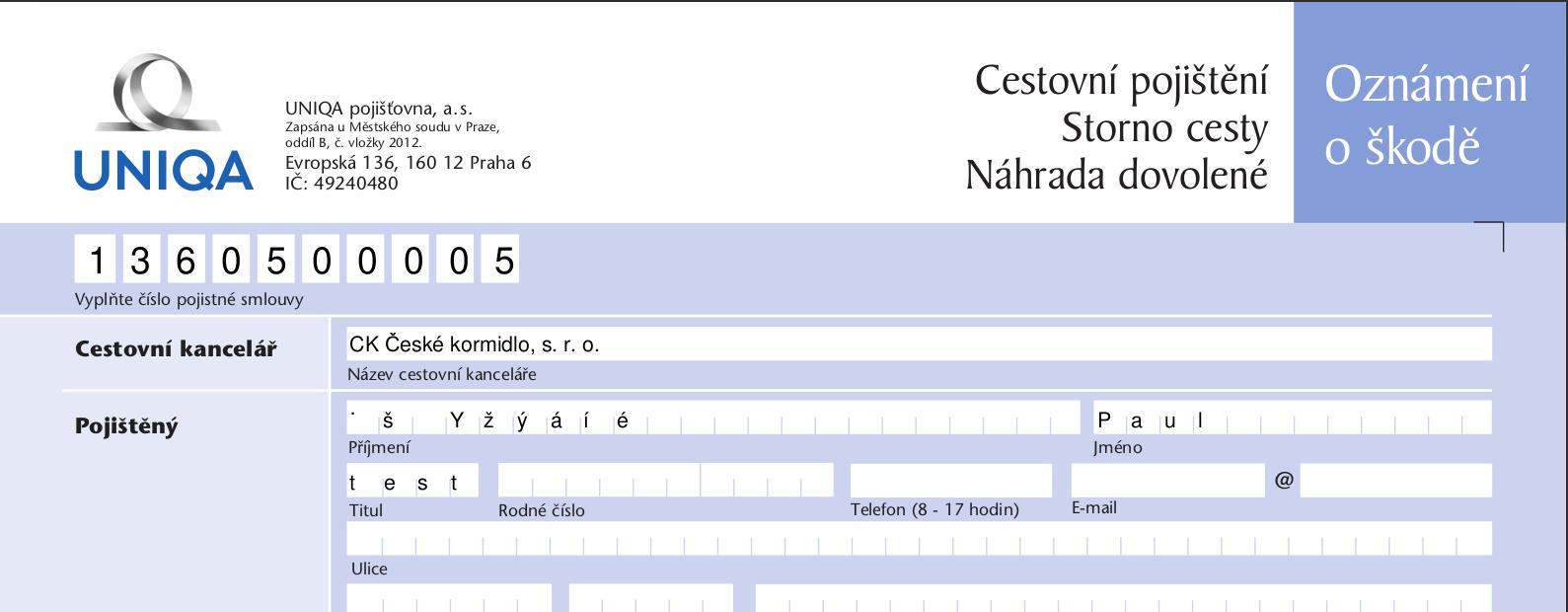
Problem type: Site is not usable Description: Unable to type Steps to Reproduce: When fill some fields of PDF form with czech characters - "ěščřžýáíé" and I try download a PDF form, downloaded form contain broken characters. For example - "ěščřžýáíé" create ".š Yžýáíé"
View the screenshot
Browser Configuration
- None
From webcompat.com with ❤️

Thanks for the report, I was able to reproduce the issue. After typing "ěščřžýáíé" in one of the fields, downloading the pdf file and opening it with a document viewer, the text displayed is ".š Yžýáíé"

Note:
- The issue is not reproducible on Chrome.
- The changed downloaded pdf file need to be opened in a Document viewer.
Tested with: Browser / Version: Firefox Nightly 105.0a1 (2022-08-04), Firefox Release 103.0.1 Operating System: Ubuntu 20.04.2
Moving to Needsdiagnosis for further investigation.
[qa_31/2022]

This appears to be a known issue: https://bugzilla.mozilla.org/show_bug.cgi?id=1666824
Let's close this a duplicate. I'll ping that bug to see if we can't get an update, and to make sure they're aware of this site also having the problem.

