

 warpdotdev
Clicking the first (+ tab) button opens http://127.0.0.1:6669/
Describe the bug
When I have have one tab open and click the tabbar button with + to open a 2nd tab then the browser tries to open http://127.0.0.1:6669/ . This does not happen when there are already more tabs open or if I use cmd+T instead.
To Reproduce
Steps to reproduce:
- Go to '...'
- Click on '...'
- Scroll down to '...'
- See error '...'
Expected behaviour
No response
Screenshots
No response
Operating System
No response
OS Version
No response
Additional context
No response

P.S. this only seems to happen when I am running tokio-console in one of the panes
That is, uh, strange. Mind sharing the set of commands you run? It'll help me repro on my end.

Theory from our eng team - any chance there's a URL in the tokio-console output that's scrolled up underneath the tab bar, and when you click on the new tab button we're treating it as a click on the link below instead? Would explain why it doesn't reproduce when using keyboard shortcuts or when the new tab button is in a different (horizontal) location.
That seems to be exactly what is causing this! I did not notice the link before when the screen was filled with much more output. The bug happens in fullscreen (screenshots below) but also in non-fullscreen.
With the mouse cursor in the main window:
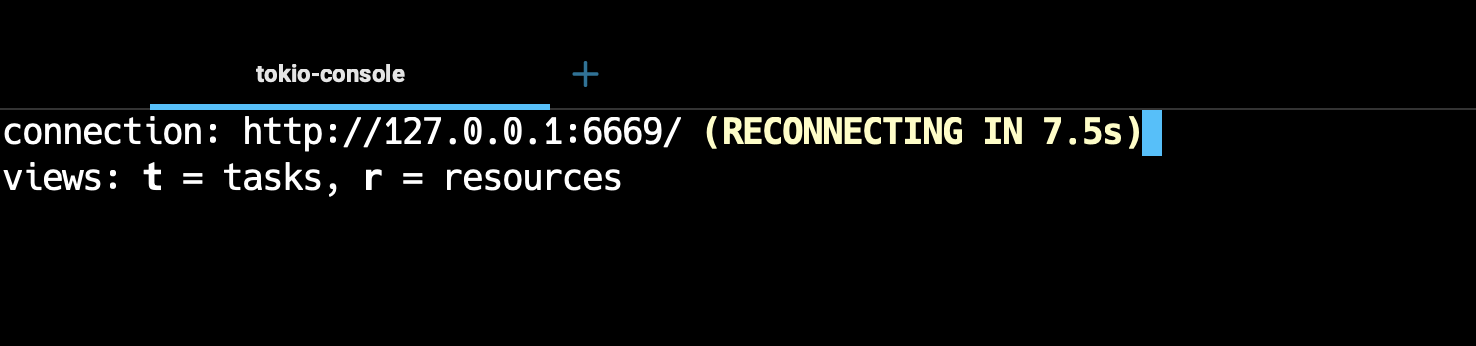
When moving the cursor over the link and then clicking on the tab indicator opens the link.
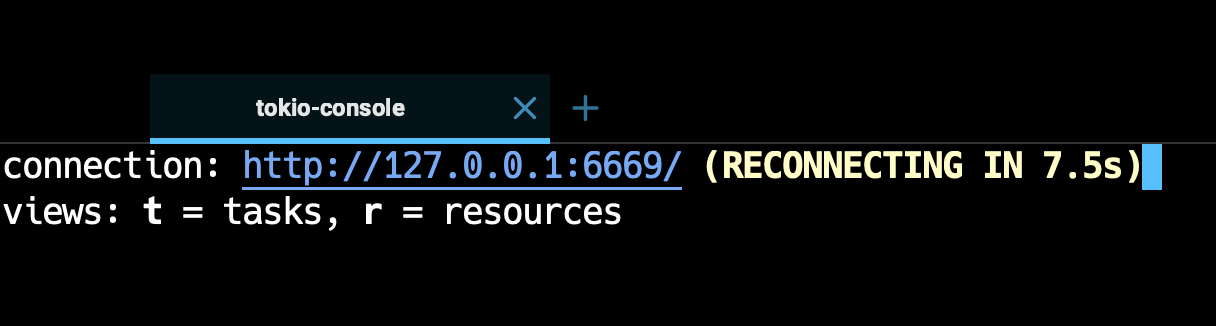
BTW The same thing happens when I do not first hilite the link. In that case I move the cursor to the topright of the screen and to the area above the link but rightside of the + button. In that case clicking also opens the link.
@ericvrp Mind checking if this is fixed for you? We've made quite a few changes to our link handling logic recently. Thanks!

