

 warpdotdev
Next/Previous Tab Keyboard Shortcuts displayed in menu don't match settings keybindings
Discord username (optional)
No response
Describe the bug
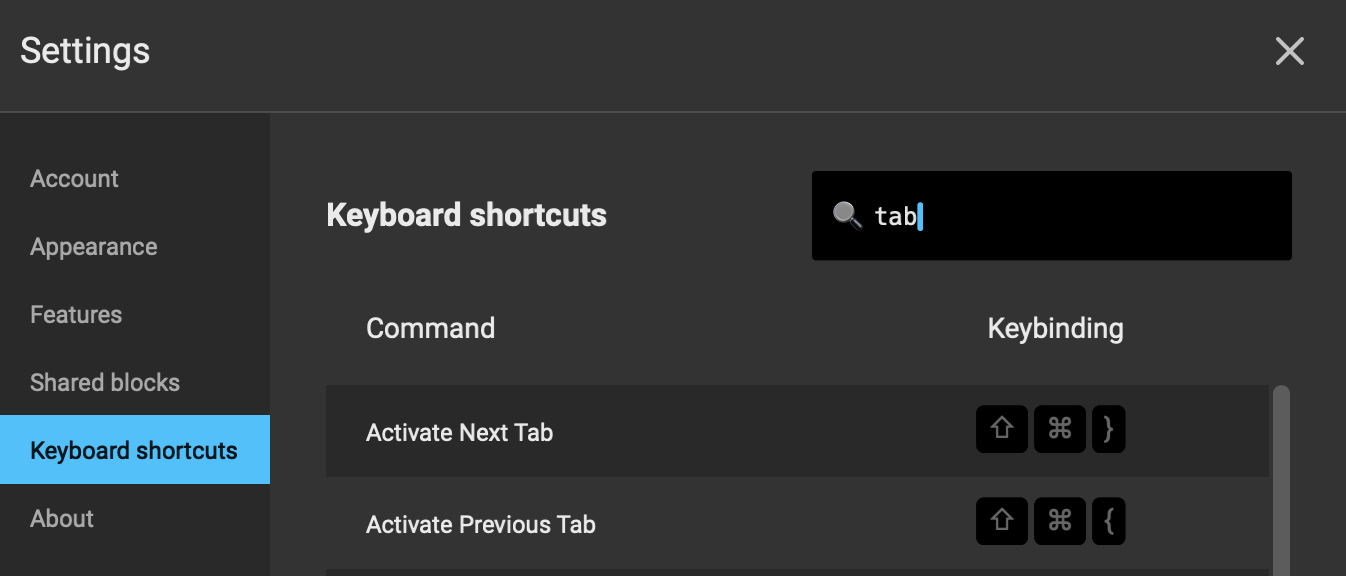
The keybinding displayed in the Tab menu show different key bindings than are displayed in the settings dialog. The Tab menu keybindings seem to be showing a key symbol that doesn't exist on my keyboard either; maybe they are home and end? For consistency it would also be nice if the text associated with each keybinding was the same in the tab menu and in the settings dialog.
To Reproduce
- Click on Tab menu and notice keybindings for "Switch to next tab" and "Switch to previous tab".
- Click on Settings and search for "tab" notice the keybindings for "Activate next tab" and "Activate previous tab" are different from the tab menu selections.
Expected behaviour
The tab menu key bindings should display the user's keybindings.
Screenshots

Operating System
MacOS
OS Version
13.0.1
Shell Version
zsh 5.8.1 (x86_64-apple-darwin22.0)
Warp Version
v0.2022.11.29.08.03.stable_03
Additional context
No response
Does this block you from using Warp daily?
No
Warp Internal (ignore): linear-label:b8107fdf-ba31-488d-b103-d271c89cac3e
None

hey! thanks for bringing this to our attention. We will post updates here on the status of this fix.

It also seems impossible to update the "Switch to Next/Previous Tab" bindings. It would be great to be able to do so


Just to add another related issue here: the activate previous/next tab can't be assigned to command + meta + left/right arrow key.

Can't find 'Switch to Next Tab' and 'Switch to Previous Tab' in Configure Keyboard shortcuts dialog.

@emaillenin Warp uses the word activate instead of Switch. You can search for it in the Keyboard shortcuts menu.
![warpdotdev-devx[bot] avatar](https://avatars.githubusercontent.com/in/278516?v=4 "Published by a pub.dev verified publisher")
+1
Activate next tab and activate previous tab to CMD + Left/Right doesn't seem to take effect.

+1
Customize key to Activate next tab and activate previous tab doesn't seem to take effect.

