

 wallabag
PHP Warning, Images don't load.
Been working on this for an hour with no luck.
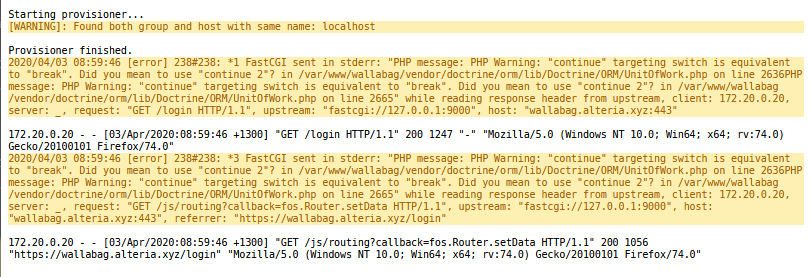
I'm using unraid, and trying to set this up behind a reverse proxy (linuxserver/letsencrypt). I can get to a login screen, however there's no images loaded, and an error is being thrown in the logs:
The login page looks like this:

This is the docker command used for the container, bear in mind it's for unraid:
/usr/local/emhttp/plugins/dynamix.docker.manager/scripts/docker create --name='alteria-wallabag' --net='docker-secure' --cpuset-cpus='1,4,5' -e TZ="Pacific/Auckland" -e HOST_OS="Unraid" -e 'SYMFONY__ENV__DOMAIN__NAME'='https://wallabag.alteria.xyz' -v '/mnt/user/appdata/alteria-wallabag/data':'/var/www/wallabag/data':'rw' -v '/mnt/user/appdata/alteria-wallabag/images':'/var/www/wallabag/web/assets/images':'rw' 'wallabag/wallabag'

I have the same issue.
Firstly i tried to use docker run command from readme and docker-compose. Then i saw some errors saying 'your-url ...' not found.
After that I launched wallabag container usingdocker run -p 80:80 --ip="172.19.0.1" -e "SYMFONY__ENV__DOMAIN_NAME=http://172.19.0.1" and still no luck.
Replacing 'continue' to 'continue 2' didn't helped me either.
I have no experience with PHP but i think that it either Doctrine framework's fault or some strange DB configuration problems.

ok. i fixed my problem this using -e SYMFONY__ENV__DOMAIN_NAME="http://127.0.0.1:80", where 80 is port i exposed by docker.
i hope this can help you.
That doesn't work for me, but would work for you. I assume you accessing it all on the same computer. so 127.0.0.1 makes sense for the domain name.
Sadly what ever I give mine, ports and all, doesn't work.
I've also noticed it's not reporting the correct client. This should not be returning the ip of the proxy container as the client in the logs.
I was facing the same issue, I had been running it on a rpi3 with hostname "SYMFONY__ENV__DOMAIN_NAME=http://172.19.0.11". This would lead to the material.css trying to resolve itself to http://192.168.0.11/wallassets/material.css which as you would imagine will cause this to fail as the file's just not there.
I solved by changing the above to "SYMFONY__ENV__DOMAIN_NAME=http://172.19.0.11:5001", whichever port you are exposing the container on. This leads to a successful material.css call and the site gets rendered properly. You need to add the port on which the container is exposed as part of the domain name environment variable.
Hope this works for you as well.

And completely forgot to update this issue. My apologies, I should have done that.
@bonehead
I solved by changing the above to "SYMFONY__ENV__DOMAIN_NAME=http://172.19.0.11:5001"
I'd mention previously that including ports didn't work in the slightest.
I eventually noticed with uMatrix (a browser extension I use), that it was trying to request for a url: https://your-wallabag-url-instance.com It was at that point I realized it wasn't even accepting the url at all, as if I wasn't giving it one.
Looking over the ENV's, I found that for some reason, this docker image isn't compatible fully with unRaid (My servers OS). unRaid provide a webgui that I use for most of my images. Part of what it does is wrap the names and variable is single quotes. This is shown above with -e 'SYMFONY__ENV__DOMAIN__NAME'='https://wallabag.alteria.xyz'.
Instead I told unraid to pass it as is as a Extra Parameter, which passes it along as -e SYMFONY__ENV__DOMAIN_NAME=https://wallabag.alteria.xyz:443. The image picks this up and correctly takes the ENV.
I find this unusual as the ENV to disable registration works fine with the method unRaid uses normally. For now, I'll leave the issue open for the maintainers to look into, as I believe this is an issue with the image, and not unRaid's docker methods.