

 vyleung
Inline copy code icon has weird display behavior
Summary: copy-code icon has before and after line breaks in inline codeblocks, and doesn't show at all in fenced codeblocks.
Environment:
- Logseq 0.6.6
- Copy Code plugin 1.1.2
- OS: Windows 10
- Other plugins: logseq-calendars-plugin, logseq-quicktodo-plugin, logseq-recurrence-plugin, logseq-smartblocks (all up to date)
- All plugins were installed via the Marketplace (ie not manually)
- Logseq is generally not otherwise modified.
Consider the following block:
Automatically remount the share at boot. Add the following to `/etc/fstab`
```ini
//remote/share /local/mountpoint cifs credentials=/home/username/.smbcredentials,uid=username 0 0
```
As a screenshot:

When rendered, it displays like this:

It looks as though the "copy code" button is being inserted into inline codeblocks with line breaks before and after. The button does not appear at all when I hover my mouse cursor over any fenced codeblock.
I have not altered the button's positioning from the default.
Let me know if you'd like me to try anything or if you need more information.
hi Cordelya, i've tested it on my end, and it seems to be working normally (see video). i'm on version 0.6.7 and using MacOS, but i'm not sure if those are significant differences
https://user-images.githubusercontent.com/64292157/178157091-5471ae41-e480-4bc5-8e91-46685a013d83.mp4
to troubleshoot, can you try the following steps:
- disable the plugin, refresh Logseq, then re-enable the plugin (you could also try just refreshing Logseq)
- open dev tools (
ctrl+shift+i) - click into the block w/ the inline and fenced code blocks and then click outside the block
- see if the copy code icons appear / check the console for errors

There are two parts to this response: the inline-code part and the fenced-code part.
I made a test page with the following:
- This block has `inline code`
- ```
  this block has fenced code
  ```
opened the dev-tools, and poked at it.
The Inline Code
In the devtools panel, I drilled down through the page structure to the inline code block. It appears that the user agent stylesheet is causing the issue by setting
div {
  display: block;
}
and if I override that by setting the following to the copy-code-{random}-prefix-{id}--logseq-copy-code-plugin div
div#copy-code-{random}-prefix-{id}--logseq-copy-code-plugin {
  display: inline-flex !important;
}
then the button behaves exactly as it should.
Setting display: inline-flex only to the inner copy icon div when it is hovered/visible isn't enough.
I apologize for not simply sending a PR for this fix. I have a very modest amount of js experience, but not enough to make submitting a pr for this a quick or easy task. I'm more of a python & php type of guy.
The Fenced Code
Clicking into and out of the fenced code block returns the following console error:
#logseq-copy-code-plugin logseq-copy-code-plugin can not resolve selector target #block-content-62cc15c2-0d28-4d04-bf84-fa3662bf8614 > .block-body > .cp__fenced-code-block > div > #copy-code-62cc169e-2f66-420c-92ed-4d48e56fd10a
in instrument.js, line 190
I definitely don't have enough js experience to figure out how to fix this part.
I can probably test possible changes if you send me a diff, though.
thanks for the detailed report! fixing the inline code block issue will be simple, but the fenced code block issue will be a bit trickier - i'll update you when i release the next version
i've attached a zip file of the next version of the plugin (v.1.1.3) for you to test
please do the following:
- if you don't have
Developer modealready enabled in Logseq, follow these instructions to do so - uninstall the marketplace version of the plugin and then refresh Logseq
- download the attached zip file, unzip it, then load the plugin manually (step 3 of these instructions)
let me know if you encounter any errors
logseq-copy-code-plugin (v.1.1.3_test).zip
- Dev mode turned on
- all other plugins temporarily turned off
On my test pages:
- Inline codeblocks: no change in behavior - block div ID naming order suspected cause:
- The div ID given to an inline codeblock is named
copy-code-<random>-<uid>--logseq-copy-code-pluginwhile style def in head is given ID oflogseq-copy-code-plugin--copy-code-<random>-<uid>(rearranging order of style def ID to match the block's ID applies the style correctly)
- The div ID given to an inline codeblock is named
- Fenced codeblocks: no change, plus the attached console output whenever I click in and then out of the block (contents of several queries from a different page have been deleted to reduce total file char count, but otherwise everything from the console log is included)
On a more complex page with multiple of both types of codeblock, I encountered an infinite loop where the style def is injected repeatedly into the document head. On the page itself, the block rapidly flashes between "edit" and "view". However, I cannot always reproduce this, so I don't know what's going on there.
Hi, I am having a similar problem with long inline code blocks:

When I move my cursor to click on the copy button, it disappears, making it impossible to copy long inline blocks.
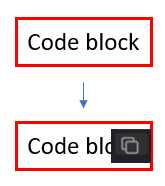
Would it be possible to add a setting that allows us to have the inline copy button stay inside the code block (assuming the code block is at least 3 characters or something)? This would be super nice! It would help me a lot to know that if I put my cursor over the right edge of an inline block, I'll be able to copy it. It's sort of frustrating sometimes to have to hover, then move and make sure you stay within the lines (especially since I use a higher-dpi setting on my mouse).
Something like this:
Thank you for the super helpful plugin! It's the most helpful one for me so far.

hi @hoggatt, sorry for the delayed response. i've added an option to always show the copy button for inline code. would this work for your use case?
hi @hoggatt, sorry for the delayed response. i've added an option to always show the copy button for inline code. would this work for your use case?
Sounds perfect! Thanks so much!