

 vrm-c
vrm-c
Blendshapes don't look the same way
- UniVRM version:
0.98.0 - Unity version:
Unity-2021.3.3f1 - OS:
Windows 10
Hi. I use Blender for modeling. It has already happened before to my previous models so it's not a new issue. I export fbx straight to unity without using CATS, and then convert it to vrm.
Seems like the vertexes slightly change their position, but it's enough to ruin my workflow.
Do you have any idea what could cause this issue?
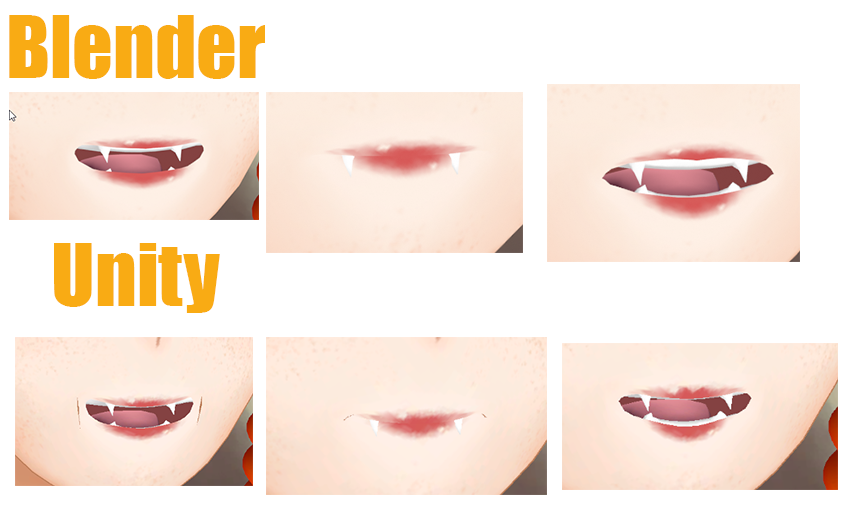

Could it be related to https://github.com/vrm-c/UniVRM/issues/597 ?
The lines are presumed to be MToon's boundaries. MToon borders are affected by the normal direction. When the normal direction is automatically calculated, in the part where the mesh is not connected (around the mouth), the normals of adjacent faces are different, and the boundary line of MToon is visible. merge vertices in blender might stop it from happening. Otherwise, care must be taken to avoid auto-computing normals at each step.

This issue has been labeled as "stale" due to no response by the reporter within 1 month (and 7 days after last commented by someone). And it will be closed automatically 14 days later if not responded.
![github-actions[bot] avatar](https://avatars.githubusercontent.com/in/15368?v=4 "Published by a pub.dev verified publisher")
This issue has been closed due to no response within 14 days after labeled as "stale", 7 days after last reopened, and 7 days after last commented.