

 vmware
No "Select Installation" in v4 or v5 beta
Describe the bug
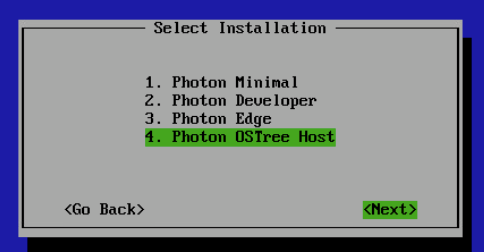
If i follow the documentation of the installation process, after the partitionioning and erasing of the disk should be a screen to choose 'Minimal', 'Full' or 'Photon OSTree server' (that i want to use for full automatic updates)
Reproduction steps
- Download the minimal ISO
- Boot in HyperV (for example)
- Launch the installation process
Expected behavior
Have the following screen
Additional context
No response


fyi full automatic updates (tdnf install tdnf-automatic) e.g. on minimal installation first must be configured. There were some issues in the past (#1185, #1244) though.
+1 confirm the self-compiled builds after ph4 rev2 full ISO show an installer issue similar to #1390 L "Oops, Installer got interrupted", but immediately when selecting Photon OSTree Host. Luckily, the photon os installer team is improving the tooling code quite fast. For the moment, avoid self-compiled (make build) full ISO up to photon-4.0-5347f73fc and ph5 beta up to photon-5.0-b63d8c3d1.

Have you tried downloading full ISO?
Nope, the minimal version. I imagine this was the problem, i am going to retry with full, thanks !
PS: However if we want to use it in production we would need a minimal version (to reduce surface attack and other consideration) plus our custom OSTree repo
fyi (https://github.com/vmware/photon/commit/bff8291af70c1a7a3093a7c0393bdc90e42cc1ec) fixed the issue mentioned