

 vitest-dev
Could not start debug with pnpm project.
Describe the bug Could not start debug with pnpm project than do not has direct vite dependency, and "vitest.commandLine" could not be applied to debug.
To Reproduce Steps to reproduce the behavior on the example project:
- Edit 'package.json' and remove vite.
- Install pnpm globally
- change package manager to 'pnpm' in setup.mjs. (do not use npm install or yarn before,if so,remove node_modules).
- Start a debug with the extension.
- The debug session closed with error: "cannot find module 'vite'"
Expected behavior Successfully run the debug.
Additional context I tried to use different methods to start vitest in terminal,all the flollwing commands are run successfully.
pnpx vitest
npx vitest
./node_modules/.bin/vitest
but the following command could not run with pnpm:
node ./node_modules/vitest/vitest.mjs
with the same error mentioned previously.
also, I've edited "vitest.commandLine" to different values and it seems have no impact on debug.
Running and watch has no issues.
Possibly a minor change here? https://github.com/vitest-dev/vscode/blob/dd70a041b8d955ed821b53684104a1f630044ea0/src/runHandler.ts#L291
Environment { "System": { "OS": "macOS 12.5" }, "Binaries": { "Node": { "version": "14.16.0", "path": "~/.nvm/versions/node/v14.16.0/bin/node" }, "Yarn": { "version": "1.22.19", "path": "~/.nvm/versions/node/v14.16.0/bin/yarn" }, "npm": { "version": "6.14.11", "path": "~/.nvm/versions/node/v14.16.0/bin/npm" } }, "IDEs": { "VSCode": { "version": "1.69.2", "path": "/usr/local/bin/code" } }, "npmPackages": { "vite": { "installed": "2.9.14", "wanted": "^2.9.9" }, "vitest": { "installed": "0.12.10", "wanted": "^0.12.6" } } }

The same goes for me. I have a project using pnpm (dayjs v2.0 e.g. branch next) and when I updated Vitest from v0.17.0 to v0.21.1 I got the above mentioned effect. The tests run without problems in the test pane of VSCode.
My environment: OS: windows 10 node: v16.15.1 VSCode: 1.70.0 Vitest Extension: 0.2.24
When starting the debug session in the debug pane of VSCode, I get the following output in the (debuggers?) terminal:
D:\Projekte\github\dayjs-2.0> d: && cd d:\Projekte\github\dayjs-2.0 && cmd /C "set "NODE_OPTIONS=--require "c:/Program Files/Microsoft VS Code/resources/app/extensions/ms-vscode.js-debug/src/bootloader.bundle.js" --inspect-publish-uid=http" && set "VSCODE_INSPECTOR_OPTIONS={"inspectorIpc":"\\\\.\\pipe\\node-cdp.5392-1.sock","deferredMode":false,"waitForDebugger":"","execPath":"C:\\Program Files\\nodejs\\node.exe","onlyEntrypoint":false,"autoAttachMode":"always","fileCallback":"C:\\Users\\ENTWIC~1\\AppData\\Local\\Temp\\node-debug-callback-7142848cae1a20bf"}" && "C:\Program Files\nodejs\node.exe" .\node_modules\vitest\vitest.mjs run tests\constructor.test.ts "
Debugger attached.
 MISSING DEP  Can not find dependency 'vite'

? Do you want to install vite? » (y/N)
complaining about a missing vitest. Looking in the node_modules directory, vitest is instaleed not in the node_modules directory directly, but in the subdirectory node_modules of the vitest directory:

additional information: if additionally I install 'vite', debugging runs without problems (but that's a hack only, no solution).

This happens to me to, within a pnpm workspace. I set the launch.json program path to the vitest.mjs of the app's node_modules folder, which runs the command correctly, but I also get the vite is not installed message, even though the app itself IS using Vite. I do not have Vitest or Vite installed within the root folder. Even if I would do that, it probably won't pick up the correct vite.config.ts file of the app within the workspace?

Same for me with pnpm. pnpm test works just fine, and my custom debug vscode task works just fine. I'm on windows.
One thing I noticed is that it does seem to take the 2nd+ parameters, but it always replaces the first parameter (pnpm) with this node vitest.mjs stuff.
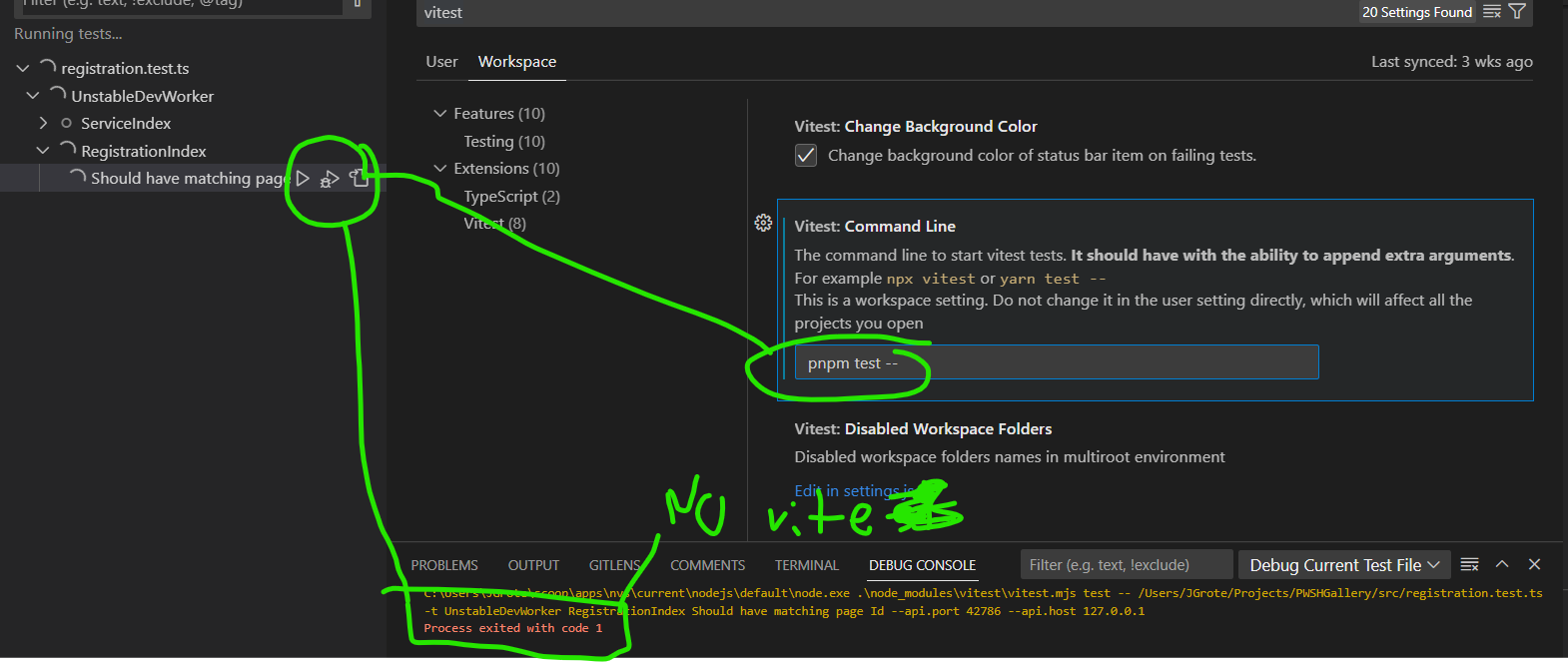
EDIT: I've noticed this happens if I do node node_modules/vitest/vitest.mjs as well, so I'm not sure it's extension-specific but may be a vite issue directly.

My pnpm project is fixed this problem with that .vscode/settings.json.
{
    "vitest.commandLine": "pnpm vitest"
}
env
- pnpm vitest --version
- vitest/0.33.0 linux-x64 node-v20.8.0
- pnpm --version
- 8.7.5
- OS
- mcr.microsoft.com/devcontainers/javascript-node:20-bookworm
log
/usr/local/bin/node ./node_modules/vitest/vitest.mjs vitest /app/tests/xxx.spec.ts -t sample fetch mock should GET done rignt --api.port 41355 --api.host 127.0.0.1
DEV  v0.33.0 /app
vendor-cli-api.iriqwoerupo.js:12594
API started at http://127.0.0.1:41355

Broken my config after update to vitest v1.*.*..
vitest.commandLine: "pnpm vitest" in the settings.json is also not working.
[INFO 4:06:23 AM] Vitest Workspace [app]: Vitest version = undefined
env
- OS: Linux 4fbc5bb9c4a8 5.15.123.1-microsoft-standard-WSL2 # 1 SMP Mon Aug 7 19:01:48 UTC 2023 x86_64 GNU/Linux
- Vitest: vitest/1.3.1 linux-x64 node-v20.11.0
- Vitest Extension: 0.4.0
- VSCode
- Version: 1.86.2 (system setup) Commit: 903b1e9d8990623e3d7da1df3d33db3e42d80eda Date: 2024-02-13T19:40:56.878Z Electron: 27.2.3 ElectronBuildId: 26908389 Chromium: 118.0.5993.159 Node.js: 18.17.1 V8: 11.8.172.18-electron.0 OS: Windows_NT x64 10.0.22631
PoC
https://github.com/ShortArrow/poc_vitest_extension_in_devcontainer
This should be fixed in pre-release 0.5.0 and higher. Note that the extension now requires Vitest 1.4.0 or higher.
