

 visualfc
LiteIDE UI readbility
Please answer these questions before submitting your issue. Thanks! Please download LiteIDE latest version and test before submitting your issue. Thanks!
What version of LiteIDE are you using (LiteIDE About - Version and Build Qt Version)?
x33.3 QT5.5.1 (64bit)
What version of Go are you using (go version)?
1.10
What operating system and processor architecture are you using(go env)?
Linux (mint 18.3) AMD64
What did you do?
Installed and started LiteIDE
What did you expect to see?
An interface that is easy on my eyes or at the very least configurable to be so.
What did you see instead?
Bright blue and fine black lettering on a gray background that is painful to read. Especially on the Welcome and Doc windows.
I can control the main editing and output sections which is fine, though it would be nice to have more control of the output window since the background is not controllable unless it is set to be the same as the editor. The rest of the interface needs to be theme-able.
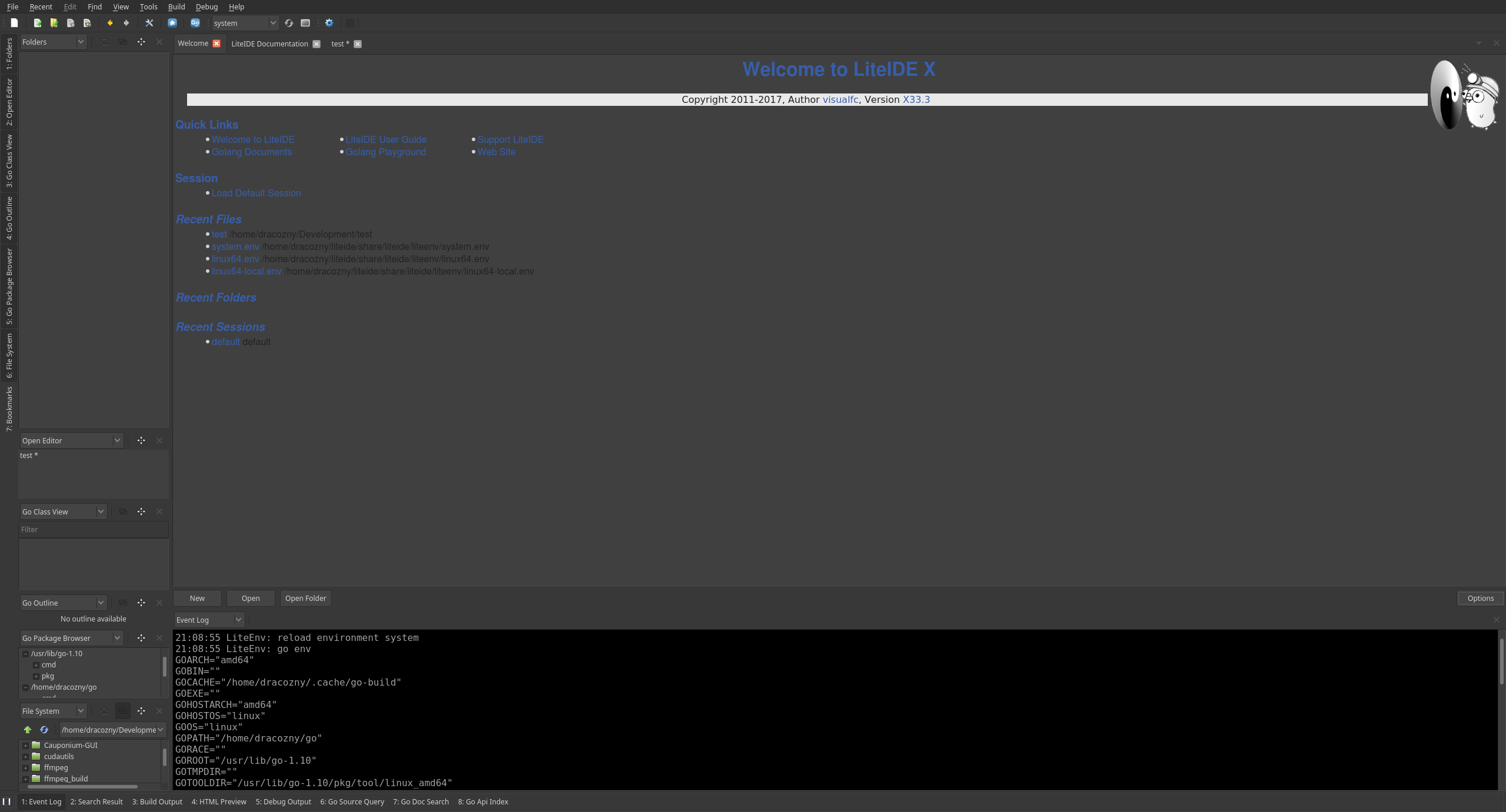

OK, I found the theme setting. though it is messy as the themes are not complete.
Please elaborate on exactly what you found incomplete and "messy". If this is not a real issue to you anymore, please close it.

If you change the theme, the Welcome Page as shown above doesn't play nice. My workaround is finding the CSS related to the welcome page and altering it directly so that it fits the theme. Ideally these pages should be pulling from the theme and not specifying their own formating.
I added this to style.css:
.recent {
    color: #586e75;
}
Though as @Dracozny says, it should be part of the theme. Without the css change, the paths for recent files are virtually invisible for me - far worse than @Dracozny 's screenshot. I almost didn't realize they were there.
If you click the Golang Documents link on that page, it is similarly unreadable.
I'm thinking the problem I see is actually incomplete support of window system colors - the things I dislike are just as unreadable with the default theme as with solarized-dark.
In the attached screenshot, I'm using KDE with its Breeze Dark theme, and LiteIDE with the solarized-dark theme. Note that all that changes when I change LiteIDE's theme from default to solarized-dark is the colors in the bottom pane (event log).


Still an issue with the newest liteide. I've made more changes, though I'm not sure all are necessary (some pages update without reloading liteide, but the welcome page requires reload):
diff --git a/liteidex/deploy/packages/go/godoc/style.css b/liteidex/deploy/packages/go/godoc/style.css
index 9b255a8c..4676b166 100644
--- a/liteidex/deploy/packages/go/godoc/style.css
+++ b/liteidex/deploy/packages/go/godoc/style.css
@@ -16,7 +16,7 @@ pre .ln {
    color: #999;
 }
 body {
-   color: #222;
+   color: #567;
 }
 a {
    color: #375EAB;
@@ -41,7 +41,7 @@ h1, h2, h3, h4, .rootHeading {
    font-weight: bold;
 }
 h2 {
-   background: #E0EBF5;
+   background: #101B05;
    padding: 2px 5px;
 }
 .rootHeading {
diff --git a/liteidex/deploy/welcome/css/style.css b/liteidex/deploy/welcome/css/style.css
index 8c6f00df..09ea28a0 100644
--- a/liteidex/deploy/welcome/css/style.css
+++ b/liteidex/deploy/welcome/css/style.css
@@ -13,7 +13,12 @@ pre .ln {
    color: #999;
 }
 body {
-   color: #222;
+   color: #567;
+}
+.recent {
+    color: #586e75;
+    font-family: SourceCodePro, Anonymous, Menlo, monospace;
+    font-size: 10px;
 }
 a {
    color: #375EAB;
@@ -23,7 +28,7 @@ p, pre, ul, ol {
    margin: 20px;
 }
 pre {
-   background: #e9e9e9;
+   background: #242;
    padding: 10px;

    -webkit-border-radius: 5px;
@@ -38,7 +43,7 @@ h1, h2, h3, h4, .rootHeading {
    font-weight: bold;
 }
 h2 {
-   background: #E0EBF5;
+   background: #101B05;
    padding: 2px 5px;
 }
 .rootHeading {
@@ -79,7 +84,7 @@ table.dir td {
 }

 #topbar {
-   background: #E0EBF5;
+   background: #101B05;
 }

 body {