visualfc
LiteIDE small font sizes on multi monitor setup
Please answer these questions before submitting your issue. Thanks!
What version of LiteIDE are you using (LiteIDE About - Version and Build Qt Version)?
X33.1 based on Qt 5.10.1 (64bit)
What version of Go are you using (go version)?
go version go1.10 linux/amd64
What operating system and processor architecture are you using(go env)?
Arch Linux 64bit
GOARCH="amd64"
GOBIN=""
GOCACHE="/home/snafu/.cache/go-build"
GOEXE=""
GOHOSTARCH="amd64"
GOHOSTOS="linux"
GOOS="linux"
GOPATH="/data/development/goprojects"
GORACE=""
GOROOT="/usr/lib/go"
GOTMPDIR=""
GOTOOLDIR="/usr/lib/go/pkg/tool/linux_amd64"
GCCGO="gccgo"
CC="gcc"
CXX="g++"
CGO_ENABLED="1"
CGO_CFLAGS="-g -O2"
CGO_CPPFLAGS=""
CGO_CXXFLAGS="-g -O2"
CGO_FFLAGS="-g -O2"
CGO_LDFLAGS="-g -O2"
PKG_CONFIG="pkg-config"
GOGCCFLAGS="-fPIC -m64 -pthread -fmessage-length=0 -fdebug-prefix-map=/tmp/go-build592877623=/tmp/go-build -gno-record-gcc-switches"
What did you do?
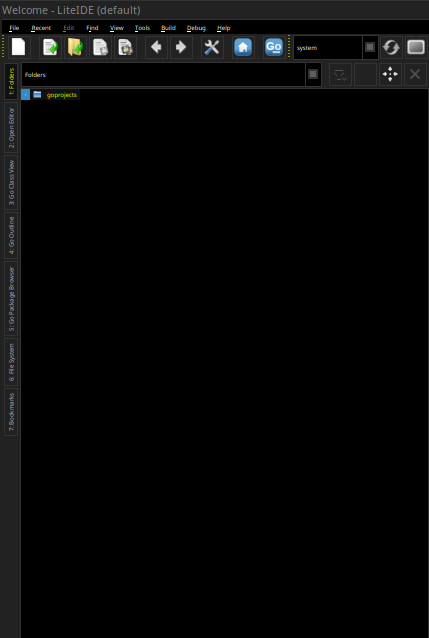
Following monitor setup leads to very small font sizes in the UI if liteide was started on the 24" monitor (see screenshot). If I disable my small laptop monitor (eDP1) before I open liteide the font size is normal.
-> xrandr
Screen 0: minimum 8 x 8, current 5760 x 1200, maximum 32767 x 32767
eDP1 connected primary 1920x1080+3840+0 (normal left inverted right x axis y axis) 310mm x 170mm
   1920x1080     60.05*+  59.93    48.04
   1680x1050     59.88
   1400x1050     59.98
   1600x900      60.00    59.95    59.82
   1280x1024     60.02
   1400x900      59.96    59.88
   1280x960      60.00
   1368x768      60.00    59.88    59.85
   1280x800      59.81    59.91
   1280x720      59.86    60.00    59.74
   1024x768      60.00
   1024x576      60.00    59.90    59.82
   960x540       60.00    59.63    59.82
   800x600       60.32    56.25
   864x486       60.00    59.92    59.57
   640x480       59.94
   720x405       59.51    60.00    58.99
   640x360       59.84    59.32    60.00
DP1 disconnected (normal left inverted right x axis y axis)
DP1-1 connected 1920x1200+0+0 (normal left inverted right x axis y axis) 520mm x 320mm
   1920x1200     59.95*+
   1920x1080     60.00    50.00    59.94    30.00    25.00    24.00    29.97    23.98
   1600x1200     60.00
   1280x1024     75.02    60.02
   1152x864      75.00
   1280x720      60.00    50.00    59.94
   1024x768      75.03    60.00
   800x600       75.00    60.32
   720x576       50.00
   720x480       60.00    59.94
   640x480       75.00    60.00    59.94
   720x400       70.08
DP1-2 connected 1920x1200+1920+0 (normal left inverted right x axis y axis) 520mm x 320mm
   1920x1200     59.95*+
   1920x1080     60.00    50.00    59.94    30.00    25.00    24.00    29.97    23.98
   1600x1200     60.00
   1280x1024     75.02    60.02
   1152x864      75.00
   1280x720      60.00    50.00    59.94
   1024x768      75.03    60.00
   800x600       75.00    60.32
   720x576       50.00
   720x480       60.00    59.94
   640x480       75.00    60.00    59.94
   720x400       70.08
DP1-3 disconnected (normal left inverted right x axis y axis)
HDMI1 disconnected (normal left inverted right x axis y axis)
HDMI2 disconnected (normal left inverted right x axis y axis)
VIRTUAL1 disconnected (normal left inverted right x axis y axis)
What did you expect to see?
Normal font size
What did you see instead?
Small font sizes

Suddenly, I have exactly the same issue now. The only configuration change I did a hour ago was a key setting, that probably will not be the cause.

I faced the same issue in liteide X 37.4 64-bit under Linux Mint 20.1 with a Samsung U28E590 monitor. Any changes to font sizes or DPI values in the qt5 customization utilities do not affect the font sizes in the liteide interface in any way (although other programs using QT5 do respond to them). The sizes of controls and icons also do not change. You can only change the size of the fonts that are configured within liteide itself (in the text editor and the output window). I also noticed that when you change the theme on the Options / LiteApp / Generic page, the font of the dialog boxes changes in the interface, but among the themes that come with the program, there are no ones where the fonts would be large enough.