

 vislee
nginx location 的匹配顺序
nginx location 的匹配顺序
nginx的官方文档location支持以下几种形式的配置,
location [ = | ~ | ~* | ^~ ] uri { ... }
location @name { ... }
注:在实际配置中符号和后面的uri中间有没有空格效果是一样的。
我们一般也就用三种配置,= 精确匹配,[^~] 前缀匹配,~或~* 正则匹配。 这个顺序也是他们匹配的顺序,前缀匹配会最大限度的匹配,例如 /test/ 和 /test/hello 如果你的url是/test/helloworld 会匹配到location /test/hello。前缀匹配完,如果没有配置^~,则还会匹配正则匹配的,如果有正则匹配则会覆盖前缀匹配的。如果前缀匹配的配置了^~,则不再匹配正则匹配的。
这个匹配规则和你在配置文件中配置的location的先后顺序没有关系,不会因为location /test/ {} 在 location /test/hello {}就让url /test/helloworld 先匹配第一个location。
利用我github ngx_http_hello_world_module 模块测试一下。从github上clone下来以后,编译的时候在configure添加--add-module=./vislee/ngx_http_hello_world_module后编译。
测试配置文件:
        location ^~/test0/ {
            hello_world;
            hello_by "by ^~/test0/";

            location ^~/test0/hello/ {
                hello_world;
                hello_by "by nested ^~/test0/hello";
            }

            location ^~/test0/world/ {
                hello_world;
                hello_by "by nested ^~/test0/world/";
            }

        }

        location ^~/test0/hello/ {
            hello_world;
            hello_by "by ^~/test0/hello";
        }

        location =/test0/ {
            hello_world;
            hello_by "by =/test0/";
        }

        location ^~/test {
            hello_world;
            hello_by "by ^~/test";
        }

        location ^~/test/ {
            hello_world;
            hello_by "by ^~/test/";
        }

        location ^~/testa {
            hello_world;
            hello_by "by ^~/testa";
        }
测试结果:
curl -v 'http://127.0.0.1:8080/test0/
hello world by =/test0/%

curl -v 'http://127.0.0.1:8080/test0/test'
hello world by ^~/test0/%

curl -v 'http://127.0.0.1:8080/test0/hello/'
hello world by ^~/test0/hello%

curl -v 'http://127.0.0.1:8080/test0/world/'
hello world by nested ^~/test0/world/%
总结:
先匹配精确匹配的location,也就是配置location = xxx {}的。
其次匹配正则表达式的location,也就是配置location ~ xxx {}的。linux平台下~和~*是有点区别的,带星号的是忽略大小写的,匹配的前后顺序按照配置的先后顺序匹配。
最后匹配前缀匹配的location,也就是配置location [^~] xxx {}的。先匹配前缀较长的,相同长度的先匹配字典顺序较大的。
注:代码实现上,前缀匹配和精确匹配先匹配,只不过精确匹配后直接返回,而前缀匹配后还进行正则匹配,匹配完以后如果有合适的location就覆盖前缀匹配的。例如下面的配置,"/hello/li"会返回333,"/hello/world/" 会返回111。如果下面的配置改为location ^~ /hello/, 正则表达式的location就不起作用了。
        location ~ /hello/\w+ {
            return 200 "333";
        }

        location /hello/ {
            location = /hello/world/ {
                return 200 "111";
            }

            location /hello/li {
                return 200 "222";
            }
        }
源码分析
- location解析
location的解析是通过函数ngx_http_core_location处理的。首先location也会对应一个ngx_http_conf_ctx_t,并分配location级别的模块的配置结构体。在此这些都不是重点。
配置解析了2个或3个参数,第一个参数是location,第二个参数是符号(= | ^~| ~ )第三个参数是uri。
第二个参数 如果是“=” 则为精确匹配clcf->exact_match = 1。 如果是“^~”,则为非正则匹配(前缀匹配)clcf->noregex = 1,非正则匹配是前缀匹配的一种。 如果是“~”,则为正则匹配,加*的会忽略大小写,仅linux平台。clcf->regex = ngx_http_regex_compile(cf, &rc);
clcf->name = 第三个参数。
location是可以嵌套的,精确和正则匹配的location内不能再嵌套location。前缀匹配的location内嵌套的location的uri(第三个参数)前缀必须是相同的,就是说外层location的uri是uri1,则内层的必需是uri1xxxx。必需以外层location的uri开始。
最后调用ngx_http_add_location函数把clcf添加到父级别(server级别、location级别)clcf的locations双链表中。
http_block 最后会调用ngx_http_init_locations处理每个server下的location。
-
首先会对server下的所有location进行排序,排序结果:字母顺序(精确匹配、前缀匹配的)升序(有相同前缀的字符串,长的排在后面)|正则匹配|@匹配的|if location的
-
遍历排序后的location。把@符号的location设置到cscf->named_locations。正则的设置到pclcf->regex_locations上。最终locations只剩下了精确匹配的和前缀匹配的了。
-
接着调用ngx_http_init_static_location_trees函数把pclcf->locations链表上的location初始化为一棵静态二叉查找树,树根节点付给pclcf->static_locations。
-
ngx_http_init_static_location_trees函数中先调用ngx_http_join_exact_locations函数,把同名的两个location列表上的元素合并在一个元素上。上面对location列表进行了排序,同名的精确匹配的在前缀匹配的前面。就是把这样的两个location合并到一个上。exact指针指向精确匹配的,inclusive指向前缀匹配的。这样减少了元素的个数,降低了二叉树的深度,加快了查找速度。
-
调用ngx_http_create_locations_list函数合并有相同前缀的前缀匹配的location链表元素。上述排序把有相同前缀的location,按照长度由小到大排列。例如:/abc /abcd /abcde 这样。该函数的目的就是把有相同前缀的location元素合并到一个元素上。例如,/abcd 和/abcde就会挂到 /abc这个元素的list指针上。这样做的目的也是降低二叉树深度。
- location查找
调用ngx_http_core_find_location函数。调用ngx_http_core_find_static_location函数从所属server下的location静态二叉查找树,根据uri查找location。
附录
- 增加debug信息
static void
ngx_http_create_locations_list(ngx_queue_t *locations, ngx_queue_t *q)
{
    u_char                     *name;
    size_t                      len;
    ngx_queue_t                *x, tail;
    ngx_http_location_queue_t  *lq, *lx;

    // 双链表只有一个元素
    if (q == ngx_queue_last(locations)) {
        return;
    }

    lq = (ngx_http_location_queue_t *) q;

    // 如果是完全匹配
    if (lq->inclusive == NULL) {
        ngx_http_create_locations_list(locations, ngx_queue_next(q));
        return;
    }

    len = lq->name->len;
    name = lq->name->data;

    fprintf(stderr, "==1==%.*s\n", (int)len, name);

    // 有相同前缀
    for (x = ngx_queue_next(q);
         x != ngx_queue_sentinel(locations);
         x = ngx_queue_next(x))
    {
        lx = (ngx_http_location_queue_t *) x;
        fprintf(stderr, "==2==%.*s\n", (int)lx->name->len, lx->name->data);

        if (len > lx->name->len
            || ngx_filename_cmp(name, lx->name->data, len) != 0)
        {
            break;
        }
    }

    // 让出相同前缀的第一个元素,也就是q指向第二个
    q = ngx_queue_next(q);

    if (q == x) {    // 没有相同前缀的元素
        ngx_http_create_locations_list(locations, x);
        return;
    }

    fprintf(stderr, "==3==%.*s\n", (int)(((ngx_http_location_queue_t*)q)->name->len), ((ngx_http_location_queue_t*)q)->name->data);
    ngx_queue_split(locations, q, &tail);
    ngx_queue_add(&lq->list, &tail);

    if (x == ngx_queue_sentinel(locations)) {
        ngx_http_create_locations_list(&lq->list, ngx_queue_head(&lq->list));
        return;
    }

    fprintf(stderr, "==4==%.*s\n", (int)(((ngx_http_location_queue_t*)x)->name->len), ((ngx_http_location_queue_t*)x)->name->data);
    ngx_queue_split(&lq->list, x, &tail);
    ngx_queue_add(locations, &tail);

    ngx_http_create_locations_list(&lq->list, ngx_queue_head(&lq->list));

    ngx_http_create_locations_list(locations, x);
}


static ngx_http_location_tree_node_t *
ngx_http_create_locations_tree(ngx_conf_t *cf, ngx_queue_t *locations,
    size_t prefix)
{
    size_t                          len;
    ngx_queue_t                    *q, tail;
    ngx_http_location_queue_t      *lq;
    ngx_http_location_tree_node_t  *node;

    // 快慢指针获取链表中间偏右的节点。奇数个节点中间节点唯一,偶数个节点中间2个节点取第二个。
    // 符合构造树的习惯
    q = ngx_queue_middle(locations);

    lq = (ngx_http_location_queue_t *) q;
    len = lq->name->len - prefix;

    node = ngx_palloc(cf->pool,
                      offsetof(ngx_http_location_tree_node_t, name) + len);
    if (node == NULL) {
        return NULL;
    }

    node->left = NULL;
    node->right = NULL;
    node->tree = NULL;
    node->exact = lq->exact;
    node->inclusive = lq->inclusive;

    node->auto_redirect = (u_char) ((lq->exact && lq->exact->auto_redirect)
                           || (lq->inclusive && lq->inclusive->auto_redirect));

    node->len = (u_char) len;
    ngx_memcpy(node->name, &lq->name->data[prefix], len);

    fprintf(stderr, "===node====prefix:%.*s name:%.*s\n", (int)prefix, lq->name->data, (int)node->len, node->name);

    ngx_queue_split(locations, q, &tail);

    if (ngx_queue_empty(locations)) {
        /*
         * ngx_queue_split() insures that if left part is empty,
         * then right one is empty too
         */
        goto inclusive;
    }

    node->left = ngx_http_create_locations_tree(cf, locations, prefix);
    if (node->left == NULL) {
        return NULL;
    }

    ngx_queue_remove(q);

    if (ngx_queue_empty(&tail)) {
        goto inclusive;
    }

    node->right = ngx_http_create_locations_tree(cf, &tail, prefix);
    if (node->right == NULL) {
        return NULL;
    }

inclusive:

    if (ngx_queue_empty(&lq->list)) {
        return node;
    }

    node->tree = ngx_http_create_locations_tree(cf, &lq->list, prefix + len);
    if (node->tree == NULL) {
        return NULL;
    }

    return node;
}
    server {
        listen       8080;
        server_name  localhost;

        #charset koi8-r;

        #access_log  logs/host.access.log  main;

        location /ab {
            return 200 "/ab";
        }

        location /abc {
            return 200 "/abc";
        }

        location /abcd {
            return 200 "/abcd";
        }

        location = /b {
            return 200 "= /b";
        }

        location /b {
            return 200 "/b";
        }

        location /bcd {
            return 200 "/abcd";
        }

        location /bce {
            return 200 "/abce";
        }
        location /bcf {
            return 200 "/bcf";
        }
        location /bcg {
            return 200 "/bcg";
        }
    }
➜  nginx ./sbin/nginx -c ./conf/nginx.conf -t
==1==/ab
==2==/abc
==2==/abcd
==2==/b
==3==/abc
==4==/b
==1==/abc
==2==/abcd
==3==/abcd
==1==/b
==2==/bcd
==2==/bce
==2==/bcf
==2==/bcg
==3==/bcd
==1==/bcd
==2==/bce
==1==/bce
==2==/bcf
==1==/bcf
==2==/bcg
===node====prefix: name:/b
===node====prefix: name:/ab
===node====prefix:/ab name:c
===node====prefix:/abc name:d
===node====prefix:/b name:cf
===node====prefix:/b name:ce
===node====prefix:/b name:cd
===node====prefix:/b name:cg


# 调用ngx_http_create_locations_list后的数据结构
/ab ------------>=/b(/b)
|->/abc             |->/bcd -> /bce -> /bcf -> /bcg
    |->/abcd
// 调用ngx_http_create_locations_tree生成树
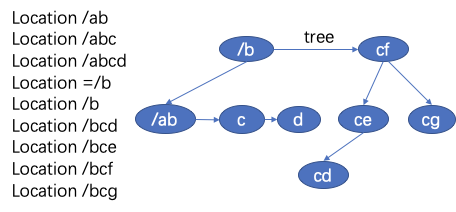
ngx_http_core_find_location
/*
 * NGX_OK       - exact or regex match
 * NGX_DONE     - auto redirect
 * NGX_AGAIN    - inclusive match
 * NGX_ERROR    - regex error
 * NGX_DECLINED - no match
 */

static ngx_int_t
ngx_http_core_find_location(ngx_http_request_t *r)
{
    ngx_int_t                  rc;
    ngx_http_core_loc_conf_t  *pclcf;
#if (NGX_PCRE)
    ngx_int_t                  n;
    ngx_uint_t                 noregex;
    ngx_http_core_loc_conf_t  *clcf, **clcfp;

    noregex = 0;
#endif

    // 默认server块的默认location
    pclcf = ngx_http_get_module_loc_conf(r, ngx_http_core_module);

    // 查找对应的location
    rc = ngx_http_core_find_static_location(r, pclcf->static_locations);

    // 如果是前缀匹配
    if (rc == NGX_AGAIN) {

#if (NGX_PCRE)
        clcf = ngx_http_get_module_loc_conf(r, ngx_http_core_module);
        // 匹配的location是否要继续查找正则匹配的location
        noregex = clcf->noregex;
#endif

        /* look up nested locations */
        // 继续查找嵌套的location
        rc = ngx_http_core_find_location(r);
    }

    // 只有匹配的是前缀匹配的location,才可以继续正则匹配。
    if (rc == NGX_OK || rc == NGX_DONE) {
        return rc;
    }

    /* rc == NGX_DECLINED or rc == NGX_AGAIN in nested location */

#if (NGX_PCRE)

    if (noregex == 0 && pclcf->regex_locations) {

        for (clcfp = pclcf->regex_locations; *clcfp; clcfp++) {

            ngx_log_debug1(NGX_LOG_DEBUG_HTTP, r->connection->log, 0,
                           "test location: ~ \"%V\"", &(*clcfp)->name);

            // 执行匹配正则表达式
            n = ngx_http_regex_exec(r, (*clcfp)->regex, &r->uri);

            if (n == NGX_OK) {
                r->loc_conf = (*clcfp)->loc_conf;

                /* look up nested locations */
                // 匹配嵌套的location
                rc = ngx_http_core_find_location(r);

                return (rc == NGX_ERROR) ? rc : NGX_OK;
            }

            if (n == NGX_DECLINED) {
                continue;
            }

            return NGX_ERROR;
        }
    }
#endif

    return rc;
}
ngx_http_core_find_static_location
/*
 * NGX_OK       - exact match
 * NGX_DONE     - auto redirect
 * NGX_AGAIN    - inclusive match
 * NGX_DECLINED - no match
 */

static ngx_int_t
ngx_http_core_find_static_location(ngx_http_request_t *r,
    ngx_http_location_tree_node_t *node)
{
    u_char     *uri;
    size_t      len, n;
    ngx_int_t   rc, rv;

    len = r->uri.len;
    uri = r->uri.data;

    rv = NGX_DECLINED;

    for ( ;; ) {

         // 遍历子节点结束 或者 树为空
        if (node == NULL) {
            return rv;
        }

        ngx_log_debug2(NGX_LOG_DEBUG_HTTP, r->connection->log, 0,
                       "test location: \"%*s\"",
                       (size_t) node->len, node->name);

        n = (len <= (size_t) node->len) ? len : node->len;

        rc = ngx_filename_cmp(uri, node->name, n);

        if (rc != 0) {
            node = (rc < 0) ? node->left : node->right;    // 遍历二叉树

            continue;
        }

        // 匹配到二叉树节点

        if (len > (size_t) node->len) {

            if (node->inclusive) {  // 是否配置了前缀匹配的loaction

                // 赋值,已经找到了前缀匹配的一个location,接下来的匹配
                r->loc_conf = node->inclusive->loc_conf;
                rv = NGX_AGAIN;

                // 有多个相同前缀的location,只能有一个会保存在inclusive,其余的都以二叉树的形似保存在tree下,同时为了提升匹配效率,已经比较过的字符串就不再比较了。
                node = node->tree;    // 匹配更多的前缀匹配树
                uri += n;
                len -= n;

                continue;
            }

            /* exact only */

            node = node->right;

            continue;
        }

        if (len == (size_t) node->len) {
            // 有精确匹配的,则直接返回精确匹配的location。
            if (node->exact) {
                r->loc_conf = node->exact->loc_conf;
                return NGX_OK;

            } else {
                r->loc_conf = node->inclusive->loc_conf;
                return NGX_AGAIN;
            }
        }

        /* len < node->len */

        // proxy_pass 的 location 配置的是 /a/ 而请求的path是 /a 注意最后的/,就会命中该if分支
        // 最后给客户端返沪的是301 schema://host:port/a/
        if (len + 1 == (size_t) node->len && node->auto_redirect) {

            r->loc_conf = (node->exact) ? node->exact->loc_conf:
                                          node->inclusive->loc_conf;
            rv = NGX_DONE;
        }

        node = node->left;
    }
}
ngx_http_core_find_config_phase
ngx_int_t
ngx_http_core_find_config_phase(ngx_http_request_t *r,
    ngx_http_phase_handler_t *ph)
{
    u_char                    *p;
    size_t                     len;
    ngx_int_t                  rc;
    ngx_http_core_loc_conf_t  *clcf;

    r->content_handler = NULL;
    r->uri_changed = 0;

    rc = ngx_http_core_find_location(r);

    if (rc == NGX_ERROR) {
        ngx_http_finalize_request(r, NGX_HTTP_INTERNAL_SERVER_ERROR);
        return NGX_OK;
    }

    clcf = ngx_http_get_module_loc_conf(r, ngx_http_core_module);
    // location 配置了internal。
    // 这个地方也是个坑
    if (!r->internal && clcf->internal) {
        ngx_http_finalize_request(r, NGX_HTTP_NOT_FOUND);
        return NGX_OK;
    }

    ngx_log_debug2(NGX_LOG_DEBUG_HTTP, r->connection->log, 0,
                   "using configuration \"%s%V\"",
                   (clcf->noname ? "*" : (clcf->exact_match ? "=" : "")),
                   &clcf->name);

    // 主要更新一些locaiton的配置,复制到r结构体。
    ngx_http_update_location_config(r);

    ngx_log_debug2(NGX_LOG_DEBUG_HTTP, r->connection->log, 0,
                   "http cl:%O max:%O",
                   r->headers_in.content_length_n, clcf->client_max_body_size);

    if (r->headers_in.content_length_n != -1
        && !r->discard_body
        && clcf->client_max_body_size
        && clcf->client_max_body_size < r->headers_in.content_length_n)
    {
        ngx_log_error(NGX_LOG_ERR, r->connection->log, 0,
                      "client intended to send too large body: %O bytes",
                      r->headers_in.content_length_n);

        r->expect_tested = 1;
        (void) ngx_http_discard_request_body(r);
        ngx_http_finalize_request(r, NGX_HTTP_REQUEST_ENTITY_TOO_LARGE);
        return NGX_OK;
    }

    // 301 跳转,设置Location响应头,如果有参数会复制参数。
    if (rc == NGX_DONE) {
        ngx_http_clear_location(r);

        r->headers_out.location = ngx_list_push(&r->headers_out.headers);
        if (r->headers_out.location == NULL) {
            ngx_http_finalize_request(r, NGX_HTTP_INTERNAL_SERVER_ERROR);
            return NGX_OK;
        }

        r->headers_out.location->hash = 1;
        ngx_str_set(&r->headers_out.location->key, "Location");

        if (r->args.len == 0) {
            r->headers_out.location->value = clcf->name;

        } else {
            len = clcf->name.len + 1 + r->args.len;
            p = ngx_pnalloc(r->pool, len);

            if (p == NULL) {
                ngx_http_clear_location(r);
                ngx_http_finalize_request(r, NGX_HTTP_INTERNAL_SERVER_ERROR);
                return NGX_OK;
            }

            r->headers_out.location->value.len = len;
            r->headers_out.location->value.data = p;

            p = ngx_cpymem(p, clcf->name.data, clcf->name.len);
            *p++ = '?';
            ngx_memcpy(p, r->args.data, r->args.len);
        }

        ngx_http_finalize_request(r, NGX_HTTP_MOVED_PERMANENTLY);
        return NGX_OK;
    }

    r->phase_handler++;
    return NGX_AGAIN;
}
