

 visjs
visjs
The font color of a new node don't follow the global config
problem
A network is created/initialized with options of node's font.color = "white". Then, from javascript console in browser, add a node to the existing network, the new node's label color is not "white".
Below is the code sample to reproduce it. I use nodes.add({id:10, label:"new node"}) to add a new node.
I check the new node's property options.font.color, its value is set to "white" which is correct, but it seems the graph is not redrawed correctly.
Workaround for me is to call node.setOptions({font: {color : "white"}}) and call visnet.stabilize(), then the font color is updated.
code sample
// create an array with nodes
const nodes = new DataSet([
  { id: 1, label: "Node 1" },
  { id: 2, label: "Node 2" },
  { id: 3, label: "Node 3" },
  { id: 4, label: "Node 4" },
  { id: 5, label: "Node 5" },
]);

// create an array with edges
const edges = new DataSet([
  {id:1, from: 1, to: 3 },
  {id:2, from: 1, to: 2 },
  {id:3, from: 2, to: 4 },
  {id:4, from: 2, to: 5 },
  {id:5, from: 3, to: 3 },
]);

const container = document.getElementById("mynetwork");
const data = {
  nodes: nodes,
  edges: edges,
};


const options = {
  autoResize: true,
  height: "100%",
  width: "100%",
  locale: "en",
  edges: {
	arrows: { to: { enabled: true } },
	smooth: { enabled: false },
  },
  nodes: {
	font: { color: "white" },
	color: {border: 'green', background: "black"},
	shape: "circle"
  }
};
visnet = new Network(container, data, options);

Can you please share the network that you got before and post addition of a new node. I tried to replicate your code and got this network.
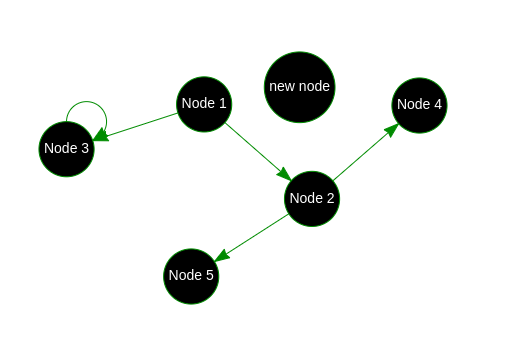
I think it is the correct output.

Hi,
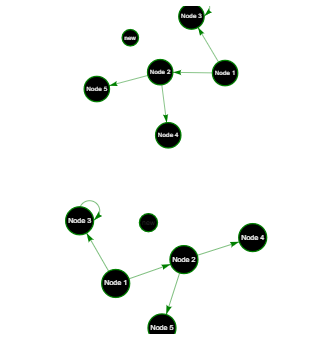
I tried to compare the result, the problem exists when using nodejs build, but not umd build in browser.
Below are the main.js script file in Vue nodejs project, and the corresponding html file to reproduce it.
"mynetwork1" works fine because created by using umd build in browser,
"mynetwork2" has the issue, it use the nodejs package.
To workaround the issue in "mynetwork2", I provide explicit options when add a new node. nodes.add({id:Math.floor(Math.random()*100), label: "new", font: {color: "white"}})
import Vue from 'vue'
import * as vis from "vis-network/standalone"

Vue.config.productionTip = false


/* eslint-disable */
let VisNet = Vue.extend({
  render (h) {
    return h('div')
  },
  data: function () {
    return {
      visnet: "",
      nodes: "",
      edges: "",
      options: ""
    }
  },
  mounted: function () {

    // Code that will run only after the
    // entire view has been rendered
    // create an array with nodes
    this.nodes = new vis.DataSet([
      { id: 1, label: "Node 1" },
      { id: 2, label: "Node 2" },
      { id: 3, label: "Node 3" },
      { id: 4, label: "Node 4" },
      { id: 5, label: "Node 5" },
    ]);

    // create an array with edges
    this.edges = new vis.DataSet([
      { id: 1, from: 1, to: 3 },
      { id: 2, from: 1, to: 2 },
      { id: 3, from: 2, to: 4 },
      { id: 4, from: 2, to: 5 },
      { id: 5, from: 3, to: 3 },
    ]);

    const container = document.getElementById("mynetwork2");

    this.options = {
      autoResize: true,
      height: "100%",
      width: "100%",
      locale: "en",
      edges: {
        arrows: { to: { enabled: true } },
        smooth: { enabled: false },
      },
      nodes: {
        font: { color: "white" },
        color: { border: "green", background: "black" },
        shape: "circle",
      },
    };


    let visnet = new vis.Network(container, { nodes: this.nodes, edges: this.edges }, this.options);
    this.visnet = visnet;


  }
})

new VisNet().$mount('#app')
<!DOCTYPE html>
<html lang="en">

<head>
    <meta charset="utf-8" />
    <title>Network | Basic Usage | Standalone Build</title>


</head>
  <body>

    <div id="app"></div>
    <!-- built files will be auto injected -->

    <div id="mynetwork1"></div>

    <div id="mynetwork2"></div>

    <script type="text/javascript" src="https://unpkg.com/vis-network/standalone/umd/vis-network.min.js"></script>
    <script type="text/javascript">
        // create an array with nodes
        const nodes = new vis.DataSet([
            { id: 1, label: "Node 1" },
            { id: 2, label: "Node 2" },
            { id: 3, label: "Node 3" },
            { id: 4, label: "Node 4" },
            { id: 5, label: "Node 5" },
        ]);

        // create an array with edges
        const edges = new vis.DataSet([
            { id: 1, from: 1, to: 3 },
            { id: 2, from: 1, to: 2 },
            { id: 3, from: 2, to: 4 },
            { id: 4, from: 2, to: 5 },
            { id: 5, from: 3, to: 3 },
        ]);

        const container = document.getElementById("mynetwork1");
        const data = {
            nodes: nodes,
            edges: edges,
        };


        const options = {
            autoResize: true,
            height: "100%",
            width: "100%",
            locale: "en",
            edges: {
                arrows: { to: { enabled: true } },
                smooth: { enabled: false },
            },
            nodes: {
                font: { color: "white" },
                color: { border: 'green', background: "black" },
                shape: "circle"
            }
        };
        visnet = new vis.Network(container, data, options);

    </script>
  </body>
</html>