

 vescon
Issue when debugging intercepted methods that contain if statements
Hi,
I found some problem in VS2022 when debugging intercepted methods that contain if clauses. It seems that local variables that are defined within the if statement are somehow renamed so that VS cannot find them when debugging. Neither can it find the when hovering over over the corresponding token in the source window nor in the watch window, nor in the immediate window. The message is always the same:
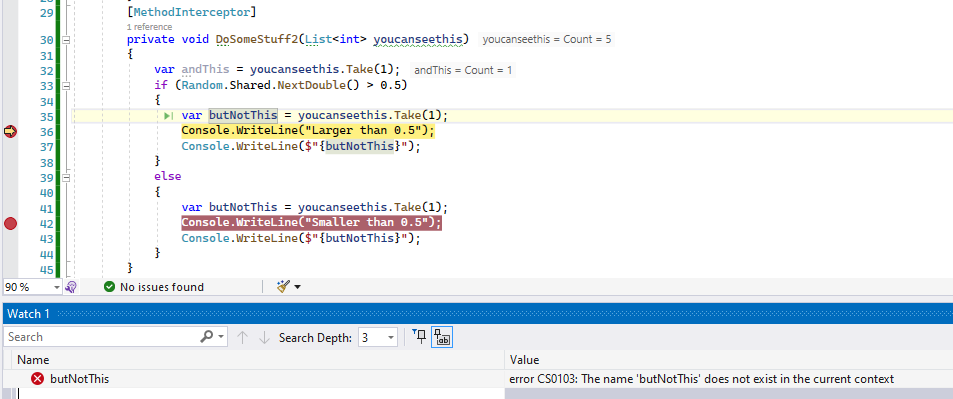 The method still works as expected, so its just a debugger/source mapping problem.
I attached the sample project and like know to whether I can avoid this behavior because it would render debugging a very bad experience.
Best regards

Yepp, this issue is confimed. Have observed the same thing. Before a if-statement a variable can be observed. Within a if-statement it will not be observed anymore, how ever works.

Pre compiled code
public void ExecuteLongTask()
        {
            string preTest = "Pre test";
            string[] arrPreTest = preTest.Split(' ');
            if(arrPreTest[0] == "Pre")
            {
                string interTest = "Internal test";
                string[] arrInterTest = interTest.Split(' ');
                if(arrInterTest[0] == "Internal")
                {

                }
            }
        }
vs recompiled
		private void $_executor_ExecuteLongTask()
		{
			string str = "Pre test";
			if (str.Split(new char[] { ' ' })[0] == "Pre")
			{
				string str1 = "Internal test";
				if (str1.Split(new char[] { ' ' })[0] == "Internal")
				{
				}
			}
		}


	public void ExecuteLongTask()
		{
			object[] objArray = new object[0];
			MethodExecutionArgs methodExecutionArg = new MethodExecutionArgs();
			methodExecutionArg.set_Arguments(objArray);
			methodExecutionArg.set_Method(MethodInfos._methodInfo_491D3641D31A62F67589F95B9881BDCB97B5624CDFE46CACB4CE04FB52B5DC76);
			methodExecutionArg.set_Instance(this);
			ExceptionLoggerAttribute exceptionLoggerAttribute = new ExceptionLoggerAttribute();
			NodeThree nodeThree = this;
			try
			{
				nodeThree.$_executor_ExecuteLongTask();
			}
			catch (Exception exception)
			{
				methodExecutionArg.set_Exception(exception);
				exceptionLoggerAttribute.OnException(methodExecutionArg);
				FlowBehavior flowBehavior = methodExecutionArg.get_FlowBehavior();
				if (flowBehavior != 1 && flowBehavior != 3)
				{
					throw;
				}
				return;
			}
		}
As seen, the names of theses strings get renamed. Is this part of the issue why we cant debug this data in VS? Besides this is not only strings, you do this with other types of other types of objects, they will also get renamed. And not observable any more.
Can you try out prerelease "2.0.146-pre" and check if it solves your issues? It is currently a prerelease because I am not so sure about the possible impacts of the fix Maybe there are some issues when just using the original debug information.

Just tested the 2.0.146-pre . This solves the issue of benig able to debug and observe all data as presented according to the example I previously posted above. Thank you Ralf1108 Excellent work!
Wow, glad to hear. So unfortunately I don't remember why I implemented the copying of the debug scope in this way instead of just using the original one.
So I will then make a production release.
Thx for your feedback!